
Automatic set Color Space of Texture Node
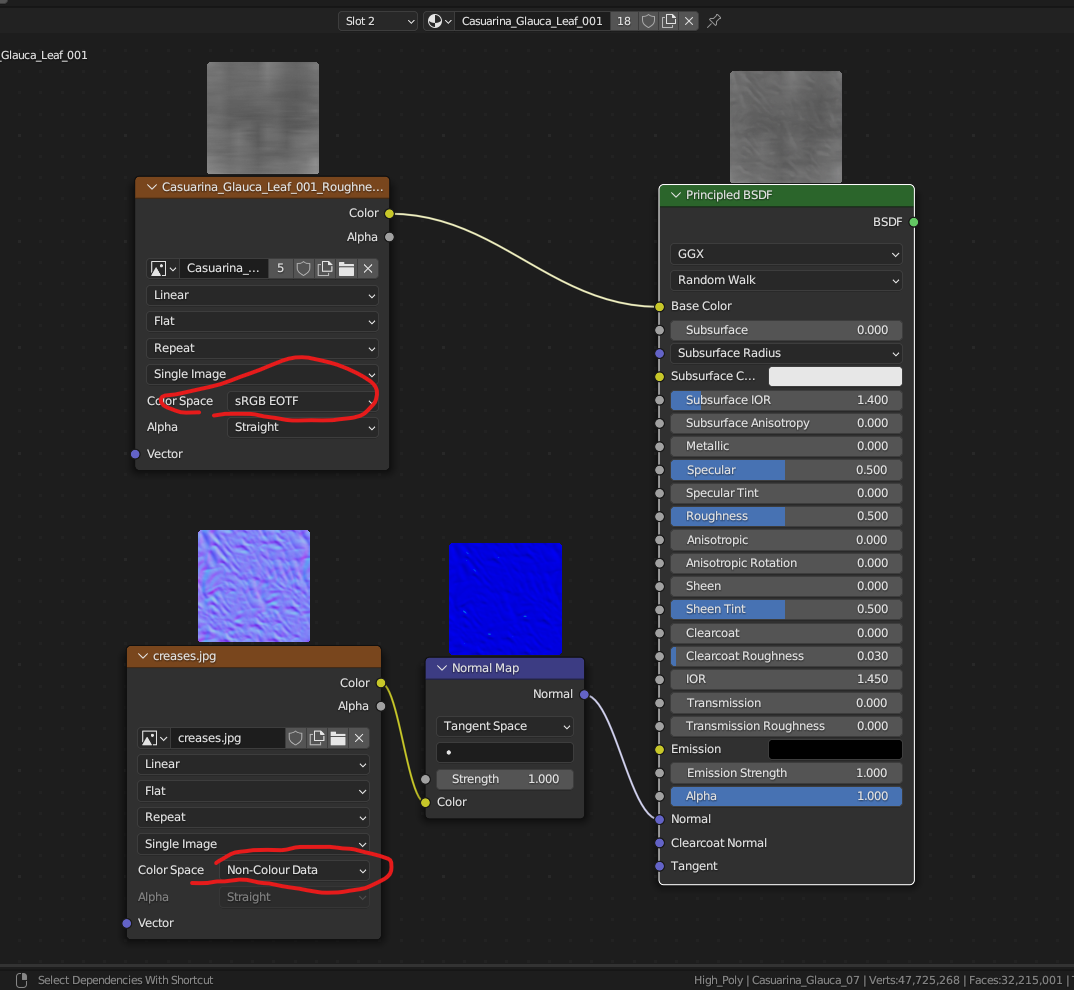
Why do we enter the color space value of each node manually? Wouldn't it be smarter to do it automatically? For example, if we are connecting a texture to the base color, if we are connecting the color space value to sRGB, Normap map, the Non-Colour Data value should be done automatically, not manually.
4 Comments
I would actually propose a setting in the preference tab where we could determine an automatic color space selection based on the name of our textures. For example, if the name contains _normal, set it to non color. Same for _roughness, _metallic, _ormh, etc.
it looks simple when you just want to connect simple image textures but not when you builtup big node tree. see it for faster PBR setup: youtube.com/shorts/Bya53QEvsT4
What about when we buy a ready-made model?
actually bro, it is not that easy because blender dont know whether you want to apply color transform or not. However, as you said based upon which socket it is being connected can be used as a guide to tell blender that all the previous image texture that is connected to roughness,normal metallic should be change to non-color automatically.
But think if you want to plug the same texture to mix with base color and also want to plug into roughness map then how blender will treat the texture- color or non-color. Actually what you want can be implemented only if it applies for all usage cases.
For you work, you have to make a script which will work like that - after making all connection, when you click on principal BSDF and run the script, it will analyse all the image texture and how they finally connected like roughness or base color. also if the same map is connected to base color and other non-color then it should make duplicate of that image texture.
i hope you will get my point and if you become successful in your work then distribute it to community for small price, people will be happy to pay for their time saved.