
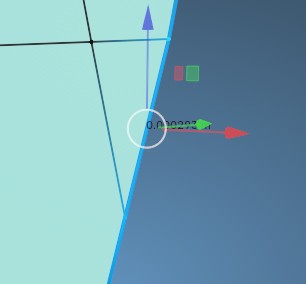
measurement text while using gizmo
when the gizmo (Space+G) is enabled, the small text is hidden behind it and it is very difficult to immediately read the numbers. i think this should be fixed, bcoz it's annoying as hell.
also i would like to have a theme settings control over the size and color of this text to adjust a visibility.
thanks!
2 Comments
Simple, but sounds fundamental. I'm adding the following information, for reproducibility, because not everyone is aware of the features you have indicated (btw, I think you also meant [ Shift+Space, then Press G ] for Selecting the Move Tool as a Shortcut):
On Edit Mode, for Mesh Objects: 3D Viewport Editor > Header Region > Mesh Edit Mode Overlays Popover Menu > Measurement Panel > Enable [some] Options there (e.g., Edge Length Option), and then Select some Mesh elements; while having any of Transforms Tools (e.g., Move/Rotate/Scale/Transform), that will show their Gizmo often affecting the text Measurement information in that negative way.
it is more simple to press Space+B, then reading whole this text ))) but the problem is i want it to be adjustable and easy reading while using a gizmo. you offer crutches workaround, but I want a professional 'out-of-the-box' solution.