
Highlight Elements (Faces / Edges / Vertices )
I was wondering if something like highlighting the elements in edit mode could be implemented for 2.8 . The examples are in Silo but Modo does'it, Maya etc .
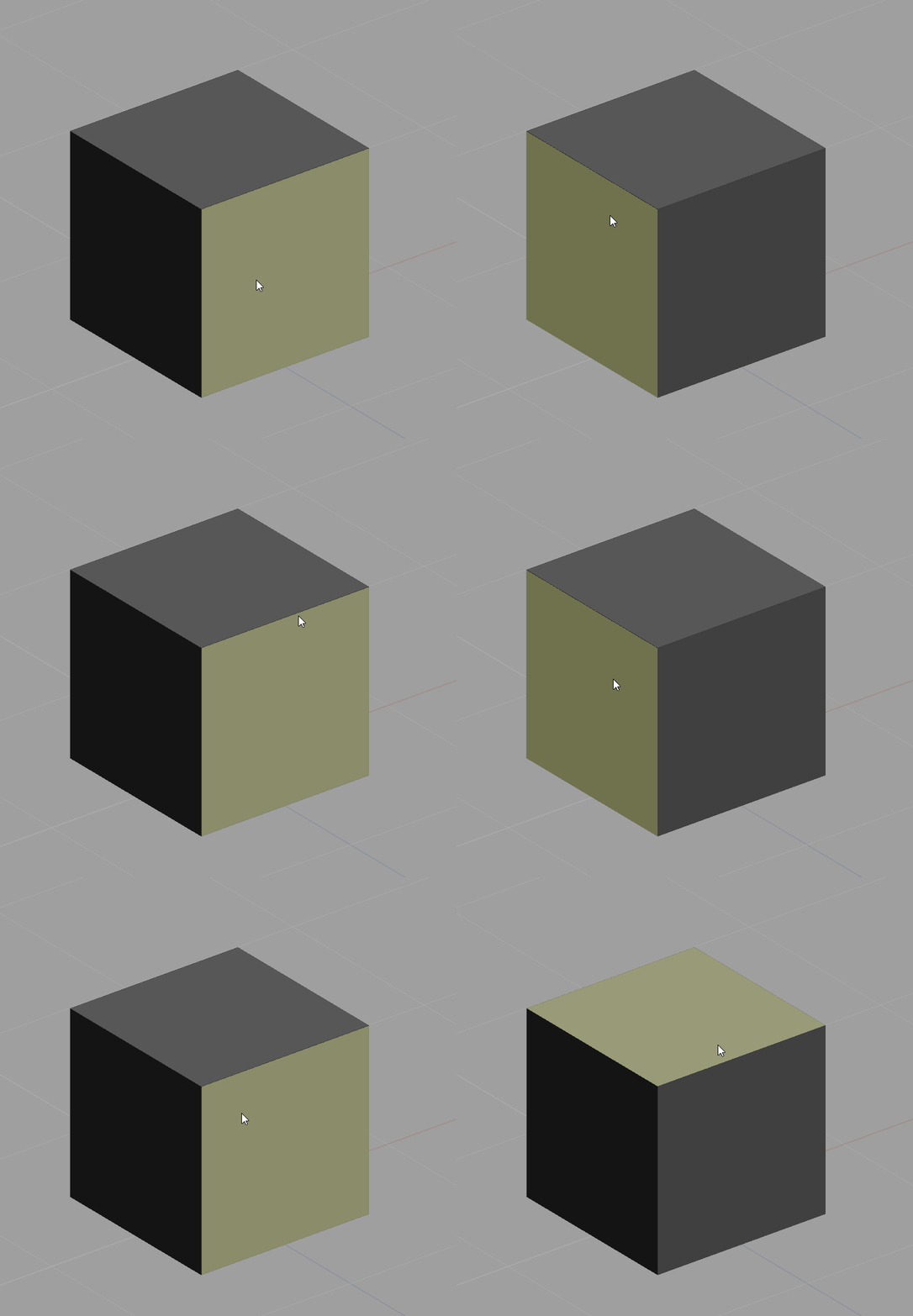
So when in Edit mode, when selecting faces, the faces become highlighted when you mouse-over them.
The vertices and edges do the same .
15 Comments
The quality of life it brings for modelling it's great . So I think it's a must have in a 2018 app .
This has been standard in trueSpace since 2009! haha, yes, would be nice for a highlight pre-select.
Sorry to resurrect an old thread, but the cool thing about the way this is done in Silo while you are using a pen - you don't have to click to select before you move the element. You select by moving the pen over the surface of the tablet, not touching it (hovering above slightly) and you move by putting the pen down and dragging the pen over the surface. The element moves according to your screen space. I find it a LOT less clicky. You can replicate this somewhat in Blender using sculpt mode and the drag brush but occasionally it does weird things and scales edges instead of moving verts.
Hi, I've seen that the PolyBuild tool in Blender 2.8 has the preselection highlighting . Can we have this for all the tools ?
A video about highlight selections, how they behave in Silo .
youtube.com/watch
With this method, you get ( signs & feedback ) in which mode you are . Vertices, Edges, Faces etc.
You don't realy need the circle gizmos on the faces to see you are in face mode .( which I find to be visual clutter but that's just my opinion )
Change the mode and the element get's highlighted . Even Wings 3D has this :) and I don't think it's that big of a performance cost .
Yes , i too need this feature , with this you know what you are going to select and also improves speed when selecting.
This is called preselection highlighting. It's been a contested feature since Blender has been in existence. The main arguments that people have had against it (IIRC) are the following:
@Jason van Gumster: if its due to those reasons its really stooopid, i hate that we dont have preselection highlighting and that it will never get added.
@Luciano Muñoz: I'm pretty sure those were the main reasons. Maybe there was a performance penalty that was incurred as well since Blender was using older OpenGL API calls and immediate mode drawing. An actual core developer will have to give a more definitive answer with respect to that part. But whenever this has come up, those have been the most cited reasons.
@Jason van Gumster: Even with the current state, secondary selection by another click is still not obvious. But the latter concerning visual noise could be applied and improve the first issue: when on see through select mode, the highlight changes to that back face on mouse position, or front face. Truespace also had back select, but as you toggle the see through face too the back select, on selection mode, the highlight works in accordance and highlights the backface depending on mouse position (just like clicking the face centers on see through to select that particular face). This would/could reduce noise by removing the need for the ALL face mid point system for visual representation of where to select and only highlight on mouse over, front and back depending on selection mode.
The double select toggle is not evident in the current system anyway, I had no idea till you mentioned now, adding a highlight will not alter any state of discovering that feature. The face selection will just toggle back and forth or cycle deeper like it does.
@ondraise15: A couple small clarifications:
The main reason I bring this up is because it wouldn't be consistent to just have preselection highlighting in just Edit mode. It would make sense to have it in other modes as well. And that's where it becomes a little less clear how helpful it is.
@Jason van Gumster: Yeah, this proposal is mainly for the edit mode exclusively, as it says in the title. I don't see why we would need to have a pre-select highlight for object mode or other modes (maybe hair edit mode?). Maybe in armature pose mode it would be very useful. But in this case, the most immediate use would be for the Edit mode: for edges/vertices/faces.
It is handy, but if it's about mode pre-select visualization consistency - then having it as a visual toggle in specific modes automatically turned off and toggleble in it's most useful modes (Edit, Armature Pose, Hair/particles Edit) would preserve that consistency but aid the speed in those workflows.
Thinking twice though, even in Object mode it could be handy. If I had an object pre-highlight, I wouldn't need to select it if it wasn't the one I wanted. I wouldn''t need to cycle. I did use the object highlight often in trueSpace in larger scenes, come to think of it. But It wasn't a default. It was a viewport toggle. Optional (and for all modes).
@Jason van Gumster: There would also be a performance cost detecting under the mouse, typically this is only done once on mouse up or down.
Actually, this is a lie. and for example, this function is already implemented in paid adons. And nothing blinks. And everything works fine. So these are just the usual excuses from developers blender youtu.be/KtRHctLxy0Y