
Set local transform (relative to parent) in object mode
EDIT: Check the following video for the real problem: Video
EDIT: The core functionality I proposed in this post (i.e. set local transform relative to parent) is already implemented. The reason I created this post is that originally I didn't see this behaviour because I set the parent object through the "Scenes" panel (top right corner) instead of setting explicitly in the "Object->Relations->Parent". Please check my comment below to check a video showing what I mean.
At the moment there doesn't seem to be an easy way to set the transform values (position, rotation, scale) of a child node relative to its parent node.
I would like to suggest adding a toggle button to switch between "World" and "Local" coordinate systems in Object Mode.
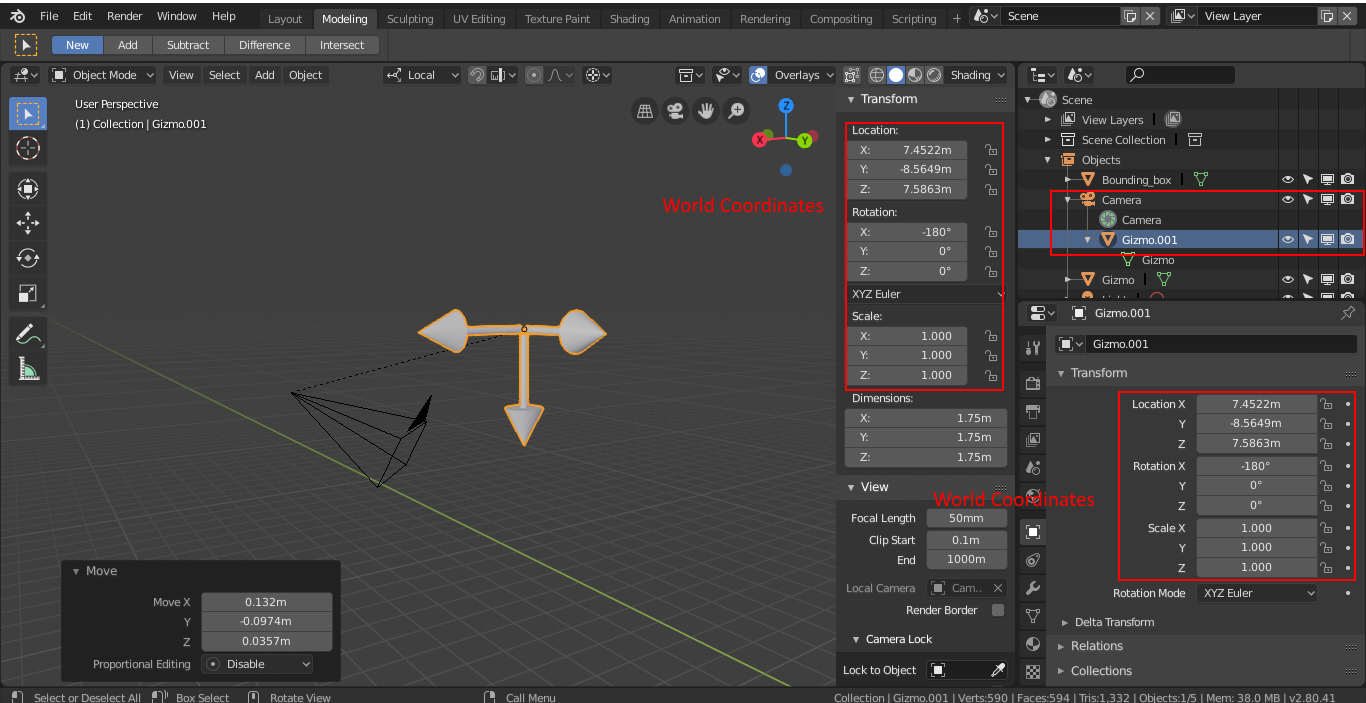
Example: Object "Gizmo.001" is a child of node "Camera". The transform panel shows the world coordinate values. There is no easy way to precisely align the "Gizmo.001"s local coordinate system with the "Camera"s local coordinate system. This would be very easy to achieve, by setting the local translation and rotation of the child node to 0.

Note: I'm a programmer, but I never made a contribution to Blender before. If needed, I could help implement this feature.
13 Comments
Voted. Absolutely vital, must have function! Wonder, why it's not there for so long. It's like a car without wheels. In 2.79 it seems to work properly, but it just automatically swith to local coordinate. I'd like to choose between global/local. In 2.80 it don't even work, coordinates remains global, but remains the same as I move parent object (which is good, but coordinates are absolutely wrong). Fix it please!
It seems that Blender already does what I was requesting (i.e. ability to set object coordinates relative to parent object). But it only begins doing so when I set the property "Object->Relations->Parent" explicitly, which doesn't seem ideal. Originally I used the "Scenes" and view layers to set the parent which didn't work as I expected (check the video). I'm not sure if this is a bug, or intended. First, the Transform panel shows World Coordinates. After I set the parent in the Object->Relations panel, the object suddenly changes coordinates, and the Transform panel begins to show Local Coordinates (which is what I ultimately wanted to set).
{attachment Blender_2019-04-03_20-02-09_Trimmp4}
Either way, I was so confused in the first place that I decided to create this post :/. I think I will close this post and maybe create a bug report if it is confirmed as such.
I realize it's been well over a year since OP posted this, but seriously this needs to be addressed. The way Blender displays the transform for child objects is bonkers and makes absolutely no sense. The displayed transform is the world transform of the child object when the parenting was set. So if I have an object at 0,0,0 and I make it the child of an object at 10,10,10, the transform location that is shown for the child object is 0,0,0. If I clear the location of the parent object: Now I have two objects with a location of 0,0,0 (according to the UI).
The only way to get the UI to reflect the child object's location in the parent objects space is to clear inverse and then subtract the parent's location from from the child's location. If there are rotations or scales to take account of then it's even harder and you have to get into getting inverse world matrices and stuff. Every other software I can think of just shows the child transform in the parent's space, maybe with an available toggle between global and parent.
Hi,
Recently updated my old Blender to 2.91. The problem seems to remain: The coordinates of a child in the Transform panel show and respond to world coordinates. As I think jpmmaia is saying, the remedy seems to be to go into Object properties and set the Parent type to Object (which is already was) - only then do the transform coordinates become related to the parent. I would call it a bug.
* @adam_bissmarck * I commented yesterday and saying this was a bug. NOPE. You just have to Parent Object (without inverse). I was showing off my inexperience with Blender!
Rather than use "Local", since that term is already used and means something different (local coordinates within Edit mode), perhaps it makes sense to use the same or similar terminology as what's used in constraint's (i.e. "Local with Parent" or just "Parent coordinates").
* @Jason van Gumster * Yes, I agree. If this feature was implemented, I would say that "Local" wouldn't be a good word since the term is overloaded in Edit mode. However, I think now that this feature only makes sense to implement if someone thinks it useful to change the world coordinates of some node with one or more parents (please check my other comment).
I come across needing better feedback for this. It makes more sense for the transition be shown as the relative parent's origin. And delta transform as relative to the world origin. Otherwise, if this is a continuous intentional, it is nice to show us the state respecting with 'kept inverse transform' or isn't as feedback.
We need an indicator to tell whether the transform values of a parented object is displayed based on the world or parent space. This is essential for all 3D software.
If we parent an object with Keep Transform option, its transform values will still be displayed based on the world space. If we choose the Keep Transform With Inverse option, its transform values will be displayed based on the local space, but incorrectly.
I have tried the same setup in Unity 3D and Autodesk 3ds Max. Both 3D software show the correct transform values based on parent space, but I have to use Parent Inverse add-on to achieve the same thing in Blender.
I find it always a bit sad when I search for the solution for a Blender-related question on the internet and I land here: what I need to do is still in the realm of wishlist.
This is much needed: numerical input for transform in parent-space.
The link for video is down :(
If i understand you well, you want to match easily position of gizmo to camera but those world gizmo coordinates confuse you? I can suggest to use constrain copy position and gizmo will snap to camera origin. I'm coming from Maya where we have great option Freez Transforms (where maya reset all values for translation, rotation and scale to 0) in blender you have option All transforms to delta which dose same thing. Anyway, if you are programmer feel free to join to developers and help, that will be really great. Thanks.
* @gulicmanojlo * All transforms to delta isn't exactly the same, what you want is Apply Transforms.