
Allow node creation while keeping the add node menu open
When adding a node in any node editor via navigation, it would save time to be able to add nodes without leaving the current menu location.
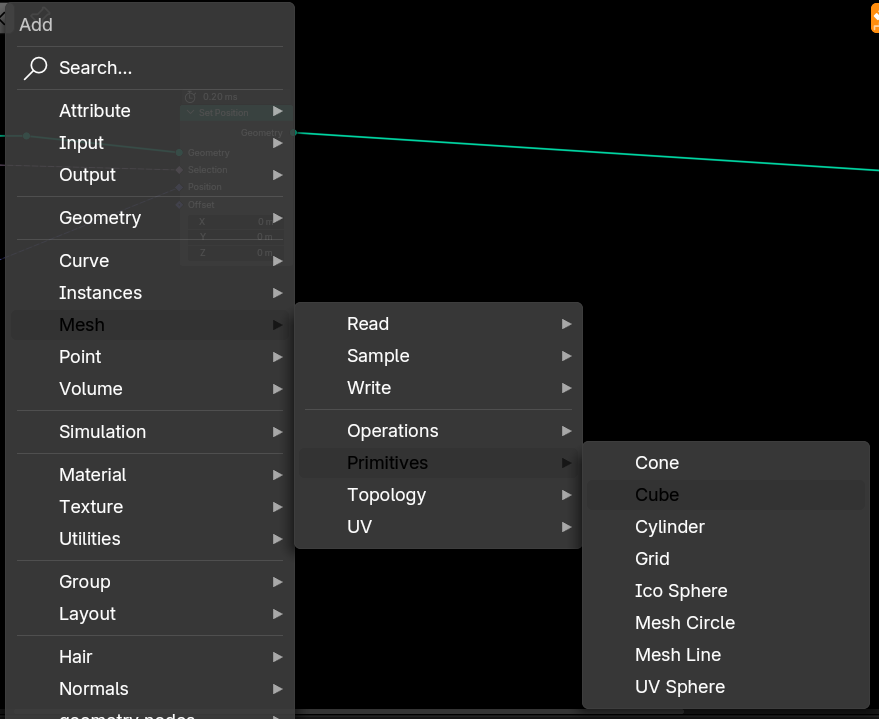
For example, in geometry nodes, if the user navigates to Add > Mesh > Primitive, they could, for example, use "middle mouse click" to add in a cube, keep the menu open at the same "Add > Mesh > Primitive" location, and continue to middle mouse click on other primitives without having to re-navigate to that location each time.
For an example of this functionality, Google Chrome lets the user keep their bookmark dropdown menu open and opens the desired website in a new tab via middle mouse clicking, and closes the menu with a left click input.
7 Comments
use pie menu editor addon, it allow you to do that. not just pie menu but also any list/menu. you can choose between either to keep window open or just close instantly on clicking.
even you can customize list items as well. you can design any menu you want.
This suggestion is for built-in functionality, not using a paid addon.
there are so many nodes in geo node. pie manu will eat whole screen
While the idea of adding multiple nodes from the same sub-menu location without re-navigation has its appeal, keeping the 'Add Node' menu persistently open in the node editor could introduce significant workflow drawbacks.
Currently, the typical flow involves adding a node and then immediately connecting it to other nodes to build the desired logic. A continuously open menu would likely interfere with this crucial next step:
Therefore, while the proposed method aims to speed up adding multiple nodes from the same category, the subsequent steps of connecting and organizing nodes, which are integral to the node-based workflow, could be significantly slowed down and made less intuitive due to the persistent menu obstructing the workspace and requiring extra dismissal actions.
I should be clear, what I'm proposing changes nothing for anyone who likes how it currently works.
Only by middle mouse clicking can a node be added while the menu stays open, and moving the mouse off the menu screen space or left/right clicking will close the menu just like the current implementation. There would be no "persistent menu."
There would also be no disruption to a connection-based workflow as you described and no extra dismissal actions, just the option to quickly add in multiple nodes (index+pos+sample index for example) for those who'd like it.
I do ask if you downvoted to kindly reconsider to at least a neutral stance as the suggestion is quite different from what you described, owing likely in part to my lack of clarity in the original post.
Got it. Downvoate removed.
there should be a choice when user click with shift then the menu should remains open