
Edit all values faster with arrow keys
When you are editing numberboxes, it would be good to have a parallel feature with the current one that can be used to select the number just by using arrow keys
Mouse over number selector: up -> increase number down -> decrease number Shift + right/up -> increase number with x 10 speed. Shift + left/down -> decrease number with x 10 speed.
(This is very common behavior in Photoshop when editing numbers, or moving objects and it is very handy.) Here is a gif of how you edit amount of noise with photoshop just using arrow keys and shift and numbad. dl.dropboxusercontent.com/u/5904620/Blender_aid/editing_numbers_with_photoshop.gif
Curves and ramp: If you have very clear idea of what you wanna achieve with curve node, it really is a pain in butt to edit that with mouse. So curves and ramps etc. also needs a way to edit the location of selected anchor point in the node with arrow keys.
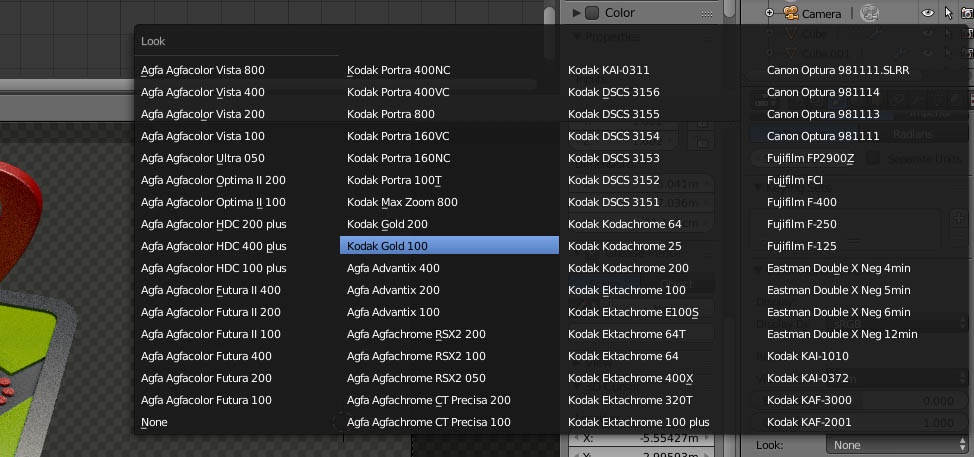
Drop menus: Also when selecting drop menu items, it would be nice to have cursor keys in use. For example in this menu would be very useful to fast check how different filters looks like just by pressing up / down when hovering with mouse over the menu / the menu is activated.
2 Comments
Hi?the Drop Menu can use the CTRL+Roll MMB to select by loop, and even others value, The ramp not easy select by the mouse , so you can can put the mouse cursor over the index value , than use the CTRL+Roll MMB to select.
BTW, very hope the image editor can support CTRL + Roll MMB to view the image by loop. rightclickselect.com/p/general/pgbbbc/ctrl-+-roll-mmb-can-view-image-by-loops-in-uv-image-editor it will be better for view the image.
That mouse thing is good and I'm happy to know about it's existence, but scrolling with mouse is slow and kills your finger sooner or later if you do it all the day. Also now it moves only 1 number / scroll step. It maybe would be better to have that shift thing with it.