
Outliner: visual indicator for Objects Linked to Collection, Link Collection to Scene
Edit: spending more time on this issue made me realize it seems to be a long-dated problem: projects.blender.org/blender/blender/issues/92978
Hi,
While working on complex files with multiple scenes and object variants, I try to use Link to Collection/ Link Collection (or Object) to Scene as much as possible, but it can get confusing. Here is an example:
- Scenario 1: Object > Link to collection
I have an object A located in collection A, that I've linked to collection B. My object is now simultaneously located in collection A and B. The only visual indication in the outliner is that it will highlight every linked objects based of my selection, assuming my hierarchy is fully expanded. Since the 'link' icon is already used for linked objects, here is one way to show it in the outliner, still visible if the hierarchy is collapsed.
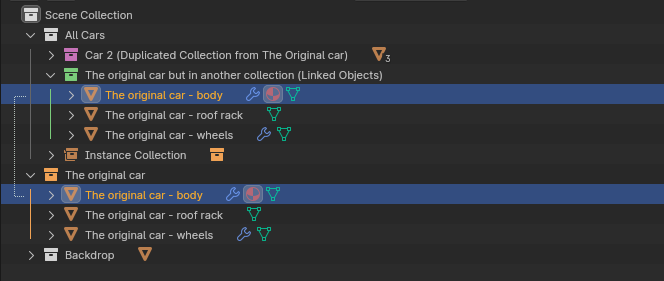
Also, if I decide to delete (X) this object, it should display a warning just in case:

- Scenario 2: Linked Collection (or Object) to Scene
I am working on Scene.002, and wanna use Collection 'Backdrop' from Scene.001. I use Outliner > Scenes > select Collection A > Link to Scene. Since I now have full editing rights to my 'Backdrop' collection within this scene, there should be a visual indication in the Outliner reminding me that the Collection is also used in Scene.001. Here is the idea:
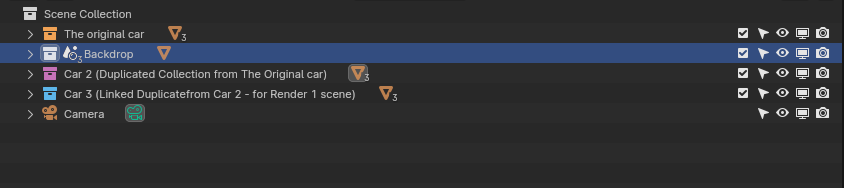
Similarly, if I decide to delete (X) this collection from Scene.002, I should have a warning like so:

2 Comments
I don't fully support your solutions but these are problems that need to be discussed.
I think these could be communicated better, but I disagree with adding these prompts. It should be added via an addon or extension because it's workflow-dependent. You can see in which collections an object is linked in the object properties > Collections panel. Deleting an object is a self explanatory operation, if I delete an object I intend for it to be removed from the scene, even if it is linked to several collection. After all it is the very same underyling object that shows twice in the outliner but only once in the 3d viewport.
I think what you really want to do is remap the delete operator from the (X) shortcut to the "Unlink" operator that does exactly what you want to do. Or you can right click > Unlink.