
Jumping UI / Viewport Render Mode
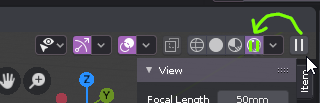
There are four display methods for the 3d-view. If we select the "rendered"-mode there appears an additional pause-button to the right to pause the continous viewport rendering. This is nice but it makes the button-set jump to the left so an intuitive mousemove to the left in order to reselect what's been selected before does not point the mouse to the expected UI-element. This is a no-go in my opinion because - yes it is a jumping interface and it feels ugly! Proposal: Make the button for the "rendered"-viewport-mode a tri state: [other than rendered] / [rendered] / [render paused] e.g. with the pause symbol overlayed and a hint in the quickinfo ("click twice to pause") Another proposal to prevent a jumping UI would be to reorder the display-mode-buttons so the pause thing could be placed on the left to them.
3 Comments
I agree that the interface jump is uncomfortable, but its suggestion seems to create confusion in the interface.
One question, do you know if when we select "Rendered" options appear in the pop-up "Viewport Shading"? If options never appear, perhaps the pause button could be there.
Or we could have a permanent pause button that freezes whatever is in that viewport regardless of which mode it's in (I would use that often). But one of the many problems with that is Blender does not indicate when viewport header has more icons and not enough space to display them. So, many beginners might not realize they need to scroll the header all the way over to the right to unpause a viewport.
I'm working with several beginners currently who have told me that things have disappeared or cannot be found because they didn't know the headers could be scrolled.
I myself did not know the outliner header had more than 2 buttons and a search box. I only recently was told about the filter and add new collection buttons when the outliner is set to View Layer and the Purge button when the outliner is set to Orphan data.
Oh yes! Agree 100%!!