
Add Auto-fit Range to Video Sequence Editor
One of the first road-blocks new users of the VSE encounter when importing media, is the question: why can I only preview/render the first 250 frames of my video?
Ex. blender.stackexchange.com/questions/60369/why-is-my-video-playing-limited-to-a-couple-seconds-when-i-add-it-to-vse blender.stackexchange.com/questions/78280/why-only-half-of-my-video-has-been-rendered/ blender.stackexchange.com/questions/43748/how-can-i-render-the-entire-video-in-blender-vse/ blender.stackexchange.com/questions/57221/how-to-set-frame-range-automatically-to-video-length
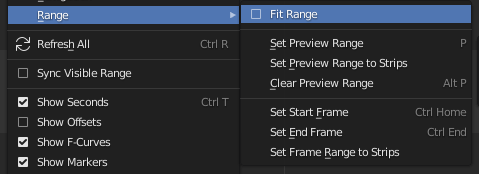
This could be avoided if the was an optional "Auto-fit Range" in the Range menu(see thumbnail), which, when checked, would continuously adjust the render range from the first frame of the first strip to the last frame of the last strip(like continuously running "Set Frame Range to Strips").
As in the new "auto-zoom to fit" feature, it should be auto-switched off when other range related functions are used.
Opening the Video Editor template this feature should be on as default value.
4 Comments
instead of an "auto feature" i think having a "crop timeline" where you execute it and it will look at the entire timeline and put start frame at the start and end frame at the end.
* @Luciano A. Muñoz Sessarego * You mean like the "Autoset Preview Range" in the Dopesheet, except it needs to to executed manually? There could be different auto-fit modes like Sequences, Keyframes and Manual.
I'd like an autofit when loading the first video in the video editor. It be 90% of my use cases in regard to setting the number of frames when videoeditting.
* @peter.boos * yes and no, because that would work when you dont have anythingelse, but if you're adding audio to an existing animation / project, then that screws with it, in that case it should also take into consideration the keyframes.