
← All ideas
  • Published 3 Nov 2022

Alternated edge loop selection

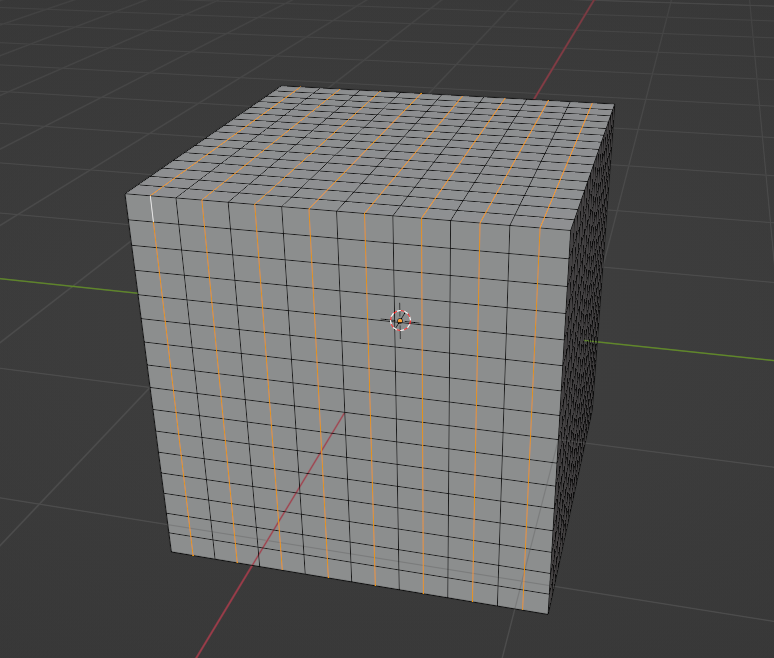
There isn't a way to select the edge loops alternated, for example one is selected, one no, one yes etc. It's good sometimes to optimize models but you need to do it by hand. It would be perfect if there is also a way to select first only a part of the model and then activate the alternated selection on the selected part of the mesh. 2.PNG
100%

Development Status: Open

Upvote 2 Downvote 0
omi1
3 Nov 2022

1 Comment

fructdw
  1. Select 2 edges with one skipped in middle, after that use select next active (Shift Ctrl Numpad Plus) multiple times:

  1. Then select loops -> edge loops:

  1. You are done with selection. If don't want going into menus or don't have numpad right click and add these operators to Q quick favourites menu:

  1. Dissolve with Ctrl X:

Strategy for Cylinders:

  1. Use Shift Ctrl Alt Left Click to select whole ring:

  1. Checker deselect. Settings can be altered in adjust last operation box to select every 3, skip 1 for example:

  1. Select edge loops again to also include top / bottom edge fans, this time accessed from quick favourites menu by just just tapping Q->E. Notice underlined letters in menu, these can act as hotkeys:

  1. Dissolve with Ctrl X:

8