
Geometry Nodes: Viewer node should identify plugged data types automatically
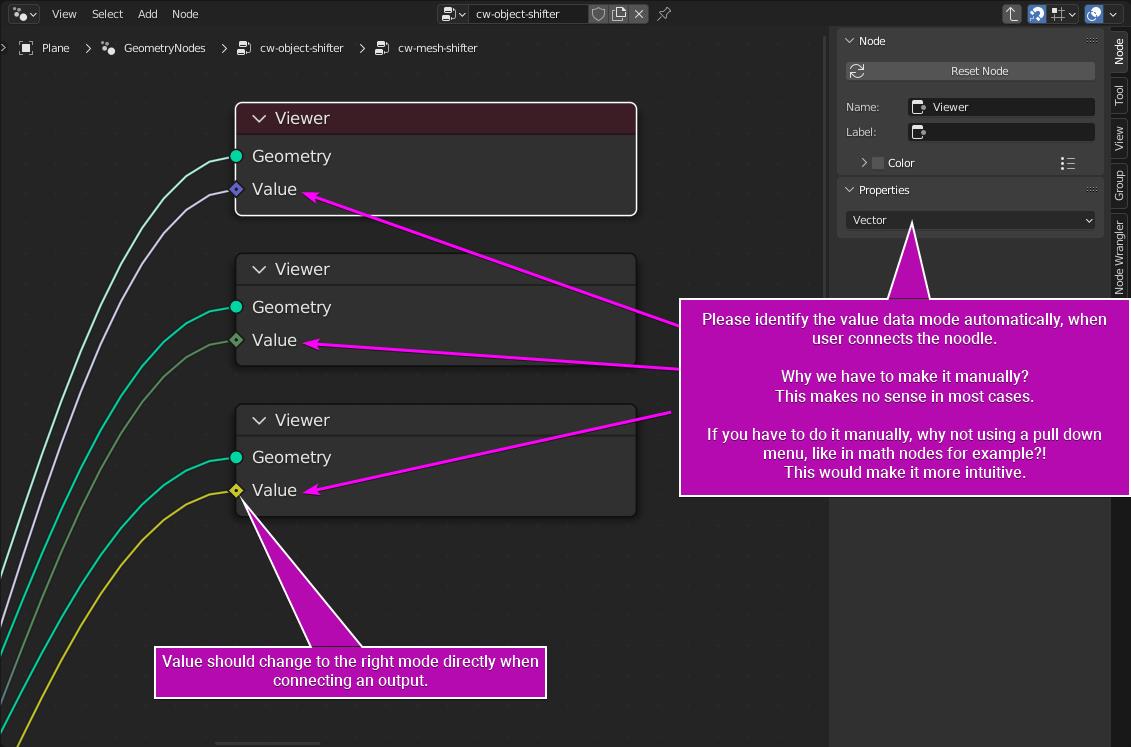
When using the viewer node in the Geometry Nodes area, I miss a function that identifies the plugged data type automatically.
Why are we forced to switch the viewer value data type by hand? It would make more sense and be a time saver, if this happen automatically.
2 Comments
Absolutely agree, also that Dropdown should be in the Node itself instead of the N Panel, so you can change it easily if you want to. I think it is wise to be able to view the Data in a different type, i.e. float values as boolean etc., but it would be great if the viewer assumes the correct data type at first.
If you try to see the output with Ctrl+Shift on a socket, it will automatically select the right type.
The problem is, like you said, when you connect the socket manually to the Viewer Node. I also suggest that you should add in the node itself an option to choose the socket type like @todesdigga mention.
When I encountered this phenomenon, I thought at first that it was a bug, and I reported it, but it turns out that it was intentional:
projects.blender.org/blender/blender/issues/122002