
Tile Headers
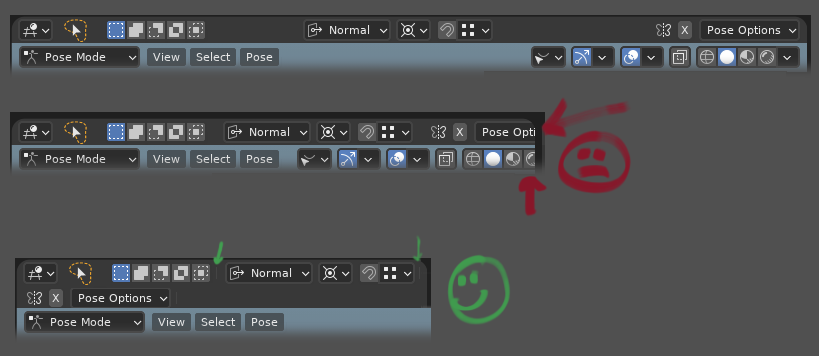
The idea is to stop headers hiding important tools by having them wrap. The sections of the header would have feint dividers (marked with green arrows) that act as a visual cue to when the section will wrap when the area is scaled. The second row is justified left or centered based on an option under header Position in Preferences/ Interface/ Header Position.
8 Comments
While I don't dislike the idea, I'd personally prefer having a customizable UI where you can choose, drag, erase etc. UI elements where you prefer. Blender currently is very customizable in terms of themes, but lacks completely in customization of elements (buttons, menus, tools...), everything is fixed and you cannot even decide if you want a certain element to appear or not. Considering a little bit what a "3D software good in mograph" does for UI customization would be extremely beneficial.
It can be user-configurable (by border dragging), like the windows taskbar. So user decides, what is the more important: the screen space or instant access of UI elements.
Such features has to be configurable IMO no doubt. I asked because it looks OK in some cases, in other cases it just broke layout. Maybe not by dragging but by some "Expand" button which will switch layout behavior. OK +1 ))
A setting in the user preferences. If headers are too long, scale the font and symbols smaller. Decrease all spacings. in the buttons. Between the buttons
Perhaps in the Text Rendering preference-- you could specify a min/max for auto-scaling text so that it will reduce text size but only to a certain amount.
Yes, but maybe not automatically, but manually extend topbar. Because You could also be low on vertical space.
Could be nice as an opt-in feature but my concern is that it causes even worse clutter. If your screen is so small that the header needs to be scrolled, stacked headers would likely just compound the space issue.
Regardless I don't see much harm in giving people the option, at least as a user preferences setting so it doesn't bloat the already large drop-downs.