
Request : Mask Node in Shader Editor
As VFX artist I believe the future of compositing in Blender is in the viewport using 3d plane and Camera projection, and less composite in Compositing Editor.
Masking is one of frequently used technique in VFX. In blender the same result can be archived using Texture painting but unlike Mask you can't animate the shape.
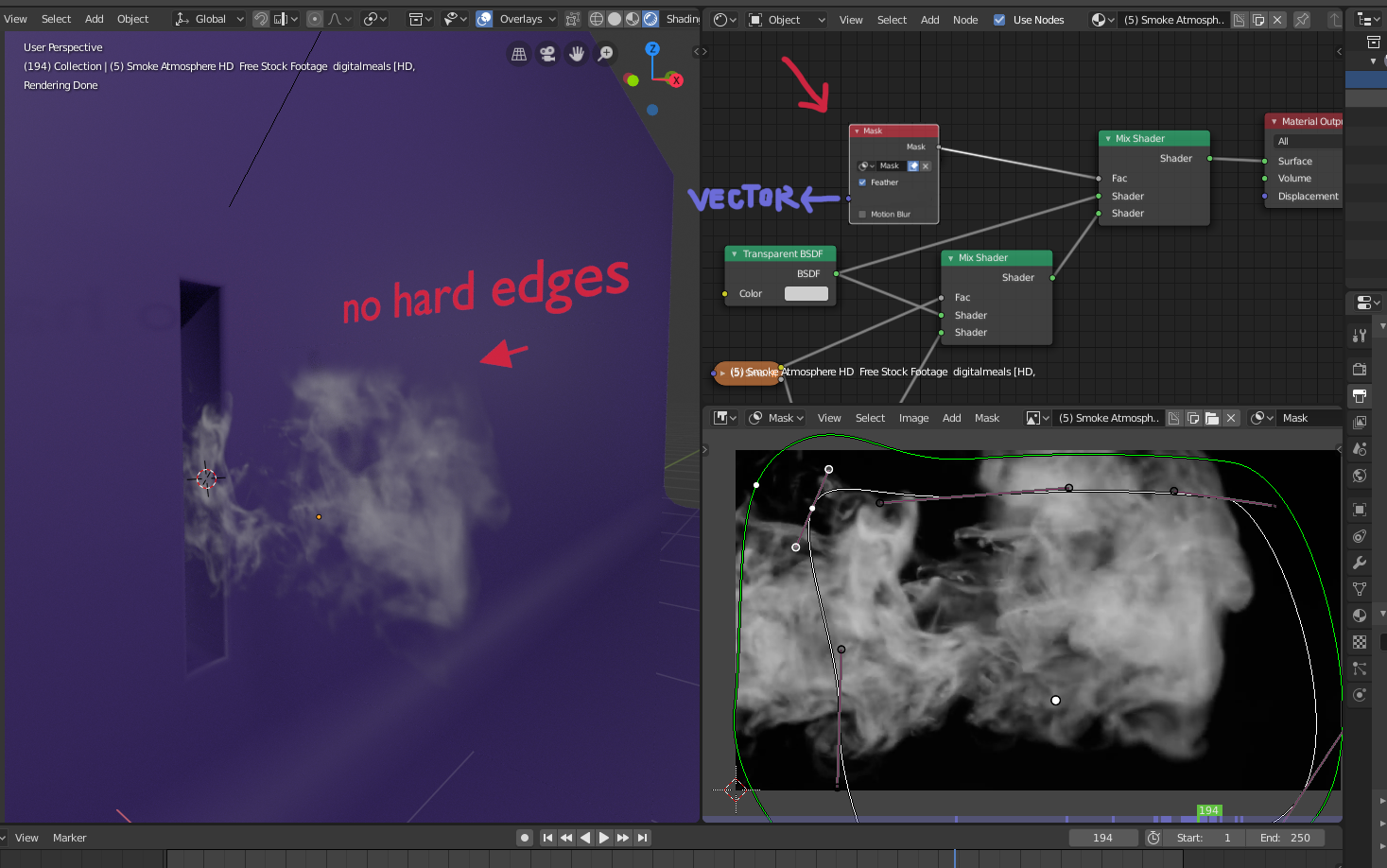
Unfortunately, "Mask Node" is not available in Shader Editor. My request is to add Mask Node in Shader Editor with a vector socket. Here is the example. imgur.com/a/PLo6o3z
3 Comments
I need this mask in shader editor. So you can modify the texture inside the shader ( like masking some parts of the texture) without have to go to compositor first and render out the new alpha.
I would also find this feature very useful. I'm quite used to using feathered masks to mask images in After Effects. So being able to use the feathered S-Curve masks to directly alpha mask image planes would be very convenient, if it could be made to work over the UV coordinates.
How does one combine a feathered S-curve mask with the Holdout shader?
Since this in a shader, what coordinate system would the mask relate to? Aside from drawing with curves, how does what you're suggesting differ from an animated texture?
More specifically, though, how doesn't the Holdout shader that's already in Blender do what you need?