
Collection Suggestions
Hi, I'm currently on blender 4.1 and I notice some shortcut changes when putting objects in collections. Here are my suggestions. I also notice a bug (maybe) in creating collection.
- When using the right click menu to move objects into a collection. I think the Shortcut placeholder should be "Shift + M" not "m". because when we clicked on this menu, the popup modal menu for "Shift+M" shows up. See image.
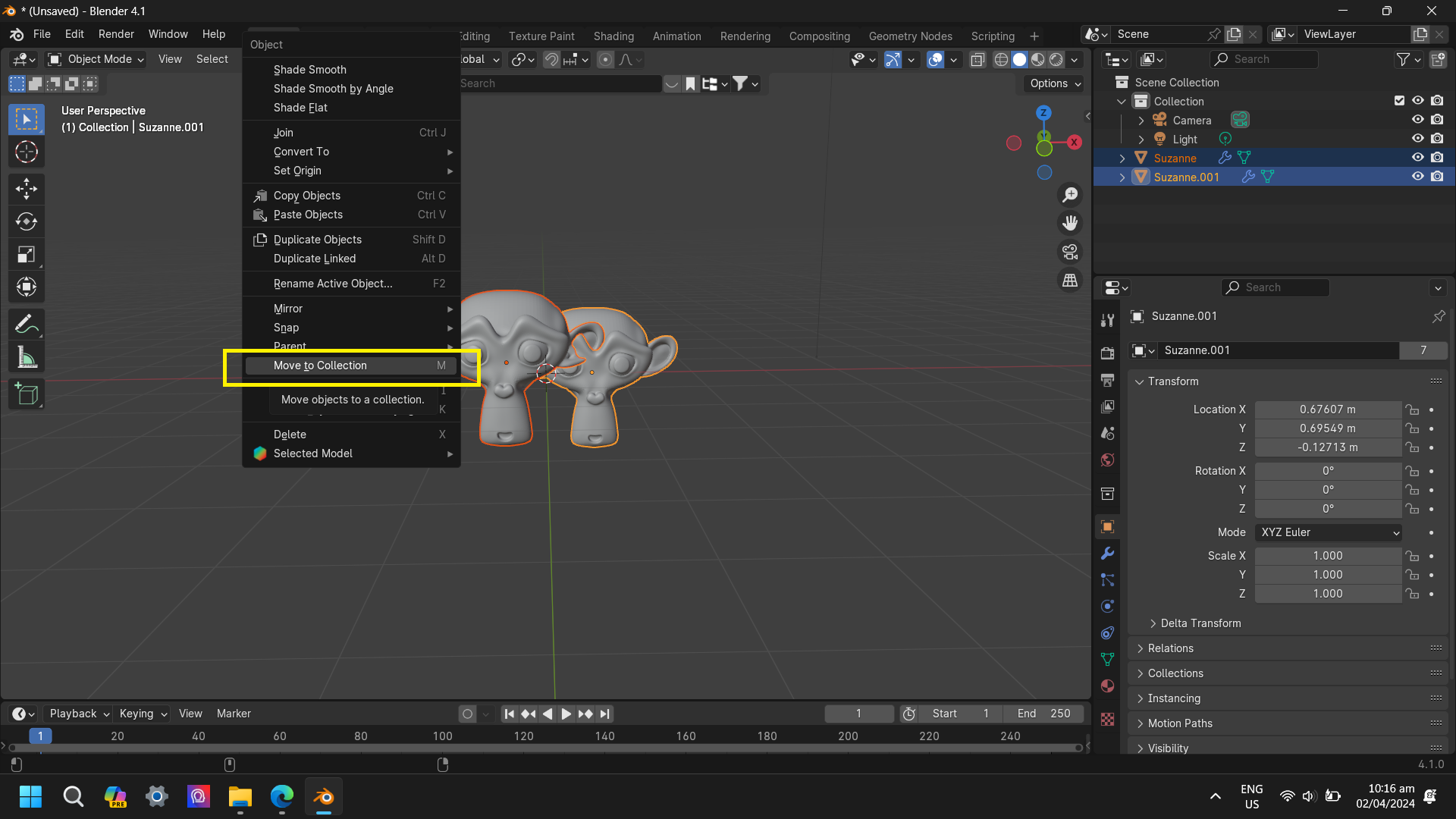
- Now in 4.1 pressing "M" will move objects to an active collection. I would like to suggest that we get a notification popup modal maybe? for blender to tell the users on where the objects have been moved.
For example: When pressing "M" it will say. "Cube has been move to Collection1"
- A bug? In blender 4.1, Pressing CTRL + G does not add the collection to the collection outliner view even if you rename the collection in "Adjust Last Operation panel". Does not work if you press enter after you named it.
The Collections in Outliner and The collections in Object tab > Collections is so confusing. Why can we add/create collections in Object tab > Collections and not shows up in the collection outliner? Or I'm just dumb on not knowing how to use it?
7 Comments
To my understanding, these ways of creating new collections do not link the created collection to the current scene. Hence, they do not show up in the outliner when its Display mode shows only data from the scene (as per default). To correct that, you need to set the outliner to Blend File, find your collection, Right 🖱️ > Link To Scene.
But that's where my understanding ends. I do not see any scenario where we need to put objects in an "invisible collection". And even if there was a scenario where this is actually needed: the user experience is atrocious. There are no signs of any of these functions behaving differently from the others, no explanations, nothing.
The user shouldn't have to tell Blender to have the new collection in the current scene when this is the default behavior anytime you create anything in Blender. And if there needs to be a way to make collections outside the scene, make an isolated and clearly indicated way to do so, or just let the user "unlink" collections manually instead of having a mix of seemingly identical functions that actually do very different things.
Over a year ago, I reported this as a bug. The similar command labeling between the two functions is confusing, with one producing the expected result and the other producing a result that makes no sense whatsoever and apparently has no real use.
The triage team replied that this nonsensical behavior is completely intended because layers used to be a thing, or something. They did not explain why one would want a collection that is not linked to anything, isn't referenced in the outliner, and you can't really do anything with it.
Their logic is always something like this: There's a button labeled create square, when pressed it creates a circle. When reported as a bug, they eventually determine that the circle is what is intended, and the text on the button being completely inaccurate is a feature request situation.
Ironically, when I initially asked in another area about this behavior, I was told by everyone it was a bug and to report it. And of course after I reported it, the triage team told me to make a feature request on RCS.
I tried doing the Blend file thing in the outliner view. Yes, you're correct. It can only be seen when switching to the "blend file view" in the outliner and when I link it to scene it just create duplicate/linked objects.
It's gets confusing and does not make sense because they named the panel and the button "Collections". It should behave like creating collections the way we create in blender.
I agree with you, I think it's really a bug. Maybe it's not a high priority bug.
projects.blender.org/blender/blender/issues/105568
The way I understand it, we call "bug" any outcome that occurs when the software doesn't behave as intended or designed. However, if the software behaves exactly as it was designed to, even if the design itself might not be ideal, it's not considered a bug. Essentially, it's like the difference between a malfunction and a feature working as intended, even if users might not like how it works. In such cases, developers may say it's not a bug because it's functioning as designed, and they typically don't handle design change requests through the bug tracker, usually because the tracker focuses on fixing issues with functionality, not design decisions, which require broader discussion and evaluation.
Holy crap. I have been trying to use Ctrl+G and other methods to "make a collection out of the selected objects" FOREVER. And never figured out why it did not appear to work. The dozens of collections I made are probably why everything else is working strangely too.
If there really really really is a reason this collection must remain outside the scene, they need to explain this with a series of steps showing how putting the new collection into the scene would produce unexpected or unwanted behavior. Not just claim that it is "not a bug because it was designed this way". By that criteria every bug that is not caused by a compiler error (but instead by code) is "not a bug because it was designed that way".
If it has to be outside the scene then there MUST be an "unlinked" header in the outliner and all the unlinked blocks below it. The lack of that is a bug as well, no matter what they call it.