
Shape Key Collections UI/UX
This topic is more detailed version of my earlier proposal with more breakdown and images.
Working with lots of shape keys can be terrible experience because of basic UI/UX functionalities that it lacks, which unfortunately can't be added with addons.
Main issue is that there is no way of grouping shape keys and differentiating them in properties panel or dope sheet. When working with dozens of shape keys this can lead to headaches, constantly having to find right shape key in endless list white text on grey background.
I propose using new Tree View functioanlity for shape keys, this way not only will it be more similar to new Bone Collections and make things more consistent, but will introduce new functioanality, such as nesting.
- Collections could be added in shape keys list, similar to panels in node group interfaces. It will allow user to drag-n-drop shape keys in collections, and collapse them temporarily to unclutter the UI.
- Collections can have lock and protect functionality that locks and protects every shape key inside it. Similar to how object collections work in outliner.
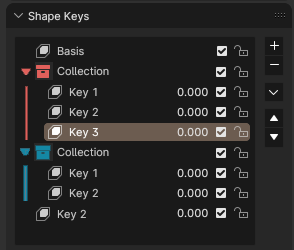
- Collections can have color property, that can help users differentiate between them more easily
- Shape Key Action mode of Dope Sheet can support collection colors for channels, similar to how Grease Pencil mode supports layer colors. This will make animation workflow 100 times better. Its incredibly hard to differentiate between shape keys when its all just grey. Accidents happen a lot and its generally unplesent experience now. This can solve all that.
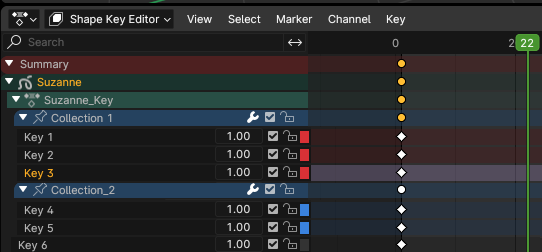
Colors for shape key collections can make lot of workflows more intuitive for users. Practical examples:
- When doing shape key blends and using face sets, user will be able to give shape keys color based on face set they affect. For example if I have face set for lips that is red, and yellow that is for eyebrows, I can have two collections, one marked with red icon that has shape keys that affect lips, and other with yellow icon with shape keys that affect eyebrows. This will make things more streamlined.
- When working with corrective shape keys user can assign shape key collections same color that bones have. For example, if I have red controllers for hand bones, I can create corrective shape keys for hands and have them in collection with red icon.
Overall, this small addition (although difficult I understand), can make shape key workflow much better and more consistent with rest of the Blender. Nesting and color-coding your work across different parts of Blender can make projects more unified and easier to read for its creator, and for others that might have to work on it.
1 Comment
would help my projects a lot! especially the collections and drag and drop functionality.