
Shader Node SHIFT+A Menu - Make It Visually Faster!
For visual learners, this would really help to more quickly navigate the 90+ nodes in the shader editor. After a while you memorize the colors, making the nodes that much faster to find. Sure, you can type in the search, but that does not necessarily substitute when you don't remember the name but you do remember the color of the category.
This can also be implemented for the Geometry Nodes and Compositor Nodes section.
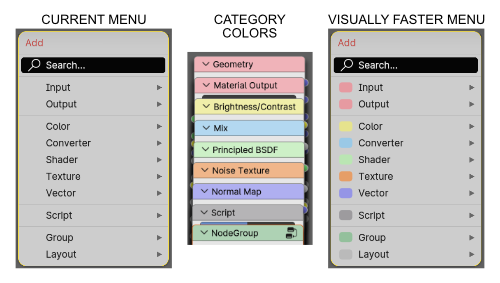 Of course the menu category colors are taken from the Preferences > Themes > Node Editor choices.
0 Comments