
Imported keymaps loses their preferences
Can we please make it so that importing a keymap will also include its preferences. Currently they are completely lost or inaccessible after importing a keymap. Thus, you are forced to keep using Blender default keymap and pray that you don't screw something up or you'll have to start over from scratch if you still want to have access to the its preferences.
This has been an issue for a very long time but apparently is not considered a bug, but rather a feature request. Even though it behaves as a bug from a user perspective.
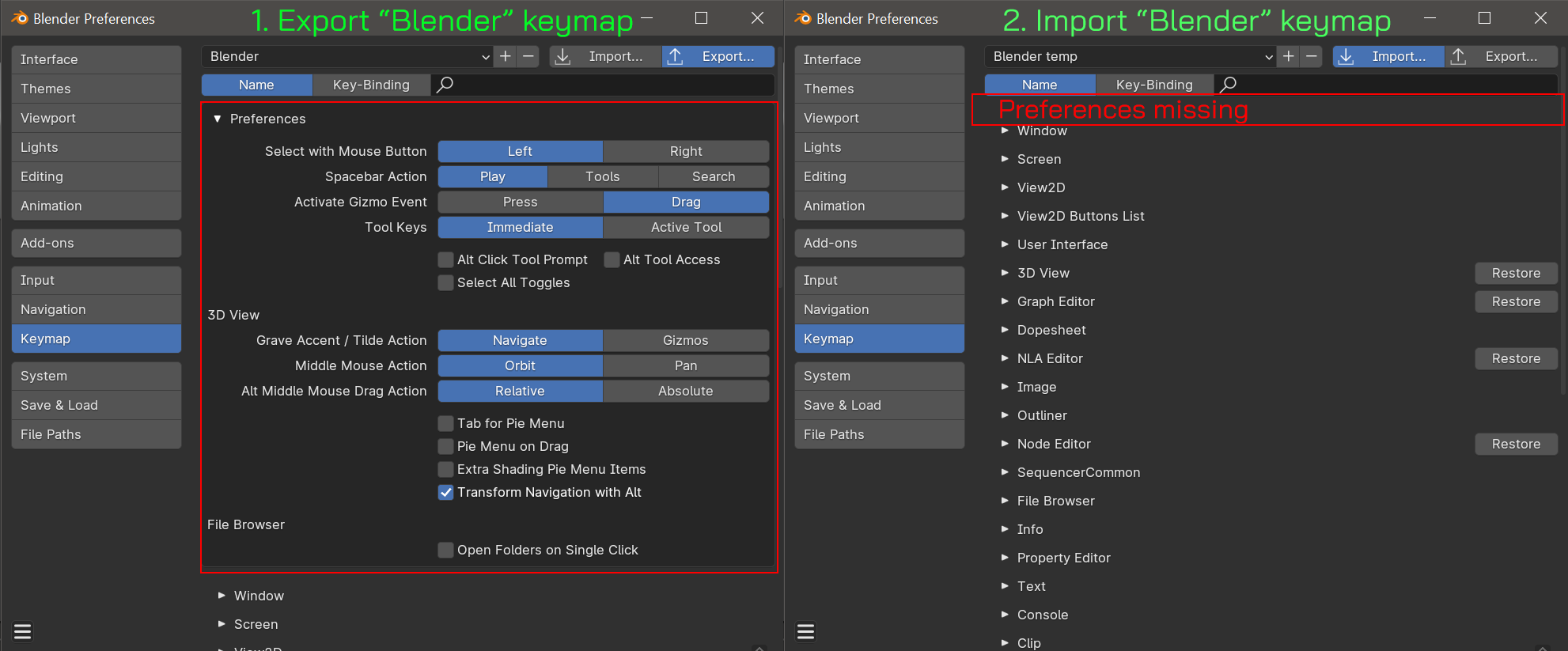
Issue on bug tracker: projects.blender.org/blender/blender/issues/65121
1 Comment
This is still an issue in 2026 as of Blender 5.2.0 LTS
The 7 year old issue on the bugtracker has been closed, without any fix. projects.blender.org/blender/blender/issues/65121
The 7 year old thread on the old devtalk forum has been archived devtalk.blender.org/t/saving-keymap-removes-preferences/5756
It seems that these preferences are global, so you can work around this issue by switching to the Blender keymap, changing the preferences, then switching back to your custom keymap. This is poor UX because you have to know that the preferences are hidden there in order to go change them. In a custom keymap even searching for the preferences doesn't show them.
If the preferences are meant to be global, why aren't they always visible?