
Allow dropping edit mesh tools
Allow user to drop edit mesh tools.
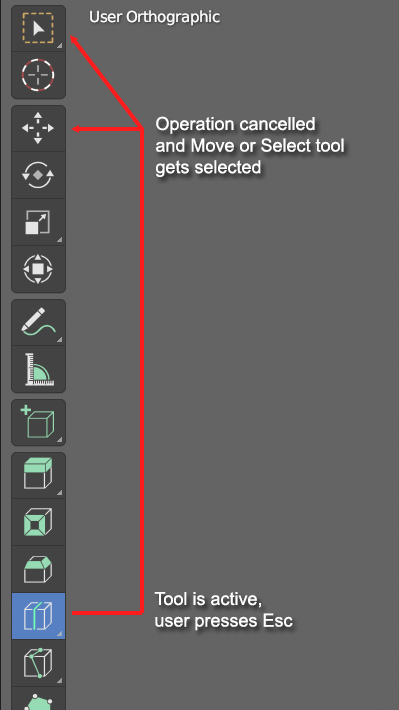
Say I select "Loop cut" - occasionally I want to cancel it but it doesn't seem to be possible by default *if there is a way, let me know and I delete this post.
How it could work:
- Edit mode tool is active
- User decides to cancel tool and presses Esc
- Tool is cancelled and Select or Move tool is selected
I find it strange that this kind of behavior is not supported by default. This would make working with edit mode tools in my opinion more natural.
Note - I also find it very inconsistent, that pressing esc when using loop cut, bevel or some other edit mesh tool is active does nothing, but with knife tool it cancels the last cut.
5 Comments
Why not use modal operators instead of active tools?
Not sure what exactly you mean in this case - maybe clarify what you mean, I haven't done that much of configuring of Blender UI (other than creating python scripts and tools) - I'm looking for functionality that works like this: I press icon, and if press esc, or whatever key is configured as break/stop I'll drop back to move or select. If I press Ctrl + R, this is already how things work, however it doesn't make any sense that activating operator from icon behaves differently.
Why not make them both behave identically?
It's nonsense that they don't in the first place. Blender is the only program I can think of that doing something after clicking a toolbar button to invoke the action is completely different in behavior than using a hotkey to invoke the action.
If all you want is press Esc to jump to a specific tool, the solution is simple:
Each tool in the toolbar already have a shortcut assigned, so it's not like you really need to make one.
I see it like the difference between GUI and CLI, or between VSCode and Vim, or bike and rollers.
These are two fundamentally different ways to do the same things, with both pros and cons, that each work best for different users or scenario.
If you think there are behavior that can be shared across both systems with no downsides, yes that would be great! But you need to explain it.
One system is GUI heavy, relies almost exclusively on the mouse, is very handy for stylus users, is easier to discover, but is slow, makes you jump between a toolbar and what you are doing all the time losing focus and time.
The other system relies on both mouse and keyboard, is as fast as you can type, lets you stay right where you are and keep focus, gives you more options because its modal nature allows isolated keymaps, but is hard to discover and learn. And because each operator is isolated, you can control their effects with more keys and have infinite drag.
IMHO a halfway option is to use the popup tool menu ( shift space by default) or assign shortcuts to the active tools directly, so that you can stay focused on your stuff and just press a key to switch tools, more similar to what Maya and 3DS do, or the addon Gizmodal Ops . But you are still limited to the nature of gizmo interaction, and I think you don't always have the same options available between a gizmo and its modal operator counterpart, like the loop cut.
Easily. Let's add a Loop cut.
Make a cube, select 4 edges, and Cntl R - ok, now we can use the mouse wheel to choose how many cuts. Click and choose, then slide them where you want them. Awesome.
Made that cube again, Select 4 edges, click the Loop Cut button in the toolbar. There's the first cut ... scroll... oh look, we're zooming the view. And we can't slide it with the mouse, either.
Open a picture in Photoshop. Click B to choose the brush tool, and paint.
Open another picture in Photoshop. Click the brush tool in the toolbar, and paint.
The Same Thing Happens no matter how you chose the brush tool.
I don't care about this entire paradigm of "it's a gizmo" vs "it's a modal operator".... that's just.... sort of an excuse, phrased in Blender Speak. Tools should have unified behavior.