
Color coding font of axes in menus to color of axes in display
If colors of the font used for axes in menus matched axes' color in the display axes' color menus would subtly become much more intuitive.
eg. in screenshot the "Scale X" font and maybe the text of its value could be displayed in the same shade of red denoting the x axis on screen, instead of them all being the same shade of grey.
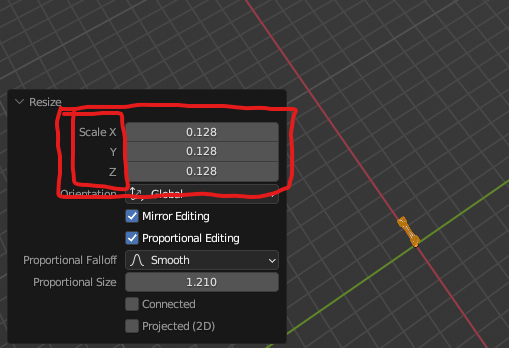
I know this might not be possible for uninteresting technical reasons so feel free to disregard.
6 Comments
2.8+ versions of Blender seem to have been going towards monochromatic look, It is very inconsistent. Most of the stuff is monochromatic, then Sculpt mode has colorful icons - and Properties tabs are colorful? The whole UI visual language is like a patchwork.
I remember back when the monochrome icon set was being made and proposed, many people were already complaining how the lack of color made it harder to recognize things.
AFAIK these complaints were answered either by "it's better than a technicolor rainbow fest" or "there will be a way to customizable icons in the future". But no surveys nor probing were made to infirm or confirm the first. And the latter didn't happen so far, and I don't think customizability should ever be used as an argument for lesser UX.
Can't find it anymore but I do believe such things were discussed on the old phabricator dev site or on devtalk, with mockups showing different proposals: colored fields, colored labels, colored dots after fields, colored vertical dashes before fields similar to the graph editor's channels:

Some other programs do similar things, it's not unheard of.
I don't think that particular isolated case is such a big deal in user experience. But as a whole, added to many other things that could definitely need more color or other kinds of touch ups, the total of changes can make a difference.
Yeah, I wouldn't presume to understand why this might clash with other features or priorities. I'm a new user and have found learning Blender extremely confusing, and I thought this would be a subtle improvement that might unambiguously improve Blender, especially for new users.
Multiple people warned me against using Blender as it's so confusing, and I think Blender's devs should prioritize user experience over UI appearance. I'm disappointed to read the UI went monochrome in previous versions like GIMP did. IMO sacrificing user experience for menu aesthetics is the epitome of neckbeard design.
I would rather only have X, Y and Z letters colors coded with RGB everywhere (as an option, not forced on everyone). But Blender has this strange way of showing channels (like location, rotation) so that the name of the channel is inside the field, unlike in the operator settings panel. So unless they change the way fields are formatted, coloring x,y and z will make those fields very unreadable, especially when a value is keyframed. The whole UI is so inconsistent - Properties panel has field names outside the fields in several places, so I wonder why do they format some fields in different style...
This is a little difficult since colored fields are used for features like keyframing. It's a nice consideration! Just maybe not worth it due to conflicts with other features.