
Search menu item
Find menu item
PLEASE CHECK THIS GIF AS WELL drive.google.com/open
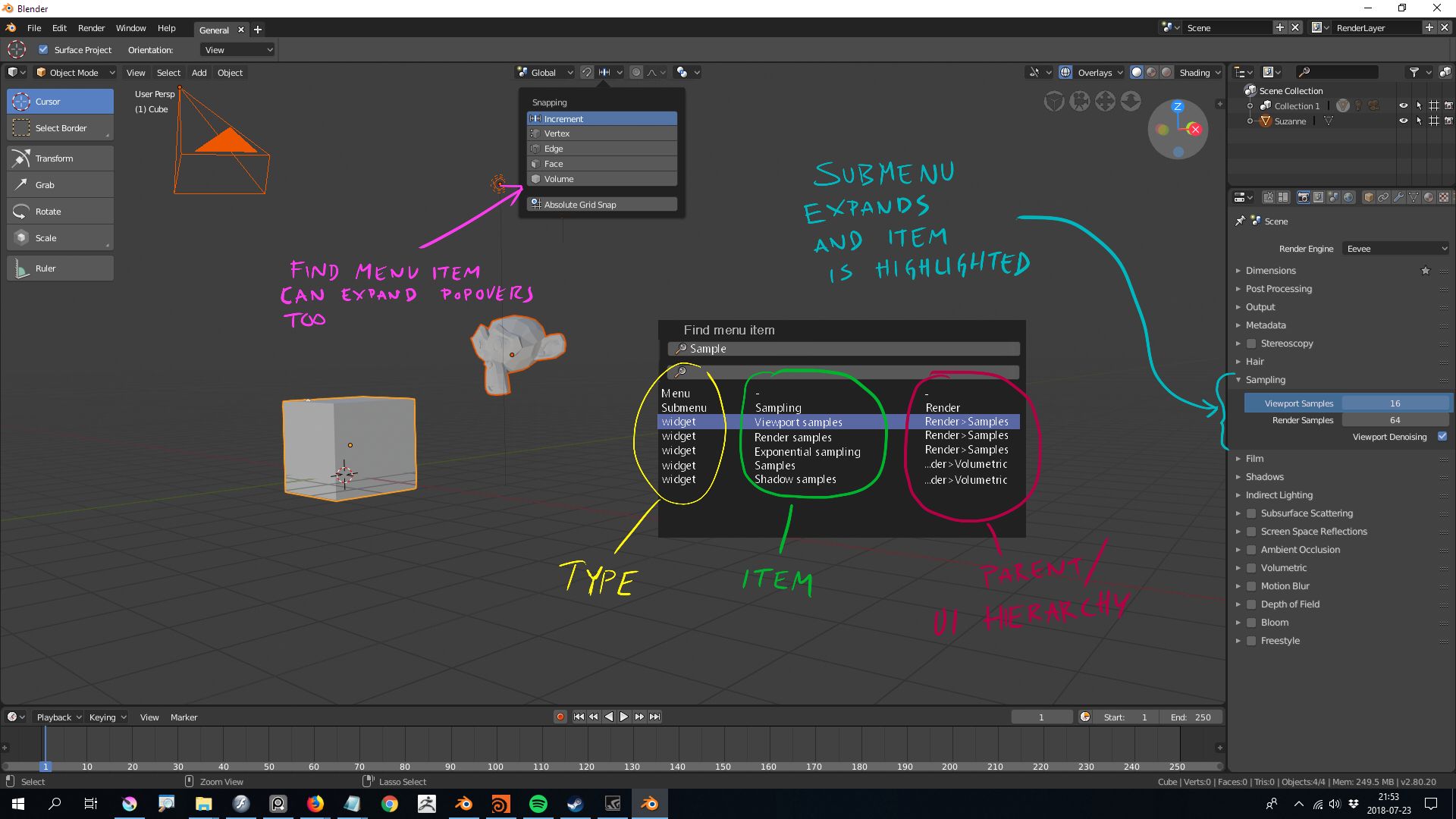
This idea is similair to the current "search operator". The goal is to enable users to discover things more easily in Blender 2.8. Both for new users and for old users that wonder where some items has been moved
When you press a button (F4?) a search menu bar comes up at the place of the mouse cursor. There is one text field for searching only the current editors menu items and one text field for searching all editors
If you write something it will list all menus, submenus and widgets (in that order) that fits the search term. For instance: subsurface scattering in Eevee has controls both in the render and material menu. It can be tricky for a user to find them without knowing where they are in advance. When the user selects an item in the search field, that menu/submenu/widget is shown by showing/expanding the proper menu and submenu. It would also be nice with some highlighting (green square or similar???) at the text of the displayed menu/submenu/widget.
If the menu item does not exist in any editor in the current workspace, change workspace where the menu item exists, if such a workspace currently exists.
If no workspace with the menu item exists, show a confirmation popup (Do you want to change editor in order to see the menu item? YES/NO). If the user chooses YES, change the current editor (where mouse is hovering) to the editor with the menu item.
0 Comments