
Depth in motion tracking
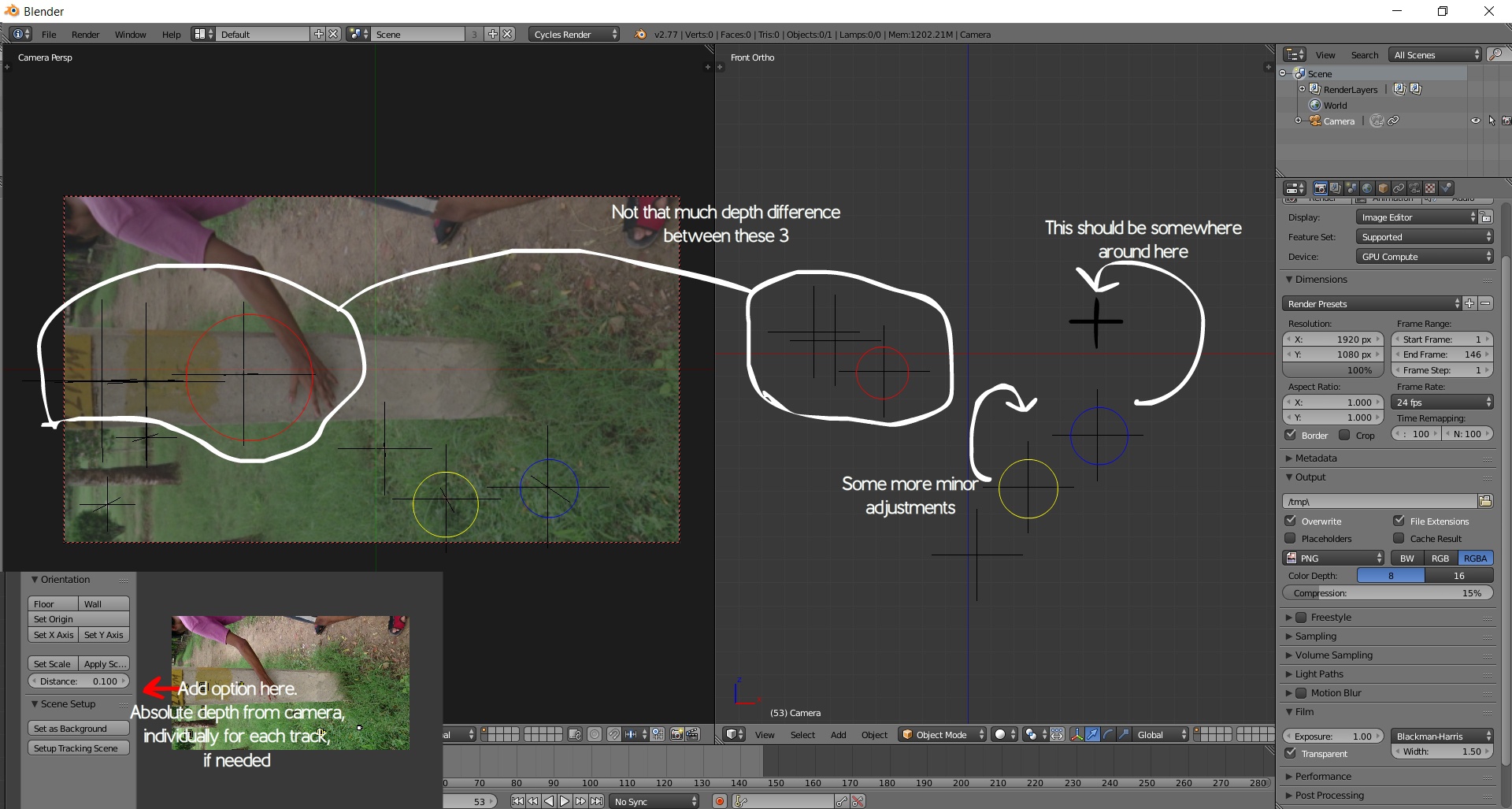
Currently, when we place trackers, blender automatically calculates their depth, and although it is really great, it is not perfect.There should be an option for each track to manually adjust what is its depth from camera, how deep it is in the scene.This would increase ease to place objects and ensure more realism in the final result of motion tracking.Again, I am saying, currently how blender does it is pretty great and works most of the time, but, many times i have faced problems due to these depth adjustments and would like if a manual option is also available. For those who have no problem, they can just ignore that option.
2 Comments
Sebastian König explains how to deal with these Problems and where they originate from in his [Track, Match, Blend! - 19 Object & Camera Track](youtube.com/watch) tutorial and maybe the following as well.
Motion tracking a shot means that the computer is reconstructing the scene based on movement information in the image. If the markers don't create accurate geometry its not the "solve" (or reconstruction) thats wrong it's your tracking or camera parameters that are incorrect or inaccurate. It makes no sense to push empties around if the camera is the wrong size or placed in the wrong position. I would argue for more robust reconstruction and perhaps integrating assisting tools, like the BLAM addon that can quickly infer camera info from parallel lines in an image.