
Stacked mode for curves in Graph Editor
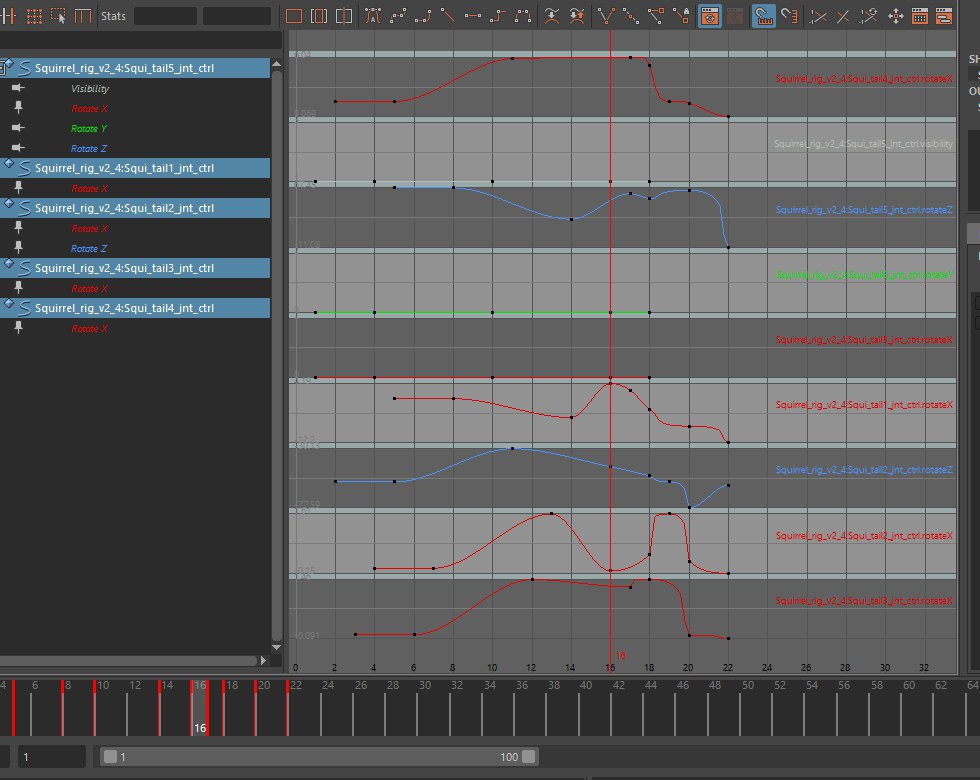
Stacked mode for Graph Editor (selected curves are placed one below the other). Update. Pictures in comments
-
This mode allow you to show and manage your F-curves more effectively in some cases
-
It allows you to see the “flow of energy” in your F-curves in a more comfortable way
-
It allows you to control you F-curves more precisely if you move handles of different curves at once when that f-curves are at the same place
16 Comments
A must have.
* @ Grady * It is in the design task list but there is no free developer to start doing it, so no one knows when its done
This mode allow you to show and manage your F-curves more effectively in some cases {attachment B3d_stacked_viewpng}
It allows you to see the “flow of energy” in your F-curves in a more comfortable way {attachment stacked2jpg}
It allows you to control you F-curves more precisely if you move handles of different curves at once when that f-curves are at the same place
P.S. How it is supposed to add pictures and gifs here?..
* @Stanislav Ovcharov *
Using direct links and markdown syntax:
There's a markdown cheatsheet link on the right when you write a message, just under the green
Sendbutton.This mode makes more sense to me than having all the curves piled into one display. It'd be a nice option to have :D
That looks amazing.
Aw man I never thought of that! +1 vote for adding it in Blender !
It's in development apparently, we just don't know when it will be done:
⚓ T71238 Graph Editor: Stacked mode for F-curves
Would be great to have this in Blender
+++
Let's implement this useful thing!)
Maybe I'm wrong but the curves are also normalized, right ?
@loic.dautry: I have forgotten it already, and my maya license is expired) But as I remember they are not in this example, just rotations
Well I don't know how they could take the same height in the graph if not normalized
@loic.dautry: I have no objection for normalize. Let it be normalized)
@loic.dautry: They should be normalized when you open it but should allow for zooming out in order for you to move handles.