Graph Editor: frame and value display instead of XY delta coordinates
Hi,
I'm just getting started with Blender, so maybe I'm missing something. I have 30 years experience in 3D, with deep knowledge of Maya, 3ds Max, and After Effects.
When I move a keyframe in the Blender Graph Editor, the Header goes away and I see some data displayed. This is disconcerting enough. I'm really not a fan of how Blender's UI constantly changes whenever I move anything. That is a UI fail, it's completely distracting.
If the Header is going to change to display some information, the least it can do is display something of practical value. But no. It displays the delta of the current transform, in mysterious units which I presume must be some kind of internal system units. Meanwhile, the key is actually snapping to whole frames, but by default, I'm not shown what frame that is.
I am aware that I can view the Active Keyframe values in the Sidebar, but that is an unnecessary level of clutter and distraction. The F-Curve tab is not sticky, it changes if I select or deselect keys. So basically the UI is in constant flux, actively grabbing my attention and trashing my concentration. This is a productivity disaster. Every other animation program I've ever used displays numerical values of selected keys in an unobtrusive manner.
From an animator's perspective, the important information is the current frame and current value of the parameter. Anything else is garbage data that not only doesn't help me, but actively blocks my comprehension of what I'm trying to do.
Please display the current frame number and current value under the cursor. The delta between the original key position and the current cursor location is useful, but only if it's in frames.
My suggestion is to get rid of this very distracting behavior of hiding the Header and displaying useless, unhelpful, distracting, meaningless numbers. Please display the current key's frame number and value in the Header at all times. Make those fields editable. This is essential for usability.
If you want serious industry adoption you are going to need to make this thing functional like a real workhorse. Strip down the clutter, strip down the distractions, show us what we need to see and nothing else.
Thank you
7 Comments
I just want editable fields for parameter value and frame number in the Header. Obviously the field can only display one value or frame number if multiple keys are selected. In other programs, the field is simply left blank in that case. But the user can still type in a value, sending all selected keys to a certain value or time. Frankly, this is basic functionality. The Sidebar is great for going in and dealing with tangent handle coordinates etc., but for 99.9% of applications it's a distracting waste of screen space.
* @aaron3 * Yes, though tbh I bet the BF will never agree to add editable fields in the headers, just for the sake of keeping their UI as is.
* @-L0Lock- * the Blender UI has many problems, and if the developers are unwilling to recognize them and make the necessary improvements, then Blender will never be able to compete with Maya et. al. All of the community support and enthusiasm is great, but it's of zero net worth to 3D professionals who need efficiency. We can't exactly tell our clients, "Sorry your project went over budget, it's the software's fault"
* @aaron3 * 3D professionals are also part of Blender community, some of them not only giving improvement suggestions, but contributing in different areas, even submitting code patches. IMHO, it's just the first impression, that developers are unwilling to recognize and make improvements . I see them working really hard to not only fixing bugs and implementing new features, but also trying to balance the needs of professionals and broader community. If you have good suggestions, I think they would be interested to talk to you on Devtalk channels.
P.S. Blender is Blender (having old traditions doing many things in it's own way), and not a clone of other software products . I doubt it will try to copy 100% of same tools available out there :)
* @aaron3 * BTW, I think your most wanted feature - to edit Graph control points just from area header - cold be implemented by a Python addon, not needing for C/C++ core devs to involve :) Tho it could be a problem to add those fields exactly where you would want (like in the middle of header), but at the end of it - it's possible to append new fields (I tested this with current frame change field).
Yes, that is exactly what you described. Though to be honest, I would not want to loose the delta informations either. I'd like to have an easy access to them too, but the good way. Named "frame" and "value", snapped when applicable, and somewhere visible.
In maya, the graph always shows the current frame and value on top, but displays the delta only for the frames and only in the timeline.
Blender has the delta in the wrong place and the true coords hidden away in a tab in the sidebar. This could (and IMHO should) be shown somewhere all the time.
The 3D view does this by showing an overlay on the 3d view, the graph should replicate this instead of replacing its header which is a NONSENSE.
The delta values could be displayed there too, just bellow the current frame/value.
{attachment mockup}
Hi and welcome :) I can understand your frustration, I felt the same way as a beginner. But it seems less weird, when you understand how it works.
One problem here is - what to show at the vertical value field when you select multiple control points of different unit types, like angle and length... The current Blender version seems to be showing it's internal unit for length and radians for angle (of the last selected - Active control point). As for key frame #, I think the unit is always a frame , even if it shows digits after the decimal point. Also, if you enter value on keyboard while dragging locked to horizontal direction , it will be in frames.
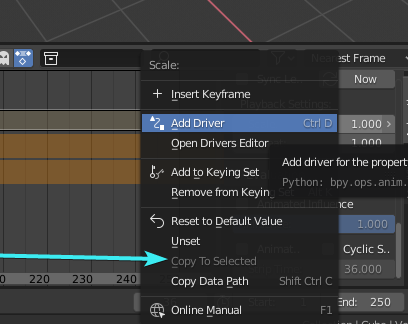
The sidebar (or N-panel , as it opens/closes when N-key is pressed) can also help if you need to set the same value for multiple selected control points. Just make sure to hold the Alt-key when clicking into the field to enter value (or while dragging the value slider). Also, you can press the RMB on the value and choose Copy Single to Selected (like in the following picture from similar menu), and it will set all selected points to the value of active point.
P.S. This doesn't seem to work when Box-selecting control points, so there's also a room for improvement :)