
Opposite Hue button Propose
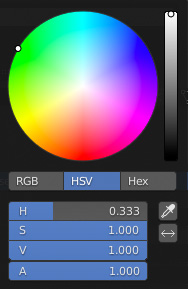
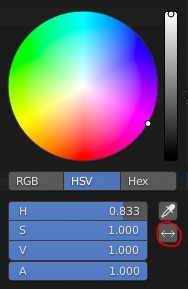
You could add a button to select the opposite color to the current color.
This is easy to calculate. It can be done with current_value%1 but it doesn't support module in the input float hue ui property, just support add and subtract operations.
Another way to go is: if the current value is less than 0.5, add to the current value 0.5 to the hue value, but if the current value is more or equal to 0.5, then we subtract 0.5 to the hue value.
With a simple button would be much simpler, here my mockup:
10 Comments
Of course, the modulo works. Just write there
(current_value+0.5)%1and it works as expected. But the one-click way to invert the color would be welcomed.* @WiresoulStudio * current_value%1 dont work. You dont need "+0.5" if you use the module.
"Opposite Color" is a little vague.
I think calling it "Opposite Hue" would be better.
It's close now, although I know my patch will never be accepted by my amateur code. But as a proof of concept I think it's understood.
My Small Progress in C:
If anyone who knows more wants to try, their help is welcome.
a small script for that if it helps you gets the value in the mean time you will have to put the color python data path though, so may not be so useful after all. but this one lets you get the opposite, thirds, or whatever number you desire:
hope it help a bit, bye
* @Jonatas Amaral * Yes, I also made a script for that, but the most useful and practical would be a button that includes blender by default.
* @Jonatas Amaral * In case you're interested in the script I was doing:
pastebin.com/ebrzwVyj
* @zebus3d * Eah, i was exactly going to ask that when reading the te msg up there, but it's already down here, so thank you for that.