
Save Render PNG with Glare
I have been trying to save renders in PNG (transparent background) with the node Glare on the compositor, but Blender doesn't save the Object with glare, just the object.
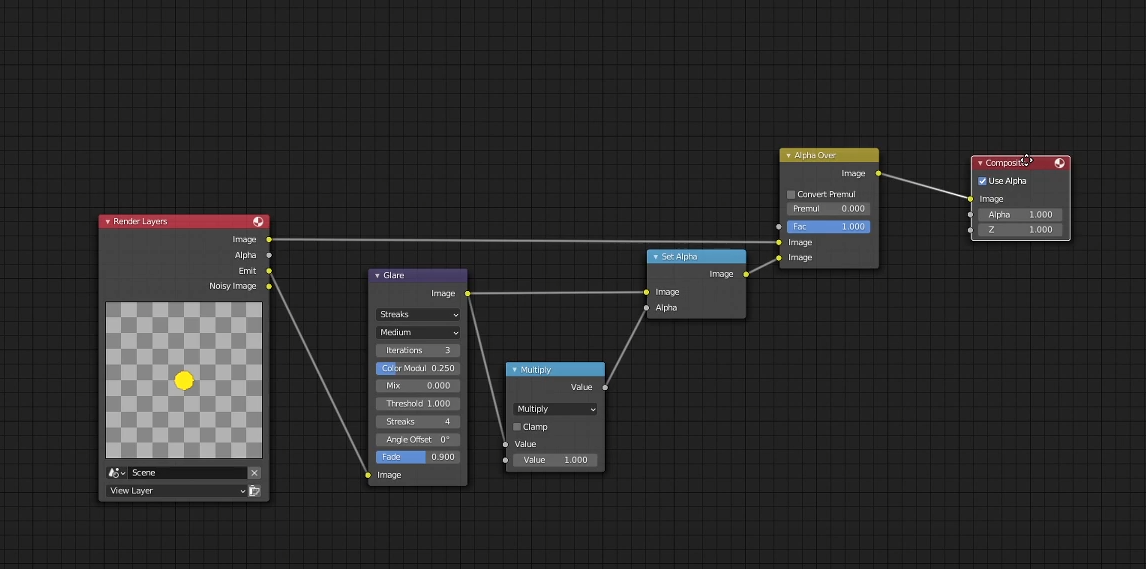
In order to make Blender save the Object with glare you have to add a Mix node set to Multiply and connected to a Set Alpha node
4 Comments
Look at me, I get to be troy_s today!
This is not only "not as easy as proposed" but is actually impossible due to how PNG encodes pixels.
In compositing light is not treated as something that should geometrically occlude other things — just like the real world! Because of this, glares and glows do not have an alpha associated with them as they are only made up of light and are composited atop other things with a plus operation.
Things that DO have an alpha are composited atop other things with an "over" operation where the alpha channel denotes how much the composited object should occlude the background. Properly encoded image files should write areas of the image that will geometrically occlude the background with an alpha channel and any purely emissive areas of the image without alpha but WITH RGB data. Pixels without alpha but with RGB data will be composited with a plus operation atop the background. In Blender I believe this would be referred to as an "alpha over" operation, in other software like Nuke it's just "over".
I say "properly encoded image files" because PNG is frustratingly NOT CAPABLE of doing this by design. The PNG format cannot encode images where RGB = 1 but A = 0. It is therefore not capable of doing what you ask and by using the method you have described above and assigning an alpha channel to pixels that should be purely emissive you are compositing your images incorrectly. Very sad! :(
In order to fix this problem you will need to save to an image format that supports proper compositing such as TIFF or EXR (the best choice). This is PNG's problem, not Blender's.
Sorry for the late reply, thank you for this information.
Although many users do want to export pure emissive colors into transparent PNGs. But it is not as easy as proposed by this request. The actual alpha and color that needs to be exported depends on the colors it would eventually be blend with.
In order to provide an user interface for this that is easily understood would be very complicated so there will always be artifacts.
Other issues is that this node setup will average the opacity of 3 color channels what would lead to artifacts when using none grey-scale pure emissive colors. This leads to incorrect exported colors.
If there was an easy solution this would already be done.
Hey, sorry for the late reply, thank your for the clarification.