
Quick favorites. PANELS.
Some tasks in blender would be far more pleasant if you could just go full screen on the 3D view and only have those few panels from the properties editor that you need for the task. For example, you could sculpt in full screen, but still have access to the multiresolution modifier. Imagine that.
And I have an idea on how to achieve this. Blender 2.8 has this great new feature "Quick favorites" and it's pure gold. Imagine if we had something similar for panels, that normally would be found in the properties editor?
But where, on the 3D view would we place it?
Well, the N shelf is the perfect place.
First of all, the N shelf is just a group of panels that already logically belong somewhere else.
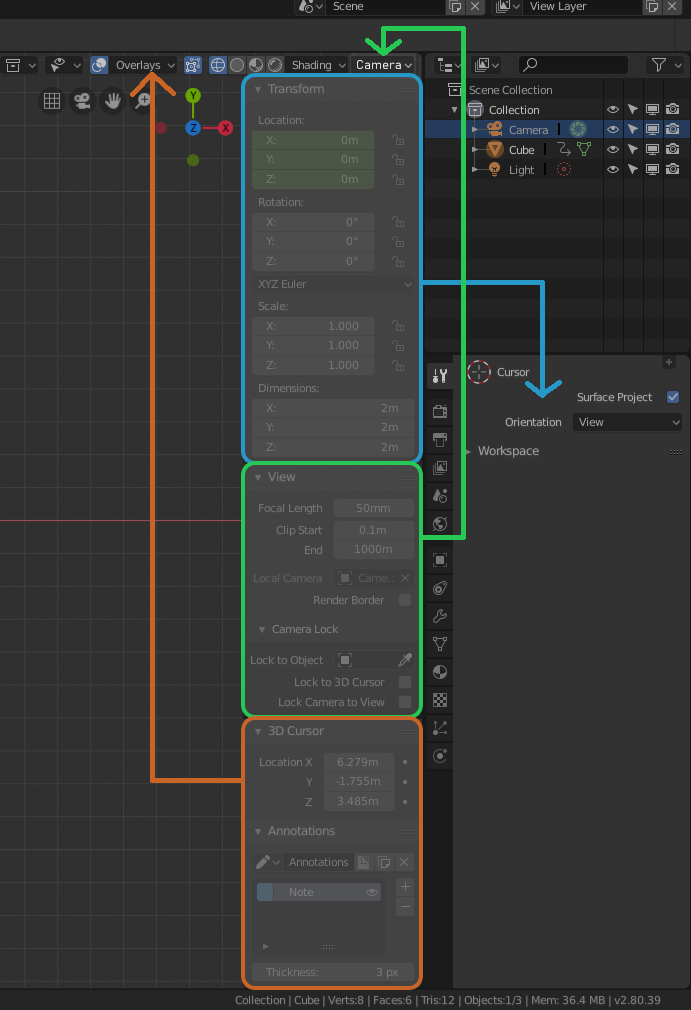
Look:
Transform (blue) already is in the properties editor, no need for duplicates. Viewport camera properties (green) should be reached in a similar way that viewport shading is. 3D cursor and annotations (orange) are, in fact, overlays.
This leaves us with an empty N shelf on the 3D view. Now it can be fully dedicated for favorite panels. With favorite panels, you can bring the "transform" panel back into it.
Would also be nice to have presets, you can create and switch, in the favorite panel shelf. These would also work with Workspace layout tab selection.
Either this, or even better: N Shelf should be Tool properties.
Get rid of the top bar for tool properties, get rid of tool properties tab in the properties editor. All problems solved.
5 Comments
Full screened Blender of my dream.
@forestgumpovu4: I think that making the properties editor a part of the 3D view totally makes sense, as it only has to do with properties of stuff in the 3D view (Except for that inconsistent Tool properties of all editors piece). However, that's a bit problematic, as that greatly reduces the flexibility of the GUI. For example, where do you place the Outliner now? As a whole column on the right? Yeah, not cool.
This, plus this ( blender.community/c/rightclickselect/CHbbbc/ ) would be perfect! Blender would cover everyone's need: you could work fullscreen, or you can either hide sidebar or topbar and still don't loose any bit of functionality in the program
Bahahaha ... so your post is about " I don't like to use Topbar, I don't like to hold Properties on screen all the time, I like to work full screened, let me use it same way it work in 2.79 - Tool Properties in transparent panel as part of 3D window ( N panel in your case) " ...
And this panel was better because it is quick to show/hide it by one key, because you can scale it, because it was part of 3D window, because it can be transparent and don't block view. Because of REASONS.
I fight for it on Devtalks for long time - no one care. So just nevermind.
No one give f*k about your full screen experience, BOI.
Use Top Bar & popups, hold Properties always ON....
And yes. N panel transforms & Properties transforms is not the same. First element transform, second object.
@forestgumpovu4: That's the thing: I know the difference between this transform and object transform. However, I believe blender is trying to and should be context sensitive. So, if you have an object selected, then it's object transform. If you have an element of an object selected, then it's an element transform. If you have multiple objects selected, it has to be the transform of multiple objects. A little bit in that direction: blender.community/c/rightclickselect/61cbbc/multiple-object-properties