
Show Active in Outliner Should Show the Actual Active Object's Name
Sometimes, I have a lot of objects in my Blend file. Sometimes, I wanna hide an object, as well as disable in viewport and render i.e. press these buttons:

So, I hover my mouse over the Outliner and press numpad period to show active. But instead of taking me to the object's name, it takes me to the greyed out version of that name. You know, the one without the buttons for hide/disable in viewport/render:
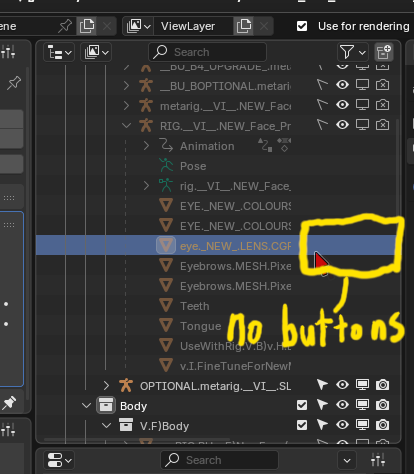
Please take me to the real object's name with the buttons. P.s. right-clicking one of those buttons and giving it h as a shortcut doesn't do anything.
3 Comments
yes i agree. this happens when the object O1 is a child of an object O2. O1 is in a collection C1 but O2 is in another collection C2. the outliner finds the row where it is listed as child of O2 in C2 first, and focuses this one. there, O1 is listed as a child but it is grey because it is not in the same collection and has no buttons. the outliner should instead continue searching, and find the row where it is directly in the collection C1 (where the buttons are available and it is not greyed out).
projects.blender.org/blender/blender/pulls/151604
And now it has been merged!