
Nodes split sockets - like Unreal Blueprint split pins functionality
Hi ! I just thought that it would really simplify node trees if we could split pins, for example :
There is no way to control the individual X or Y values of scale other than add another node previously which adds a lot of nodes in-fine and make the node trees heavy
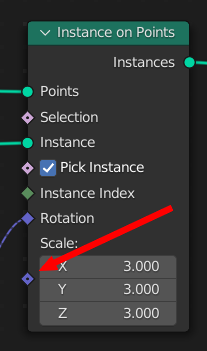
What would be great would be to have a "right-click on the pin" > "split pin" functionality to produce this result :
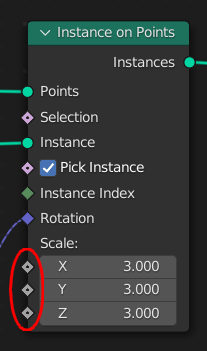
Note : The operation should be reversible, meaning after a split, we should be able to right-click the sockets and do a "recombine" so that it goes back to it's original grouped state.
As an example, it is very practical in Unreal Blueprint visual scripting system :
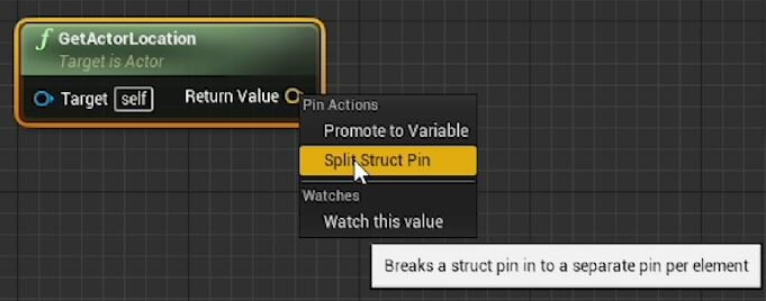
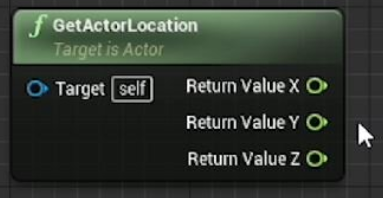
Animation showcasing both split & recombine : imgur.com/AfgTxx3
Please help me give this suggestion visibility, and thanks a lot for your time.
10 Comments
projects.blender.org/blender/blender/issues/105491
This is basically the improved version of blender.community/c/rightclickselect/WQ8Q , no?
I was sure this was already proposed sometime back. Glad it is now. To be complete and better understood by people who don't know how this work, the proposal should show the reverse operator, the collapse/recombine pins.
Indeed thanks for the input ! I'll add it
You break the logic of the concept of a vector and its seralization
I agree, the color should change to gray (as it is only 3 float and not a tuple anymore)
But the idea of using a combine/separate directly in the node (without adding extra node) could still be a good idea in my opinion.
Yes, it's a simple thing I miss from other softwares. Blender forces the user to manually add a pair of separate/combine nodes for everything while, really, it could be just a simple display option in every socket that carries channels.
Thanks for the precision, I'm editing the image to better reflect this.
Indeed the idea still would allow a great simplification of the node trees, as it also apply to a lot of nodes/sockets, not just this one
Can your idea solve the problem of choosing how an arbitrary type should be converted to a vector? or how to choose a color scheme for a color? Do you want more buttons on the nodes? Everybody wants to concatenate vectors into 1 matrix and you are talking about separating components
What arbitrary types are you talking about which aren't component X floats? The color is quite simple = right color when it a vector, grey when the inputs/outputs are floats. Other software do it since centuries and it's accelerating the users work for good.