
DECIMATE MODIFIER: showing reduced info in %
I think that knowing of the Percentage would even more helpful info for mostly beginners , than simple amount of Count.
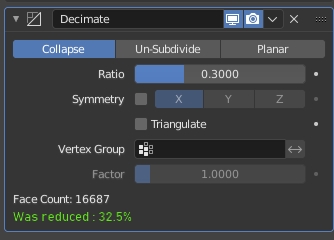
I think that knowing of the Percentage would even more helpful info for mostly beginners , than simple amount of Count.
11 Comments
isn't that what "ratio" is? i find it hard to believe that a beginner would care if the 'actual' reduction result was the 30% they requested or 32%
Hm... you know.. I feel that probably no, because there are all different names of this sliders, for each approach (collapse/un-subdivide/planar). So like it's non general thing as I see.
It should be useful for example in case when you need to compare how much it was reducde mesh (between approaches or at general, without no need so precise accuracy) how much it was compressed (and you no need to turn it on and off modificator or going to the statistic tab and comparising two different counts of dots/faces) especially if mesh is heavy (or PC is low) turning on/off midificator is going slow(when it updating mesh).
So.. I've literally described this situation from own experience as blender beginner :D
And yes, you right that for beginners it's not important difference in 2%. But when they can easy see that visually between 10 and 20% not too much difference (when theylooking at viewport at same time and choosing method and tweaking sliders).. it's much more easier to choose those one that not so heavy for scene.
Why not just read out the the facecount before/after decimation. And btw. a way to suspend the calc in case the mesh was too big was nice.
You mind effect result as value? Then should be in log info about.
version: 3.0.0 Alpha, branch: master, commit date: 2021-09-18 19:45, hash: I don't know how it possible, but I have checked it with factory settnigs (from inside/ as from manual settings folders too, by deleting it) And in v2.8 I watch it same. I even downloaded just right now fresh 3.0-alpha and there are no difference.
rBbdbc7e12a02e—The point to be able fast and easy understood between this three approaches their reducing possibilities and without no need to going to statistics and turning on/off modificator
Just changed Factor display type .
And i still dont know what the problem and why people upvote this.
"0.3" is literally the same exact thing as "30%", everyone should know that it was in primary school.
I think the goal here is to get a more understandable readout of the end result (the number of faces as a proportion of the original mesh), not a change to the way that the reduction ratio that you're inputting is displayed. Three reasons why this could be useful:
To @zuorion - Oh, thanks. I even didn't know about ability to change this settings. Should try it now. But I still think that it don't give ability to compare between methods/approaches of Decimate modif. That was described as second reson by @desksonmars. Probably that's why they still upvote. And probably begginers as I am don't know about this trick inside settings too. And by default it shows as Factor. Probably this too add some votes.
Please use this code to insert pictures in your messages:
That feature motivation should be in original proposal and not just "add percentages" with screenshot of percentages.