
Add "blending" functionality to pose library
Currently when you use a pose from the pose library, it completely overwrites whatever pose is set. It would be super useful if animators could gradually dial in a library pose over the top of what's already there, similar to how we can use the breakdowner between keyframes at the moment. The ability to blend instead of overwrite would make the pose library much more versatile with respect to animation tasks like lipsync and facial expressions - tasks where speed, fluidness and precision are valuable.
It would add even greater versatility if animators could dial in multiple poses simultaneously using the X and Y position of the mouse cursor. mouse(x=0,y=0) would be the original keys, mouse(x=0,y=positive) dials in one pose, mouse(x=positive,y=0) dials in another pose, mouse(x=positive,y=positive) dials in both. The negative direction could be used for fading in another pose (something complementary to whatever's in the positive direction, e.g. smile vs frown), nothing at all (for safety), or even a "negative" version of a pose.
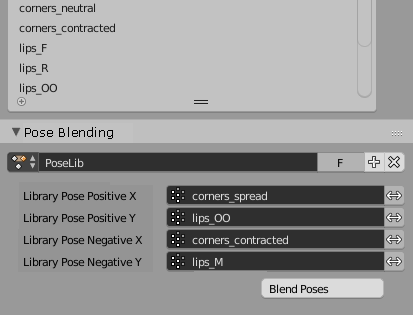
The interface could sit in a sub-panel of the pose library. It might look something like this, where the <-> toggle stands for "negative", as per UI convention.

To start blending poses, the animator might hit the Blend Poses button or a hotkey, then move the mouse to blend between the current pose and the chosen library poses.
This "pose blending space" would mean an even greater leap in versatility for Blender's pose library. I can see this kind of feature being popular for repetetive tasks like facial animation and lipsync, especially in quick turnaround where animators might be given a set of library poses to work from - such animators can achieve that "90% done" point much more rapidly than with hard poses.
6 Comments
This is an interesting idea - in fact, I've contemplated similar ideas in the past too. Perhaps the main issue I see with this is whether the need for setting up the poses used for the tool ends up being too much effort for most animators to bother using this in practice?
Anyway, it's a step in the right direction, towards having things more viewport based.
@Joshua Leung: True. For the Pose Blending mode you're looking at a bit more setup, which is a good case for presets. And you wouldn't have to fill all the boxes either - just as many as you want, e.g. if you want to blend along X without using Y direction, that's fine.
You're right that the Pose Blending setup is much more powerful than what an animator might require for most given tasks. It can and should come in a simpler version too.
For instance, what about a "Blend Pose" function which sits beneath "Apply Pose" in the UI? You'd use it exactly how you use "Apply Pose" (select the bones in the viewport, highlight the pose and click) except once it's activated, it goes into a modal behaviour which uses the mouse position to control how fully the library pose is applied. Still useful, I think!
Thanks for replying! Really appreciate your contribution to the Code Quest too! :)
@S J Bennett: Sure, that is one way of going about it. Another variant I've been keen to experiment with is allowing you "paint" poses from a pose library onto your character (using Pose Sculpting brushes). In fact, something like this would probably work really well with the active tool system.... Thinking about this more, we could even combine both of these ideas (e.g. have a widget in the viewport to configure the blend between multiple poses, and then you can selectively paint it onto the rig even) :)
@Joshua Leung: Ahh I remember pose sculpting! That looked really cool!
Painting a library pose onto the rig also sounds super useful, especially with more bone-heavy armatures where the number of bones makes changing each of them individually really finicky. And as you say, definitely a candidate for the active tool system now that we have it! It would still be good to have each tool in isolation (pose blend for all affected bones vs pose painting for more intuitive control).
Can pose lib store partial poses as well, such as hand spread, hand close, hand fist ?. Its one of the few futures i never used so far. If it can then your proposal would be great Currently i miss a system for hand posing in Blender
With a combination of Action Constraints and taking that info from those types of constraints. It could be doable. This tool would be handy to have!
The only thing that I would say.. How would you go about deleting/adding frames or bone influences inside the UI?