
Proposal regarding Shortcuts, Menus, and the Shortcut Editor
Intro
Do not fear, this is not about the actual shortcuts themselves, but about editing them, their limitations, and related things like menus.
I am a shortcut aficionado. I do everything with shortcuts. Every program I use I completely redo all the key mappings. Becuase of this I
don't
care what keymap changes they make to 2.8 and I'm very happy about many of the changes in 2.8 in terms of the UI and how it's trying to be less dependent on shortcuts and clearer visually BUT although Blender is a program designed to be used with shortcuts, it is only really designed with ITS shortcut mappings in mind (nothing shows this better than the
view3d.viewnumpad
command imo).
I remember to arrange everything in a custom way took me almost two weeks (most programs take me a day or two). This is insane. I can't be the only one. So in a way I get why people nag about changes to the default keymap, who wants to wrestle with the shortcuts editor?
I have considered attempting to write an addon or messing with the python layout source code of the shortcut editor to solve some of the problems, but I feel like that would just be putting a band-aid on a larger problem that touches many deeper parts of the source code.
Problems
In short some of the problems with shortcuts are:
- There is no base keymap with just the basics (I'm talking like mouse + important modals + harcoded shortcuts, that's it), which wouldn't be a problem in and of itself, except the keymap import/export is not a full export but a keymap delta. It's also confusing how restoring/delete works imo. I have heard mention having a smaller preset available, but until then, this is still a problem.
- There are bugs with the import/export that make editing it directly a pain and prevent sharing of completely custom keymaps.
-
Custom modifiers do not work well (e.g.
Capslock + something, I have to use autohotkey to capture them then send an obscure combination likeCtrl+Shift+Alt+key). - There is no way to reorder the shortcuts (except to export -> reorder -> import, but see #2).
- No easy way to know what commands are available.
-
No easy way to tell from a list what a shortcut is actually to (because the command might be
wm.context_toggle, etc, or you might have multiple addons with different settings likeView Numbpadand you don't know which is top/bottom/etc) - Addons plan around the default keymap, which okay, whatever, BUT there's no way to handle conflicts. I have addons that I've had to edit the code manually so they stop messing with my shortcuts. Nevermind addons have free reign to do with the UI what the please (...but that's another subject altogether).
- Sometimes when you're creating a shortcut, duplicates are merged when that wasn't what you intended.
- In the UI not all buttons tell you what the command should be to get a shortcut to it.
- Not all buttons (especially menus) have the option to add a keyboard shortcut. And when you do add a shortcut this way, it usually doesn't end up where you expect because it doesn't prompt for a context.
- No way to create custom menus (whether pie menus or regular ones) without coding.
- There are wm.context_cycle/enum commands <strike>but I have yet to understand how to use them to cycle through anything.</strike> Ok, I figured it out finally, at least the enums, but it's very confusing.
- Normal menus have what I consider a really weird way to access their sub commands. Because, I assume, they are just called as if they were opened from the actual menu-bar they all have that system where a letter of each command is highlighted (like when you press alt in other programs to navigate the menus). Does anybody actually use this? What would be far more sensible is being able to call them by the sub-command's shortcut if it exists, but this is not possible.
- Some shortcuts are hard-coded. They are few, but they exist. (new edit)
- There is no real global context. Many commands are area specific, there is no way to change a similar command for all areas (commands like view all, the commands that open the properties panels, etc). Also putting commands into the window context does not always work if I remember correctly (I can't find an example now but I'm sure I've had this happen, though it might have been because of a conflict). (new edit)
Specific to 2.8:
- User preferences can no longer be opened as an area, only a window? Nooooooo. Although there was the problem before where you couldn't have two areas open to different tabs, so... I don't know how to feel about this.
-
Minor, but there is no hint that the quick favorites can be accessed with the numbers (
Q 1,Q 2, etc).
Proposal
Shortcuts/Shortcut Chaining
If I could have one thing it would be proper shortcut chaining. Alternatively I would also settle for the ability to make menus like the new space bar type, or multiple quick favorites because they can act kind of like chains.
In fact I thought the new space shortcut menu was a chain, but it isn't really. It's great in that unlike normal menus it handles the shortcuts of it's sub-commands properly, but now I've tried it I realize it's not real chaining, it looks like it's calling a menu that can then handle the already set shortcuts? But I guess this is better than nothing if we could make these menus more easily and/or all menus could handle their commands like this.
Alternatively the new quick favorites is interesting in that it allows something like chaining, you can press
Q 1
,
Q 2
, etc, like I mentioned, so if we could have multiples of these, that would be an okay substitute as well.
Custom Menus
Either way it needs to be easier to make custom menus, whether favorites, regular, pie menus, the new space menu type, etc. It's just a pain to have to code a custom menu.
There should be an "Add Command to Custom Menu" option that would prompt you to which menu to add it or to make a new one (kind of like collections)
Shorcut Editor
The shortcut editor needs a complete redesign imo. The golden standard for me in terms of shortcut editors is Adobe Premiere's which has a visual representation of the keyboard (though it's still lacking drag and drop). But being in the process of making one myself, albeit for the web, so I know asking for that is insane .
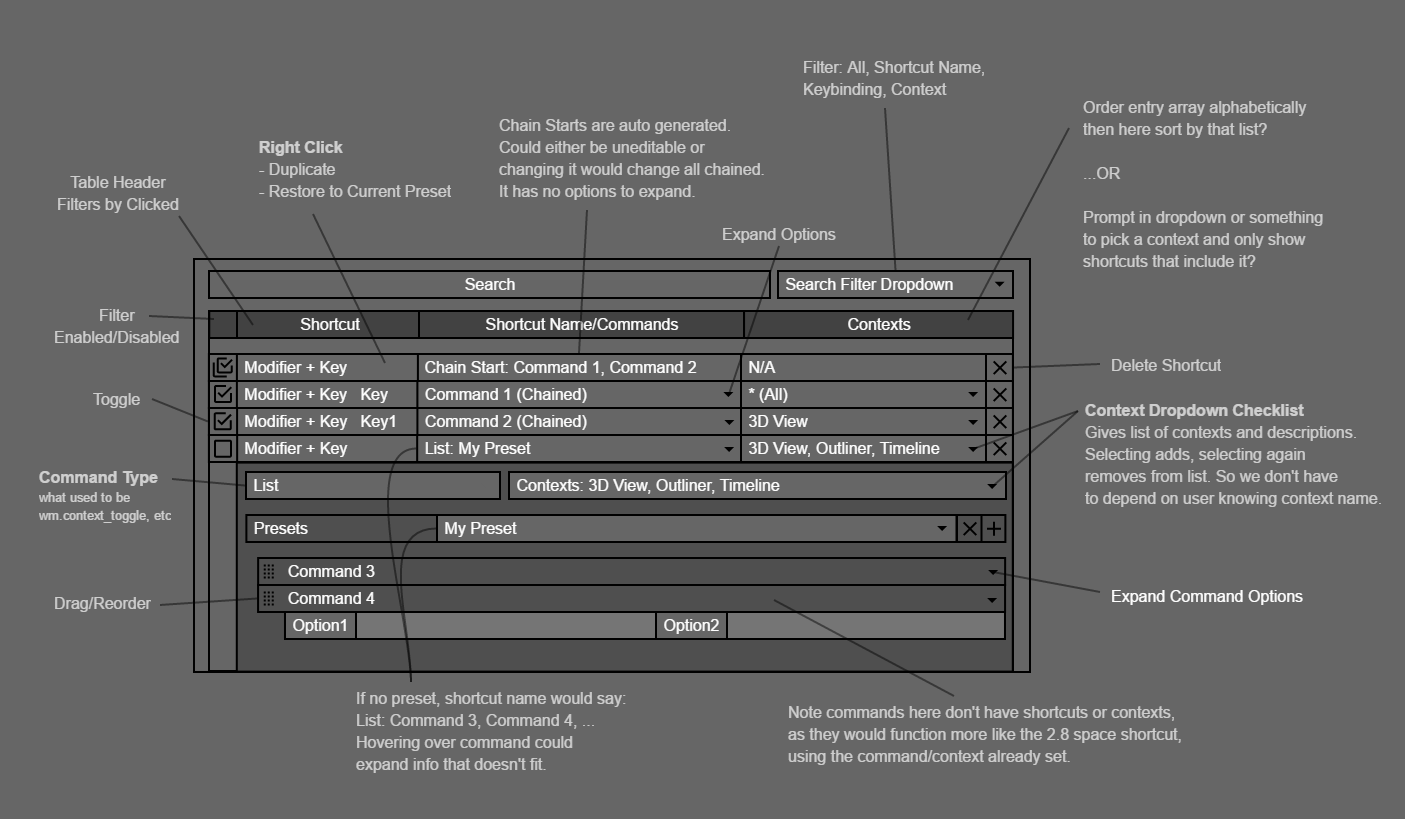
A better list will do. For me the following would be ideal. I have made a quick mock up to illustrate how it might be handled.

- There would be an option to search everything (command, shortcut, context, etc). It's really annoying having to switch between search types.
-
An entry would have a context/contexts instead of contexts containing the entry. This would help trim things down immensely and keep things more consistent.
- If the current way is kept, then at the very least it should be possible to reorder shortcuts.
- Preferably though the entire list would be sorteable by name, shortcut, shortcut type, or context, then no reordering has to be implemented at all.
-
In general the editor needs to be more abstract while maintaining functionality.
- If possible, there should only be a global version of commands (see problem #15) that exist across multiple contexts (which could be set differently per context if needed). (new edit)
-
The editor would abstract away enumerations and toggles. Shortcuts would have a "type": regular, toggle, list/menu, cycle. Blender would handle the how behind the scenes. When you pick one, for example, list which would be the most complex, it would show you the option to add a command or add a menu as a list of commands. They would be re-orderable preferably and save-able as presets. Changing the type to cycle would just cycle through the ones that can be cycled through.
- Also if proper shortcut chaining is ever implemented, it would be nice if a menu was automatically created for chains with the same starting base.
- What is the RNA field even for? It's always disabled, is it ever enabled? If not it should be hidden or in a tooltip.
-
In a collapsed list, entries that lead to menus/chains would show as many commands as possible, e.g.
CommandType | Command 1, Command 2, Command 3, ....ORCommandType | User Menu Preset NameOR make it a resizeable table. -
Sometimes a command's name doesn't really tell you much about the command (e.g.
view3d.viewnumpadagain), in which case I feel the command should specify a default property or function/template that does contain the human readable version, e.g.Text [Property Name]=View [View]=View Top,View Bottometc. - I know there is not a definite list of commands you can have because addons might add new ones, but can blender really not scan for available commands? At the very least something like the python console autocomplete would really help. Or even just hints as to where you should look to fill in a property. It's very confusing and I've written some addons and am semi-familiar with the python api, I can't imagine how it is for beginners.
Other
- I don't know exactly how shortcuts are handled internally, but I think addons should have a more automatic way to register commands. No leaving it up to the addon to register/unregister shortcuts for it's commands. Users should be able to override any addon shortcuts. They should even be able to disallow changing the shortcuts completely. In general I think addons should request permissions to things like shortcuts and changing the UI (where they're put specifically), but that's more of a separate issue.
- In general the bugs I mentioned need to be fixed to make the shortcut editor work smoothly. And if things aren't meant to work (Capslock as a modifier), they shouldn't be allowed.
- Shortcuts should not be hard-coded. And to add to that, I would not hard-code things like the new space menu either (I'm not 100% sure because I haven't checked and 2.8 is not done, but at the moment it looks hard-coded). Please tell me we will be able to create these, at least with code.
Why?
- ===> I think many people would care less about changes to the default keymap if they could more easily customize them. <===
- This would shrink the amount of shortcuts to keep track of.
- Custom menus would be a huge productivity boost and help reduce complexity of keymaps.
-
Chaining (or the alternatives I covered) would reduce the complexity even more. Real chaining though allows the grouping of common commands and allows many more shortcuts to fit in a smaller more comfortable area. And no more uncomfortable reaching for 2+ modifiers and a key. In fact, it would be easy have your hand in the middle of the keyboard with more keys in reach, and not use modifiers almost at all.
- Examples:
- Take the new collections where you can 1-10 them. When those aren't enough, instead of trying to add a Modifier + key shortcut for more, which can be hard to press sometimes. You could pick a key, say, a, to be the chain start and add a whole other layer of single key shortcuts (a a, a 1, a 2, a 3, and so on for the * entire * keyboard if you want).
- This would also help in instances where the menu is used in more than one mode. Take the default i key for insert keyframe, or the shortcut to add an object. You could then chain it for all it's menu items (i i, i 1, i 2, i 3, etc) without overriding any other shorcuts or cluttering anything.
-
You can create artificial contexts. For example
Ctrl + Sas a chain start, thenCtrl + S Ssaves,Ctrl + S Ais save as,Ctrl + S Dcould be import and so on with all saving related shortcuts. Not saying this should be the default, only using it as an example.
14 Comments
I'm fully for you. I'm not sure your editor is very friendly, it's still an intermettent programmer friendly system - but not artist friendly. I created a new proposal with a system I've loved to use for editing hotkeys in another software, Softimage. Check it out! But the system solves most of your issues.
Thread
@ondraise15: As I mentioned, for me the golden standard is Adobe Premiere's editor, which also has a visual keyboard. Don't know if you've seen it. It's far from perfect though, the actual adding of shortcuts is not exactly intuitive. Never tried softimage so didn't know it had this, but it does look a lot better functionally speaking, especially the active shortcut highlighting.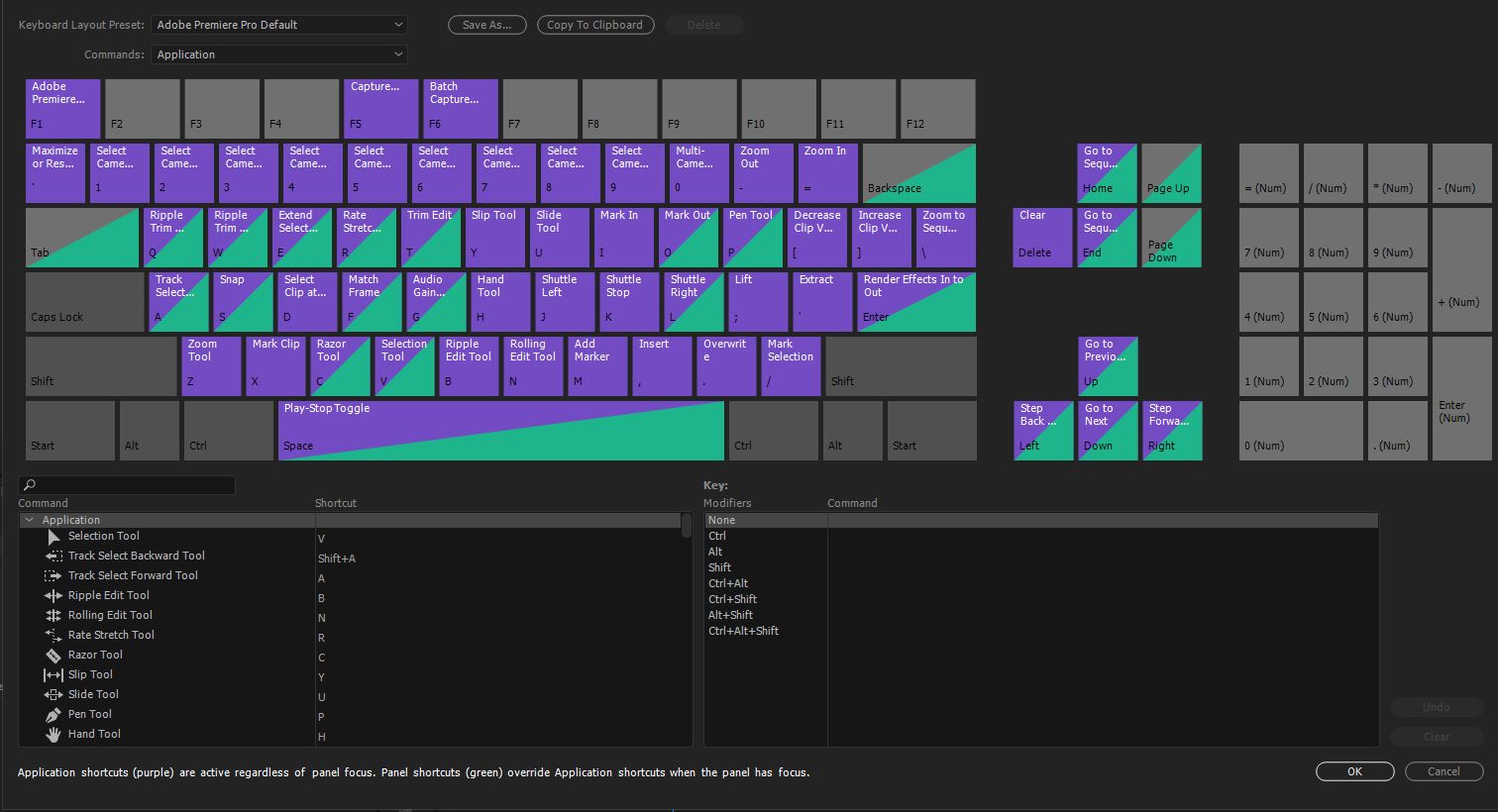 BUT I realize this is A LOT to ask. As I mentioned I am in the process of coding my own general "
shortcut-visualizer
" as I call it for organizing the shortcuts of multiple programs. The keys are in "toggle" mode by default, so you don't have to keep pressing the keys, which then means the commands can be dragged, and things like adding a shortcut can be made dependent on the active state. Here's a demo gif. At some point it will get a "command bin/list" of existing shortcuts as well and mouse shortcuts.
BUT I realize this is A LOT to ask. As I mentioned I am in the process of coding my own general "
shortcut-visualizer
" as I call it for organizing the shortcuts of multiple programs. The keys are in "toggle" mode by default, so you don't have to keep pressing the keys, which then means the commands can be dragged, and things like adding a shortcut can be made dependent on the active state. Here's a demo gif. At some point it will get a "command bin/list" of existing shortcuts as well and mouse shortcuts.
 But just to handle the input, the chaining, and the suggestions requires a lot of code and the dragging complicates things even further. It is a minefield of edge cases.
That's why I proposed an intermediate step, a better shortcut list, which, you need the list anyways even if you want to have the keyboard visualization someday. I tried to propose something that didn't require too many internal changes though, but this also means of course it's not as user friendly as it could be. The more I think about it though, the more it becomes apparent that Blender needs to be able to provide a set list of commands, somehow. Something like python autocomplete would satisfy me, but it's true, it will fall short for beginners.
I will work on a mock-up for doing it with a set list of commands. Was there anything in particular though about the list by itself that you found not as beginner friendly? Is it the incorporating of the menu options? That could be separated. Or just the fact we don't have any commands to pick from?
@alansartlog: Holy cow. You are already halfway there. If this could write the Input python maps for blender with correct syntax, you wouldn't need to include this into the Blender source or UI, and just have it as an "addon" or third party software. I see some drag and drop systems working already, you would only need to show what keys are available/taken and/or have a full operator list to use to drag/drop onto keys to be similar to the Softimage proposal. The context/view system also needs improving, but I am happy you already have "Global/Local".
What is this coded in?
@alansartlog: Just to say, in the other proposal, the idea is select and the key highlights, you can also select a modifier and it sticks on.
@ondraise15:
It's actually a bit farther ahead than the gif, I haven't had time to update it. The active keys now glow and stuff. But it's also riddled with bugs at the moment. It's really pre-pre-pre-alpha.
Unfortunately this cannot just be plugged into blender (even if it were written in python, it's not so easy). This is written in javascript btw, using the Vue framework. It's really just a Vue component for now. The plan is to then build two separate demos, one for developers, and an actual site where people can just go and start creating/importing/exporting keymaps (which is why it was done in javascript). They would not be directly exportable to any programs, but I plan to write parsers for at least some of the programs I use (e.g. VS Code uses a json format that is pretty similar, that will probably be my first). Unfortunately probably not blender any time soon (because many of it's commands have a bunch of sub-options needed), but I will still be planning my blender shortcuts with it once it's usable.
As I mentioned in the proposal I did think about making a blender add-on to do some of the things in this proposal but they would be very hard to do without internal changes (which I don't know how to do). For example, there is no way to know in what contexts an operator will work. The solution seems to be to brute force it by polling which is just ugly, probably also a big performance hit. The results would have to be cached somehow to avoid that. As for an actual keyboard, I'm not sure it's even possible to draw the custom interface that's needed.
@alansartlog: The way Blender maps out context is by tagging groups to a space_type and region_type.
So you have a keyset for a particular area defined by KM, then the KMI is the keymap with operator, etc.
Wish I had a few bucks spare, I would invest in a Keymap editor then leave it opensource if I could. Your concept to have it online is interesting.
@ondraise15: That's how you * assign * shortcuts a context. But you can place a shortcut in a different context and depending on the operator it might still work, or it might not work for no understandable reason (e.g. you would assume
Windowis like a global scope, but if I remember correctly it isn't). Their is no way to check the operators for which contexts they work in except polling. Just as there is no conflict checking. And for example, here's another problem, if anything can be a modifier, how the hell do you handle displaying that? That would need to be disallowed internally. I could go on. I mean the add-on could disallow it but the moment someone edits their keymap traditionally, you would then have to handle those conflicts.You would always be fighting Blender. I shudder at the thought of the workarounds that would be needed, it would be like trying to patch a leaking boat. I doubt anybody would want to attempt it (as an add-on) the way things are setup now. I certainly am not going to, and now I'm working on my more generalized one, I'm probably not going to.
I do plan to open source my project btw, at least, the component. And if anybody wants to help with it's development, or pay for a feature, I would make time to work on it (once it gets passed beta). It's more than possible to make it work with Blender (actually easier than within Blender!), it's just not my priority. To be able to export to it btw, the following would be needed apart from the todos to get passed beta: parser/export/import options, command bin/list w search, mouse visualization, per command options handling (this will take time), and a seperate python script needs to be made to extract the possible commands from Blender (minus any add-ons) and feed them to the program (that would also take some time). Since the script is a one-time thing though (per Blender version), contexts could be polled for. It might even be possible to extract what options command's take and I'm not 100% sure but maybe a list of possible options.There is an import/export bug, but it could be worked around. Like I said, it would actually be easier since we don't have to interact with Blender, and things like conflict checking would just work (once I squash all the bugs...).
@alansartlog: Please make this a thing. How hard to implement?
@daviddomingues811: In Blender? LIke I said I'm not going to even attempt it.
If you mean my separate project, I want to eventually do it and have it work with blender, but first I've got to get the minimum amount of features working. You can check/watch the github repo for my process. I am doing this in my spare time though so it's going to take a while. Just to get to this point has taken me an entire year. I expect another month or so and it should be usable, then probably another year to write all the tests to check it actually works, at which point I can start adding more features. I wish I could avoid the tests but it's very easy for functionality to regress. You fix one thing, three others break.
At some point while writing tests it will seem functional enough and I will make a demo site with just raw import/export, no parsers yet or command lists or anything, so don't expect too much, but @ondraise12 and @daviddomingues811, if you want, I can send you a message when it's up.
* @alansartlog * Is the project abandoned? Looked awesome. I wonder now with so much more focus in UI/UX could get development.
I spent a couple of months rebuilding 4000 lines of code and checking for conflicts in Python because it was easier than the current Blender method. I know your pains.
I definitely agree that the shortcut menu needs an overhaul. I also think the hard-coded hotkeys need to be open for changing (like the Shift+X/Y/Z axis commands, and the modal keys for things like Bevel, Inset, et al.). And yes, the commands need to be easier to figure out or search for.
For example, selecting component modes (vert, edge, face). There are two tool tips, depending on if you're using the Pie Menu addon or the Ctrl+Tab key.
"bpy.ops.class.face()" or "bpy.ops.mesh.select_mode(type='FACE')"
Both of which are not correct. It's simply "mesh.select_mode", then you select which component from a dropdown.
So two things to look at for inspiration:
Keyhydra for 3ds Max - This seems to do a lot of the things Alan is suggesting.
And William Vaughan is currently making short videos going over some of Modo's hotkey commands.
@mike.r.bermudez:
This is perfectly normal. The thing is addons cannot "intercept" an existing command. If an addon wants to have shortcuts it must register an operator. I agree though that it's confusing and is yet another thing that's wrong with how addons work.
They are correct though!
mesh.select_modeisbpy.ops.mesh.select_mode. This is one of the most confusing things about shortcuts. All shortcuts are tobpy.opsso they just chopped that part off, which okay, makes some sense. But then they also chopped offbpy.contextfrom most of the options you have to specify. For example, when setting awm.context_*operator you have to magically know that you should set a property available underbpy.context(usually tool_settings). Now forwm.context_*operators, there is a hover hint that says something likeRNA Context Stringand then some python data path that doesn't help, but if I didn't get what this meant, who really does apart from the developers?This is why I was confused about how to cycle through a setting. I was trying to cycle through a
bpy.opsoperator instead of a tool_setting inbpy.context.tool_settings. Strangely enough I finally found how to cycle overtool_settings.mesh_select_modehere , but it doesn't work, throws an error. I think it's a bug.And then for some operators like
wm.call_menu, the hint isName of menu. WHAT! And if you try to hover over any menu it doesn't tell you the name! Just again some useless python thing, idk what it is for yet. And sub menus don't even have a hint. When there is abpy.ops.command_namehint it's only ever on normal single commands, but if you try to set that to your shortcut, that will fail!It's really spectacular levels of confusing.
Btw, you can see all this a bit more clearly by opening the python console then typing
bpy.ops.then click autocomplete. Hence why I mentioned that as a possible way to allow users to pick a command/option.Anyways... Keyhydra looks a bit confusing in terms of UI, but I like the idea that there's different types of key-presses. There should be distinctions for things like holding, tapping once, twice, etc (four times is a bit excessive tho imo). I would take that instead of chains as well. Really anything that means I don't have to move my hand from the left side without having to press three modifiers to manage it.
Blender actually did something cool with booleans in that you can now toggle some of them (only things that already have a checkbox) from the quick menu. But yes, the setting of shortcuts for them needs to be improved. Like I said, all this
wm.*stuff needs to be abstracted away from the user.* @alansartlog * Reading this thread really late, but I relate a lot doing my share of keymaps customisation and keymapping addons lately.
Thank you for pointing all that confusing blender behaviour, at least now I know why I was confused ^^.
Reminds me that at the blender community dev meeting of Bcon2019, I took the mic to suggest it should be easier to get the name of a panel/menu directly in the interface (as you said... no hints). Now I'm confirmed that we're suffering all this at global scale... Blender dev should defintely read your report.
Earlier you said
You can map a shortcut to be global scope with
EMPTYspace_type like thiskm = bpy.context.window_manager.keyconfigs.addon.keymaps.new("Screen", space_type='EMPTY', region_type='WINDOW')But I suppose you knew that (mostly posting this for other user reading)
I agree to almost anything except point 13. I personnaly use these little letters highlighted a lot and I think its because I dont have better choices of usage yet. (and I think I'm the only one to use this amongst my friends). For exemple to add a mesh cube I'm very used to type :
Shift + A > M > C, ultra fast and convenient and did'nt have to setup a shortcut to do this. same in node editor, to add emissive shader :Shift+A > H > E. I have a lot of there "tracks" in mind. My favorite (and probably longest) being:Shift + A > C > B (create curve) > Tab (go edit) > V > V (convert to vector to straighten curve) > V > L (back to free tangent). With this you can add quickly a "straight" Curve. Sometimes you can chain stuff pretty fast as you like it @alansartlog ;). The only real downside of this: You get really use to the letter position, and if they add a new entry to the menu, it changes dynamically the letters...Not fan of chaining everywhere though (where you type two shortcuts instead of one or more like the
ctrl+S Syou mentionned ), but we clearly should be able to do it.oh and about what you saif about the shortcut being by individual editor for the
view_all, I made an addon to map allview allandfocus selectedin all editor to mouse button 4 and 5, you might be interested : github.com/Pullusb/MyKeyMouse . It would have been such a pain to map this manually indeed...Anyway thanks for opening this thread even if it didn't get the attention it deserve.