
Disable World Background on EEVEE!
There's must be an easier way to disable the world background on eevee!! like a checkbox maybe
at the moment: youtube.com/watch
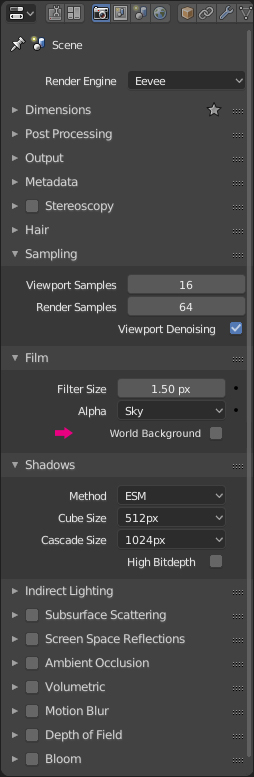
There's must be an easier way to disable the world background on eevee!! like a checkbox maybe
at the moment: youtube.com/watch
3 Comments
When you set Alpha (above your "World Background" checkbox) to Transparent, the sky won't be rendered.
The rest works just like expected. You want a background? Set an environment map. You want a background that is used for reflections but another one for the camera background? Use the Light Path trick.
"Is Camera ray" basically translates to "when seen by camera use 1, else(reflections etc) use 0" then you use this value as a mix factor. Kinda logical. Three Nodes isn't that much to do.
I'm not sure what "disabled" means in this case.
Disable = Black? or Disable = Transparent?
There will always be a background of some sort unless there is transparency. Transparency can be turned on under the film region of the Render tab. If you're talking about setting it to a solid color like black, you can untick the "Use Nodes" check box in the world shader editor. This will ofcourse remove any environmental lighting and reflections as well. If you need these, see Simon's solution above.
@dpdpforlife:
i mean have world reflection but do the 'is camera ray' trick more accessible with one click