← All ideas29 Oct 2019UIoaOpenUser InterfaceUIoa3DSinghVFXDraiseGabrielMoroIIIFGIIIJosephbburgLexi4angelbpinedaant3dmaxbnzsdcb.creativejohnpdelacruz26lacina.vojtechlsscppmarcosjframosmichaelknubbenmichele.bedendopablovazquezrileybrown704sickmonkeydubtheobairon16urkokulyasharjk
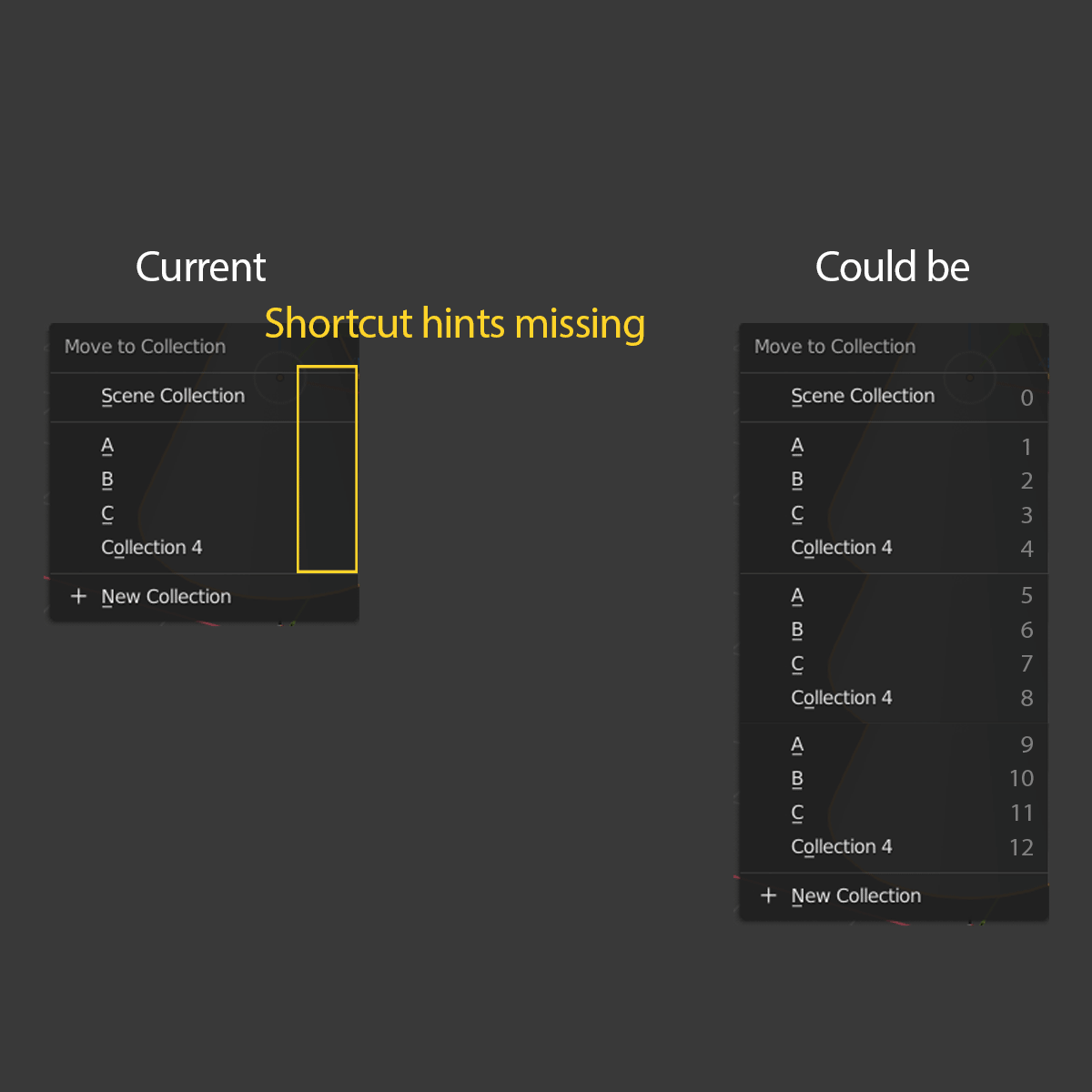
This would make things easier to see which shortcut key (number) is allocated to each collection.
95.7%
Development Status:
Open
Upvote22Downvote1
U
UIoa
29 Oct 2019
11 Comments
I
IIIFGIII
It will work only in scene with small numbers of collections. Wit large numbers - useless.
Why not just add fast search. GIF from Unreal.
5
l
lsscpp
good one. numbers over 9 could be seected by rapidly typing them. So Blender should wait a little bit of time (fraction of a second) before performing the action
1
J
Josephbburg
*
@ Lsscpp
* In 2.79 they were alt+1, alt-2, alt-3, etc.
1
U
UIoaAuthor
*
Lsscpp
* Yes, just like pressin A + A to deselect, pressing 23 quicky would be intuitive and has no friction.
*
@Josephbburg
* Pressing 2 and then separately alt+number is too difficult,
J
Josephbburg
*
@UIoa
* I was just pointing it out, might be better to keep consistency.
I don't much care, I've gotten out of the habit of using the number hotkeys because I started using 2.8 before they were re-implemented. Anything to make it easier is OK in my book.
1
U
UIoaAuthor
*
@ Lsscpp
* Search function would be great.
Is there possibility that large number of collections are divided in child collections, for example, you have 4 main collections and there are child collections under that, for example:
main-collection/child-collection/childs-child-collection/andso
Then you can press 1,2,1,4 to go to specific collection.
Maybe too far fetched.
But for small collections Blender already has the function, if you press 1-9 in the move to collection menu it will be moved.
Just the hints are missing.
U
UIoaAuthor
*
@Josephbburg
* Oh okay, maybe the alt+number would be useful some way in the menu still. What functions do you use in 2.8 so that you don't need number hotkeys?
J
Josephbburg
*
@UIoa
* No, I just quit using hotkeys and haven't gotten back in the habit. I use the outliner to select collections. I know... I'm ashamed. I need to try harder.
I
IIIFGIII
*
@ Lsscpp
* Problem is not how it could be selected but how user have to hold in head all the numbers according o collection. In your mockup 12 collection and menu is already too long - imagine 50. So this menu should have some scroll bar? And then scroll all the time to find collection to understand which number you need?
It looks really good fast solution for small scene or " test " scene. Of course - both solution can be implemented.
U
UIoaAuthor
*
@IIIFGIII
* The main point in this mockup is to get at least the missing number 1-9 shortcut hints to the menu, the function is already there. Numbers above 9 can be implemented later on if necessary. Little bit misleading mockup, sorry about that.
t
thinsoldier
I'd want a-z underlined first until it runs out of letters and then 0-9, not sure how you'd enter 12 when as soon as you press 1 the A collection would be selected.
We could get even more shortcuts if a-z were case sensitive and different from A-Z.
Beyond 2/3 of the height of the viewport you're interacting with a search box should be available also.

11 Comments
It will work only in scene with small numbers of collections. Wit large numbers - useless. Why not just add fast search. GIF from Unreal.
good one. numbers over 9 could be seected by rapidly typing them. So Blender should wait a little bit of time (fraction of a second) before performing the action
* @ Lsscpp * In 2.79 they were alt+1, alt-2, alt-3, etc.
* Lsscpp * Yes, just like pressin A + A to deselect, pressing 23 quicky would be intuitive and has no friction.
* @Josephbburg * Pressing 2 and then separately alt+number is too difficult,
* @UIoa * I was just pointing it out, might be better to keep consistency. I don't much care, I've gotten out of the habit of using the number hotkeys because I started using 2.8 before they were re-implemented. Anything to make it easier is OK in my book.
* @ Lsscpp * Search function would be great.
Is there possibility that large number of collections are divided in child collections, for example, you have 4 main collections and there are child collections under that, for example: main-collection/child-collection/childs-child-collection/andso Then you can press 1,2,1,4 to go to specific collection.
Maybe too far fetched.
But for small collections Blender already has the function, if you press 1-9 in the move to collection menu it will be moved.
Just the hints are missing.
* @Josephbburg * Oh okay, maybe the alt+number would be useful some way in the menu still. What functions do you use in 2.8 so that you don't need number hotkeys?
* @UIoa * No, I just quit using hotkeys and haven't gotten back in the habit. I use the outliner to select collections. I know... I'm ashamed. I need to try harder.
* @ Lsscpp * Problem is not how it could be selected but how user have to hold in head all the numbers according o collection. In your mockup 12 collection and menu is already too long - imagine 50. So this menu should have some scroll bar? And then scroll all the time to find collection to understand which number you need?
It looks really good fast solution for small scene or " test " scene. Of course - both solution can be implemented.
* @IIIFGIII * The main point in this mockup is to get at least the missing number 1-9 shortcut hints to the menu, the function is already there. Numbers above 9 can be implemented later on if necessary. Little bit misleading mockup, sorry about that.
I'd want a-z underlined first until it runs out of letters and then 0-9, not sure how you'd enter 12 when as soon as you press 1 the A collection would be selected.
We could get even more shortcuts if a-z were case sensitive and different from A-Z.
Beyond 2/3 of the height of the viewport you're interacting with a search box should be available also.