
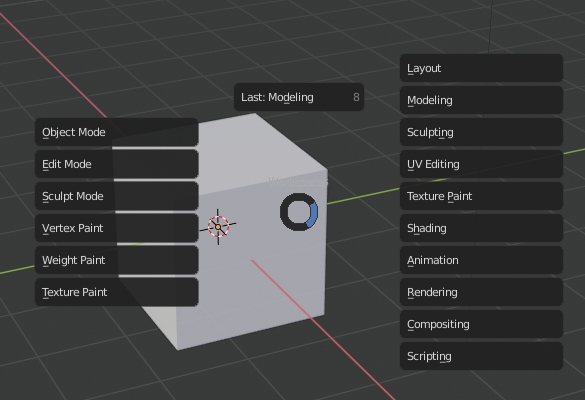
pie menu to switch workspaces and modes
Now that Blender is trying to orient around workspaces, it would be great to have a hotkey menu to switch workspaces..
This could also include modes, allowing one to quickly switch either workspaces or modes, and tap the hotkey to switch to the last workspace or mode. It could eventually be bound to the TAB hotkey, allowing people to both toggle old-school modes and new-school workspaces with a quick tap... or access more stuff by holding down.
One option is to do this as a pie menu (see screenshot).. This has some advantages, but one disadvantage is that with Blender's current pie menus, using it repeatedly tends to "walk" you to the right... and I don't see a way to put it under the cursor at the start of the pie menu
Another option is to use a traditional menu, which could locate the workspaces immediately below the pointer, making it move the mouse pointer less during usage.
I'm working on an addon, but unfortunately Workspace.order is not exported to python right now, so there is no way to put the menu in the proper order.
3 Comments
Yeah i know man, i also made an addon because i like to be able to switch quickly. Ive hardcoded the default order. but since lots folks adjust that it will break.
I made it so that the user can set its own custom order using the addon preferences github.com/schroef/QuickSwitch
I made similar pie menu, except I didn't include interaction modes to not overcomplicate the menu and ideally you should be switching to UI that is optimized for mode every time you switch modes. Also with current amount of workspaces, there should be a way to favorite workspaces (right click>add to favorite) that show up in the menu, else there will be too much clutter again to use menu smoothly.
* @rudolfs1234 * what about allowing workspaces to be "added to quick favorites" ? This might be a better way to address this issue. Currently you can't do it, I think it would be possible if the right-click menu for a workspace contained a "switch to (worksapace)" menu item which switched to that workspace... then you could right click that menu item and add it to quick favorites.