
Animation Playback FPS to Slow
Currently when working on an animation and hitting th eplay button it is often the case that the animation runs on slow or not the desired amount of FPS, I tested this with the Rain Character from blender Cloud and animated it a bit. With a more simple character like this 60fps should be quite possible. I tested it on a ryzen9 and nvidia 2070 super. ( I am aware that you usually do not animate in 60fps it was just a test)
Especially Animators coming from another software are used to play the animation right away with the desired FPS.
The same test with older Hardware only achieved about 16 fps animation viewport performance which is a glaring issue for animators and should be addressed very soon.
My guess is that the Users hardware is not used in an optimal way , which can be seen in the screenshot i attached. While there would be much more ressources open to be used, they ain't being used to get to the result wished for.
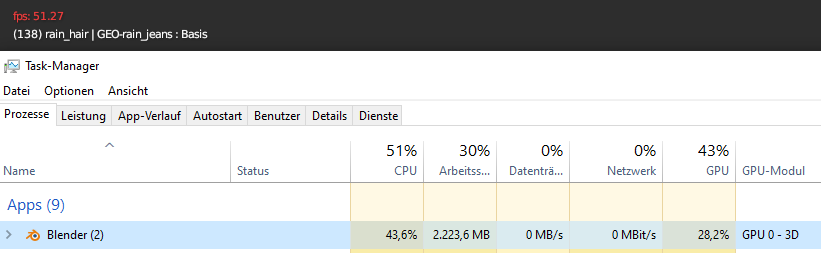
1 Comment
Animation playback is a single-thread operation. So your cpu can't use all of its cores to focus on playing animation. If you show usage for all cpu threads, you'll notice only ONE thread maxes out, while the rest don't work nearly as hard. I think some physics is also single-thread.
But I'd totally be happy if they found a way to optimize fps playback.
Your options are to find other ways to optimize fps, or upgrade to a CPU with a faster SINGLE-thread score: cpubenchmark.net/singleThread.html (Assuming you don't already have a Ryzen 9 5900) Note that SINGLE-thread score is DIFFERENT from OVERALL multi-thread score.
Ways to improve fps without spending money:
I thought there were other ways, like only view one viewport, hide bones, make sure modifiers are in a certain order, turn off. But I just tried these, and they didn't really work. You can also lower subdivision surface modifier (or turn on Simplify). Tho that's kinda obvious, and I'd rather not do that lol. I decided to animate in 2s (i.e. 12fps) because my PC can play at full 12 fps at Level 1 simplify/subsurf, and it's smooth enough (until I add another character...). I guess you could turn off subsurf for all characters except the one you're currently animating.