
Next Object Next material in Array modifier
One thing i have come across in recent times is while using the array modifier.. the material of the mesh remains same though out the node... what i want is a simple feature that can help add a new material to the next arrayed object.For example in this pic.. an arrayed cuboid... i want the first cuboid to be red... the next to be blue.. and so on... that it the next arrayed item will have the next material index from a given set of material as the materials are also stored with indexes... so that might do good! Edit : there could be a material offset feature which preserves material data, like making each 3rd material a roof material and the next one wall and the next one door. due to this feature, each house will have a different roof, wall, door. for default settings, it could be set to 1, such that each next object will have next material. there could also be a option to make it cyclic such that if we have only 3 materials and 10 meshes, 4th mesh will have 1st material, 5th will have 2nd and so on. same also with offset for 3. also, there could a random option which is fairly self explanatory

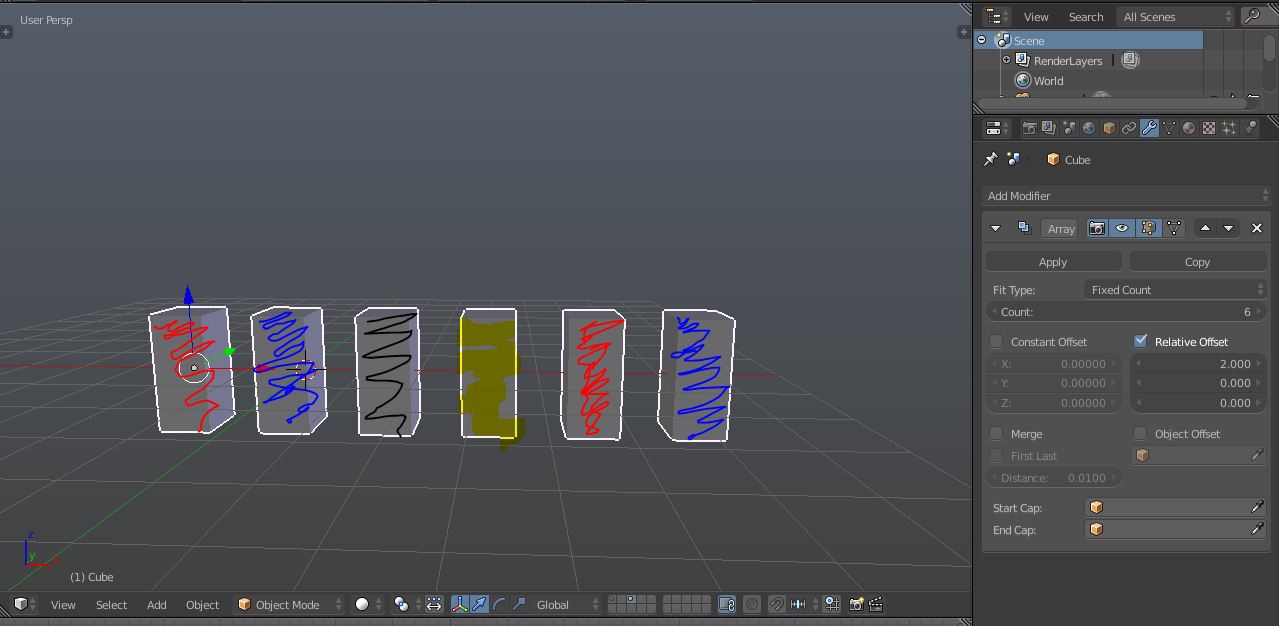
9 Comments
And, similary, random material for each object instance.
Would users be able to disable this? What if the object being arrayed already has multiple materials assigned to different faces on a single mesh? How would the modifier know which materials to go through? And would it apply the materials uniformly, or still respect the material assignments that've already been set?
It's a cool idea, but there a lot of ways in which this could break that your proposal doesn't quite address.
hello Fweeb ... i added a update with a pic that will help solve your queries .... do check that
Thanks for the update. What about the situation where the user just wants an array of multiple objects that all have the exact same material indices? Would you include a toggle for that?
yeah that time you can just toggle it or select only one material only...
Where would that toggle be?
The way I would imagine this just a toggle in the modifier called "material index" which will give each duplicate an index number that we can pull out of the object info node in the node editor. We can then use math or mix nodes to vary the shading.
The biggest issue is when having more than one array modifier, I'm not sure how the second or third arrays could handle the sorting. Personally I'd be happy with just a random index of 0-1 to add variations in shading, I can't think of too many cases where I need individual control.
OOH... i did not give a thought on that.... i 'll think of the situation of multiple array modifier and reply as soon as possible
in the array modifier only... first you toggle it o.. and then you work with material