
Glow Color, makes everything not selected Glow?
Grease Pencil Effects > Glow As i've understood from The Wiki
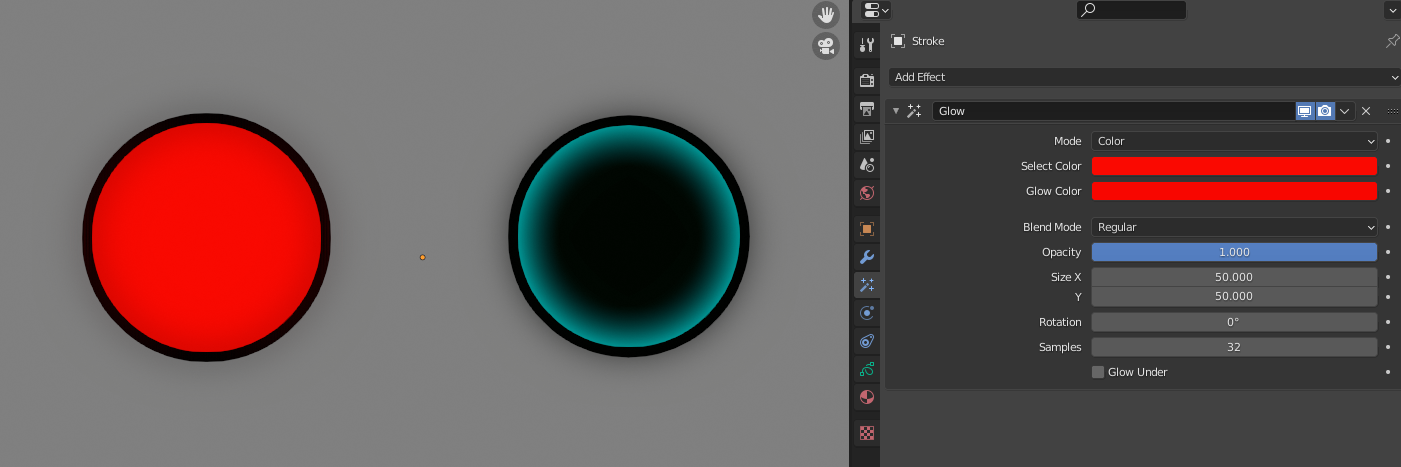
When color mode is selected, you should be able to select which color you want to be glowing, and then choose the glow color. From the example i've provided it seems to do exactly the opposite? Everything except the color I have selected Glows.
This is the base
 With these settings

What's expected to happen

What actually happens!

2 Comments
It's basically a blur (like every glow is). The pixel-mask of the color you have selected is blurred so it's margins gets soft to the inside and the outside. Can you switch the blend mode to something glowish like additive or overlay instead of the "Regular" setting? Because the normal workings of a blur is additive to the base picture and not like here the picture itself being changed.
* @vangel * I can change the blend-mode, but the issue I'm describing isn't the blending. But the fact that everything except the select color is blurred.
The mask you're describing should be inverted!