
Duplicate and batch rename
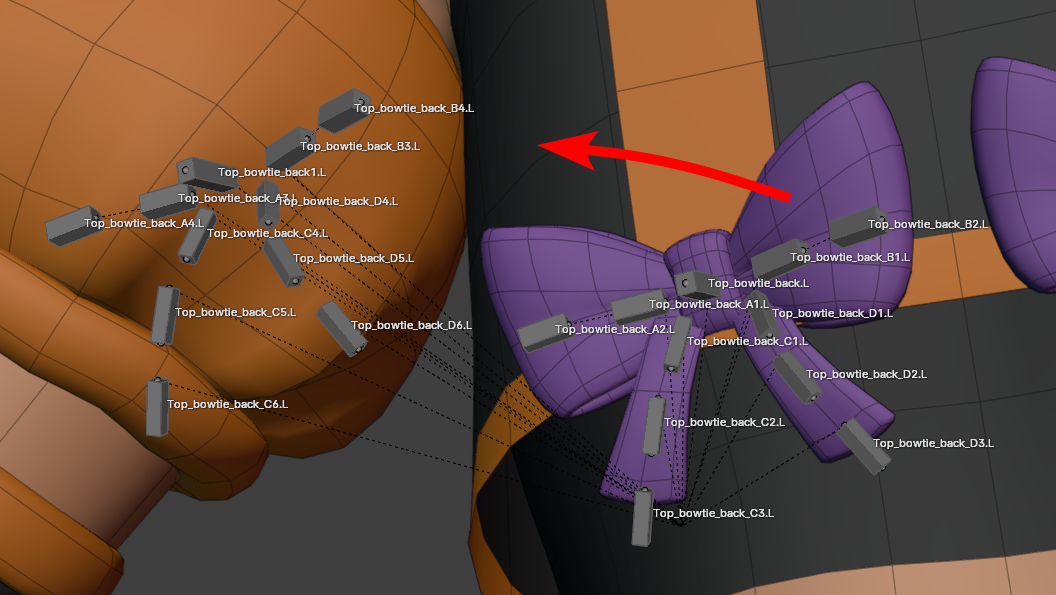
I'll explain with an example, here i have some bones for a bowtie, on the back of a character.
I want to duplicate all the bones and switch the name to say "front" instead of "back"
But after duplicating all the numbers got incremented as to not have bones with identical names, but it also means doing a batch rename right after in a single step is impossible, i now have to individually set the numbers back in order
If you could duplicate and batch rename in the same step, this hiccup could be avoided.
There might be other alternatives to this, so write other suggestions if you have
3 Comments
That is quite specific to your needs, and that can be done relatively easily using Blender's Python API. Of course that means you need to learn the basics of it, but once you do, you can do this and similar things with relative ease. And this kind things can be put together using AI tools like ChatGPT.
My suggestion would be to add a batch renaming option to the dublication context menu. When you dublicate, you should be able to type in what kind of changes you wanna make to the newly dublicated bones/objects.
I agree with @ezez that its easy to do with python. But almost all riggers come across this problem. Even the rigger from the blender studio self.
It's time for you to learn regular expressions :)