
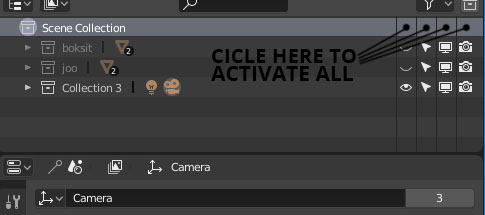
"Activate all" buttons in outliner
If you wanna very fast hide or make visible/selectable/disable from viewport/prevent rendering all your collections, you should be able just to press the button that is over the main function in question. There is even a place for that in the same row with "Scene collection" title.
Also, because the collections are now linked to the keyboard numbers, It would be logical to show the numbers next to the collection title automatically.

4 Comments
Basically letting the user manage the "Scene Collection" like any other collection. Yes!
Also, the ability to do so an a selection on the outliner.
I.E : select some objects/collections, right click → toggle vis/render/etc, and the state of the toggle would be determined from the original state of the active element (so you don't have any issue if your selected elements didn't have the same original state).
I have always wanted an option like this but for modifiers, because toggling on and off all modifiers would be extremely useful.
@wondraknathan: Make a porposal about that. I will upvote it.
@Artturi Mäntysaari: Ok I put it up there, cheers!