
Visual Cue to Box/ Lasso Select Tool Cursor Tip
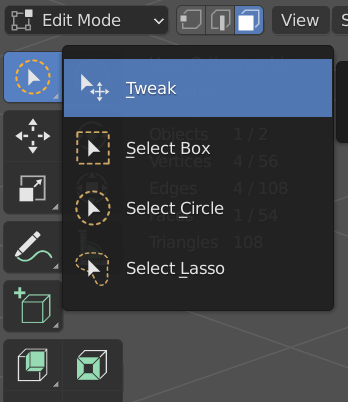
Experienced modelers will FREQUENTLY cycle through Circle/ Box/ Lasso/ Tweak Select depending on vert/ ede/ face operations. That's 12 - 24 decisions at any moment, and one shouldn't need to dart their eyes so often to upper right screen corner to check if they got the right Select Tool.
Users know they're on Circle Select because there's a circle at our cursor tip. Please add Box, Lasso icon to Box/ Lasso Select, if only for consistency. Thanks.
(maybe a View> Select Tool cursor tip visual cue on/off option)
16 Comments
specially for select and move
So basically different icons for cursor? I vote up, but also want them to be customizable
* @Yegor R * Yes. I mean, this is like a Photoshop 1997 feature lol...
And yes, customizable cursor icons would be cool. Transform gizmo too. I can design my own Tweak Gizmo and even axis/ increment indicators in non-animation tools like Daz Studio, we should be able to customize all that in Blender 2.9 I reckon...
2001 generation Photoshop Elements let users choose Cursor Tip indicator icon.
2011 generation 3D tools let you calibrate length/ color/ radius of select/ transform tool indicators
2021...
I would actually separate tweak from the selections.
Experienced modeler.
Wshortcut for cycle this tools from keymaps.Cbutton.* @IIIFGIII *
wkey for switching to tweak tool, because it's most convenient to use when doing retopo and with box cutter to turn it off.cto cursor pie menu, cause I often cycle between these tools, but don't like that stupid dropdown menu in the tools panel.* @Yegor R * You see - experienced modelers don't use defaults as is, customize workspace/tools for own comfort :)
In my case
Wused for context menu (as it were before 2.8),RMBused for deselect (deselect by click on empty disabled, hate it). I HaveGso don't feel any necessity in Tweak Tool.* @IIIFGIII * tweak tool is my choice because it's select and grab combined and I don't have to press
gevery time I need to move something, though it's not so often that I use tweak tool. At first I did misswfor special menu, but relearned for left-click select workflow (right for context) to be more consistent with other programs I use. I have a pretty custom config too, though nothing fancy really, but it takes up around 1,5gb already, and honestly, I'm not sure it should... Also it's a bit annoying to addictively constantly change it and keep up to date with lightning fast updating blender haha* @IIIFGIII * No.
Cycling between Circle Lasso Box Transform is fine, saves EXPERIENCED MODELERS a non-standard, cumbersome one extra step just to "get out of Circle select" behavior.
I'm happy to free up/ gain precious C hotkey.
All-in-one Tweak is among the best hard surface tools Blender recently introduced, a standard feature in Maya ZBrush. It can still be improved by allowing customization etc. Just because you don't use a UNIVERSAL tool doesn't mean it's shit. Be CONSTRUCTIVE.
* @Yegor R * Exactly. I don't know any experienced modeler who thinks pressing a hotkey just to move already-selected things in 3D viewports is advanced or efficient... Oh well..
* @SoloAnimator * I work without manipulator, gizmo or however you call this thing. For me press G, C, any is not extra step - my hand always on keyboard.
You just need to se some pro Blender modeler (old school one, before 2.8), who not use all this gizmos, tools, etc. and see how fast and seamless things happen just form keyboard.
* @IIIFGIII * I work with manipulator, gizmo, G, or whatever key settings I want.
You just need to see some pro Blender modelers (old school new school before after 2.8), who use manipulators + keys + ANYTHING to mesh/ sculpt/ rig/ shade/ animate, and then you would respect how others experienced users operate.
Maybe then you would stop hijacking a request thread just to tell other users what not to request, and be more respectful of other experienced CG generalists' workflow and processes.
* @SoloAnimator * I don't need to see, I already saw what I needed, much more than you may expect... Good luck, have a nice days.
* @IIIFGIII * to be fair, tweak tool doesn't require you to use a gizmo, it just invokes the usual transform operation
* @Yegor R * I see you are a man who like to have the last word... abalutza!!!