
Active Camera Filter node
When looking at that other proposal , I misread a bit and thought it was asking for a way to load a different world texture on a per-camera basis. And I thought it would be nice to have a shader node that allows filtering inputs as per specific cameras.
I made a penpot mockup (love that boy!):
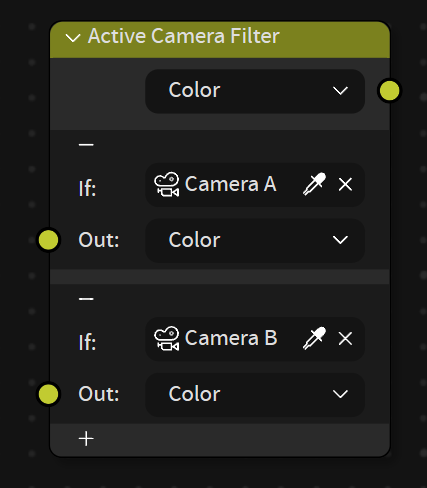
I thought about it like a mix node: it would support inputs and outputs of color, floats and vectors (or any other data type I guess, if in geonodes).
And like a Color Ramp node, it has
+
and
-
buttons to add or remove "entries" (showing 2 here).
The idea here is that you make yourself a list of cameras, for each an input (I.E. an image texture), and it will be used in the ouput if that camera is the current active.
It would allow lots of cool things, like changing any material property on a shot-basis without having to use keyframes or even scenes. I guess it could have nice uses in geo nodes too.
Imagine this in a movie environment where many things can be adapted throughout shots. Or in a product rendering where people often use different camera angles to show different things.
2 Comments
This node could be an option, there is a work around by switching via pass indexes.
That is basically the idea tho. Loading different "environment textures" per camera. Environment textures are for render/shader pipelines tho, meant to be seen and interact with lighting in rendered modes. Camera background images are not supposed to, they are for reference, it does not currently support 360 images.
hence i posted here ;)