
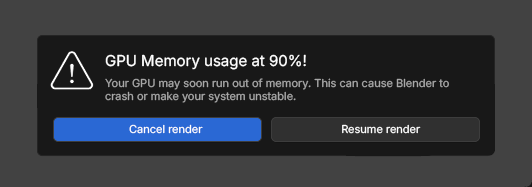
Warning when GPU reaches 90% memory usage when rendering
I’ve recently run into several severe GPU crashes when working on large files, especially with other heavy applications running in the background. In some cases, the only recovery was a full system restart.
This isn’t a bug report, but a feature suggestion. As GPU rendering becomes more common, it could be helpful to have an optional preference that warns users when GPU memory usage is nearing a critical limit, allowing them to cancel the render before a crash or system instability occurs.
Blender already has these analytics in the status bar:

So why not using it for this kind of dialog box when rendering?
5 Comments
Good idea. Having a popup window that's adjustable would be cool. We could have it turned off by default in the settings.
Isn’t the status bar's memory analytics sufficient? I think this idea might offer some value for beginners, but it still feels like it would be more annoying than useful. In many cases, you could be at 90% memory usage and still be fine. If you’re not fine at that level, then – especially as a beginner – you might need to experience the consequences firsthand at some point. I see no practical difference between this dialog and simply paying attention to the status bar.
That said, in a broader sense, this could be a great idea if Blender had a global ‘beginner mode’ – something similar to Maya’s beginner/advanced user modes. That might be an interesting topic to explore on its own.
The status bar does not always accurately depict the performance analytics of the actual render. For instance, you may have some objects or collections disabled in the viewport but enabled for rendering, which can lead to surprises regarding memory usage at render time. Also, while I disagree with the term “Beginner,” I do agree that this option should be toggleable in the preferences. Perhaps the threshold value could also be configured there.
I think it would mostly be annoying, especialy for long renders you won't stick around the whole time and comming back to see it was paused the whole time would be unpleasant. Id rather blender crash and I can fix the issue than stop because there's a risk of crashing.
I see what you mean, and I agree to an extent, but in practice, for "in-person rendering" (you're using the PC as it renders), a full PC restart after an unrecoverable GPU driver crash takes longer than simply being prompted to restart the render with safer settings. Here is my typical scenario: launch render > Switch to photoshop to do some parallel task > Blender is out of GPU (probably because of Photoshop) > the whole system is f*cked > my only option is to restart the system and waste at least 5 minutes. That’s why I think this should be offered as an option (off by default maybe).