
Snap Guides for Precise and Quick Modelling
Hello Everyone,
PROPOSAL:
This Proposal is to introduce Snap Guides into blender. As far as I know not a single Full-fledged 3d modelling software offers this functionality except sketchup (which is not built for freeform modelling). I have also searched in blender devtalk about various snapping proposals and found mano-wii ‘s proposal to be well thoughtout. (Link to the proposal: devtalk.blender.org/t/discussions-for-better-snapping-and-precision-modeling/5351 )
THE REASON/ NEED OF THE TOOL:
- For faster and precise modelling. (See Example 1)
- For Retaining/ Saving the critical snap points that might be useful later. (Especially in Architectural modelling)
- For Constructing complex snap location points. (Say you need to snap to a location which has complex relations and not just aligned to X,Y or Z axis)
WORKING:
 The Guides can be created using shortcuts or using the left Tool bar.
There can be 2 methods of creation of these guides:
The Guides can be created using shortcuts or using the left Tool bar.
There can be 2 methods of creation of these guides:
- Create guides parallel to the Global X/ Y/ Z axis
- Create guides parallel to the selected edge/ face
The Snapping Options can be:

- Snap to Guide
- Snap to Guide Intersection with a checkbox for Guide-Edge intersection
EXAMPLE 1:

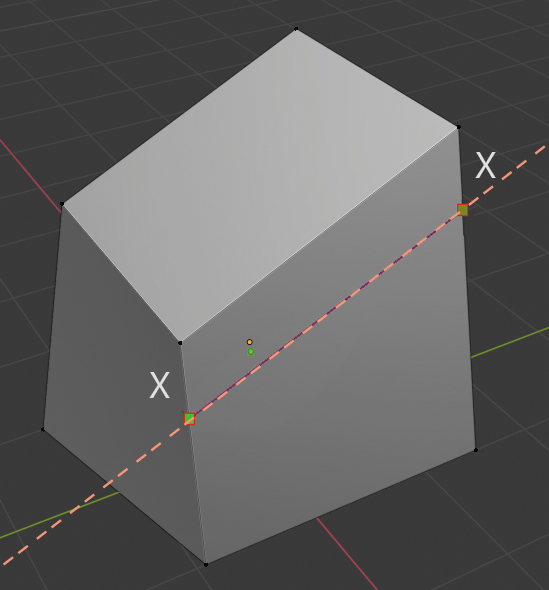
Say you want to precisely create an offset edge (at a distance X) for an irregular 3d model. (See pic 1)
The Existing method:
- Create an Edge loop intersecting the top edge
- Edge Slide to desired distance (Say X)
- Dissolve unnecessary edges
There might be other methods to achieve this goal that I am not aware of but this method doesn’t provide even offset throughout the edge if the adjacent edges are irregularly aligned. (I guess the Edge loop interpolates the position based on the whole top loop edge).
The Snap Guides method:
- Select the top edge
- Create Guide parallel to the selected edge and type the offset input
- Use the knife tool to draw the edge
- Delete the Snap guide
This may seem slower than the existing method but it gives even offset to the selected edge and is quicker than the existing method. (As existing method involves selecting of the unnecessary edges)
EXAMPLE 2:

Say you want to move a vertex from the face to its top edge for an irregular 3d model (See pic 2)
The Existing method:
- Using Knife tool and angle snap cut an edge perpendicular to the vertex till it intersects with the top edge
- Select and delete the bottom vertex
This method might not work for complex situations. Ex: if the vertex needs to be moved not perpendicular to the global Z but parallel to the side edges.
The Snap Guides method:
- Create Guide parallel to the Global Axis or Parallel to desired edge and snap to the vertex
- Enable Snap to Guide Intersection and check Guide-Edge intersection
- Move the vertex and snap to the Guide-Edge intersection
This method can work for complex situations as stated above.
Future Development:
This feature can be further developed for other areas of blender like UV Editing e.t.c
5 Comments
eg.
for more formatting go to: commonmark.org/help/
* @Pawel Piotrowski * Thanks! Embedded the image.
really cool! like Sketchup!
Heheh, like c4d... 😉
* @TheRedWaxPolice * I didn't knew about this feature existing in c4d. However after looking about it I think c4d lets you create guide using 2-endpoint method only which is useful for specific/limited modelling scenarios. (And seems to be slow for both of the examples i.e; requires extra steps of moving the guide after aligning it to desired direction). Workplanes are just like face snapping which is not a good alternative for guides either.