
Curve brush
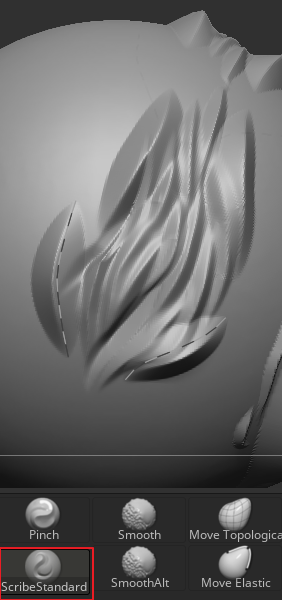
I’d like Blender’s sculpting toolset to include an additional brush something similar to ZBrush’s Scribe Standard Brush.
What it is
*It projects and deforms a mask onto the model surface by “drawing curves”, quickly generating controllable engraved lines / raised lines, or continuous patterns.
*The drawn curve allows the projected mask to stretch and deform along the curve as well.
*The curve is adjustble before projecting
*The generated stroke/curve conforms to the mesh surface, so you don’t need to manually create a separate curve object to project a mask. it automatically project the mask directly onto the mesh and apply a displacement-like effect,after stroke/curve confirms
*Useful for: hard-surface parting lines, panel lines, seams, grooves, edging, pressed lines; and for characters/props: stitches, leather embossed borders, decorative lines, engraved symbols, etc.
Why this brush would be helpful
*Fast: One drag can produce clean, sharp lines, without repeatedly combining brushes like Trim / Pinch / Clay to refine edges.
*Consistent: Line width, depth, and edge profile are easier to keep consistent—ideal for large amounts of repeated panel lines, stitches, and continuous patterns.
*Highly controllable: Compared to manual carving, it’s easier to control depth, width, and sharpness, and it’s less dependent on hand skill.
*Surface-friendly: Drawing parting lines on complex curved surfaces is more intuitive than mask + deformation workflows or boolean cutting.
*Less rework: Cleaner strokes reduce unevenness and fraying, making later normal baking / high-poly detailing less likely to produce artifacts.
*Also great for stylized hair: It can create very sharp, crisp stylized fur flow or hair forms.
This is one reason Blender users often end up sculpting hair that looks soft and blobby, spending a lot of time repeatedly layering and polishing with multiple brushes.
Using something like a Scribe Standard–thess task can be achieve a sharp artistic look in much less time.
0 Comments