
Double click the node's title bar to minimize | maximize
It would be more intuitive to have option to minimize / maximize nodes by double left clicking on the nodes title bar instead of aiming for the tiny arrow in the title bar.
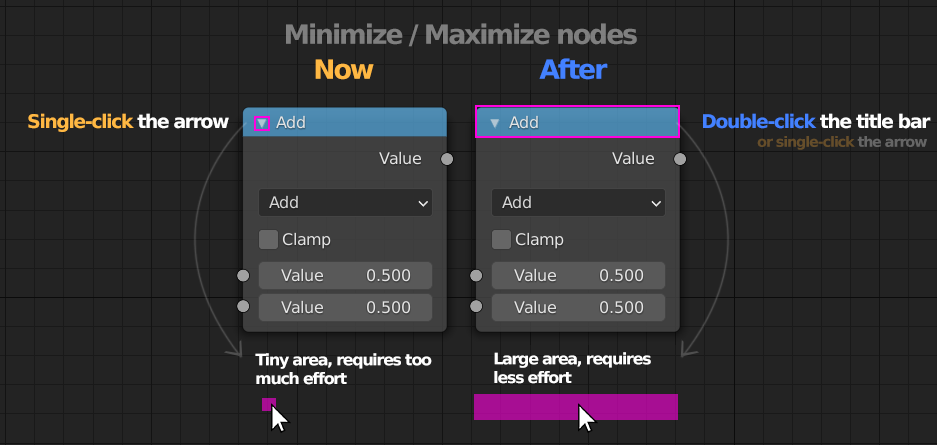
It would be more intuitive to have option to minimize / maximize nodes by double left clicking on the nodes title bar instead of aiming for the tiny arrow in the title bar.
7 Comments
You can assign a shortcut yourself...........
* @TheRedWaxPolice * Cool, thanks for the tip, but how can you do that? What do you think, would it help the UX & workflow if it would be default like that?
There is already shortcuts for that, "h" for hide and "ctrl + h" to collapse unused inputs/outputs
Same for modifiers, now you need to click this little arrow (around 12pixel² for a mouse set to have a DPI high enough to navigate in trial 4k screen)
* @yoann softyoda * Seems that you can single click on the title :)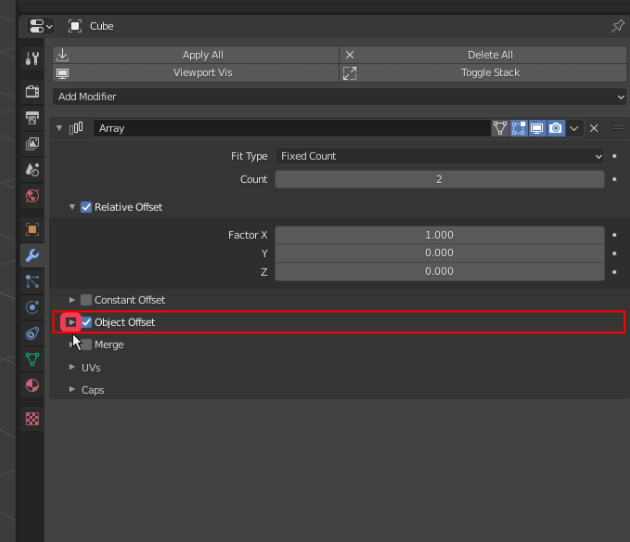
* @UIoa * UUUmhhh ok you can... but you have to know it
* @yoann softyoda * Nope, for any panel or subpanel you can click anywhere on the title to change the expansion. Just not on any buttons of course.