
Handles for Reroute node
Reroute nodes currently connects only horizontally and from left to right, this causes a small bump at the ends when connecting from left to right. This could be solved by simply checking if the destination is to the left or right of the reroute, but then there are vertical connections which makes tricks like this not work very well.
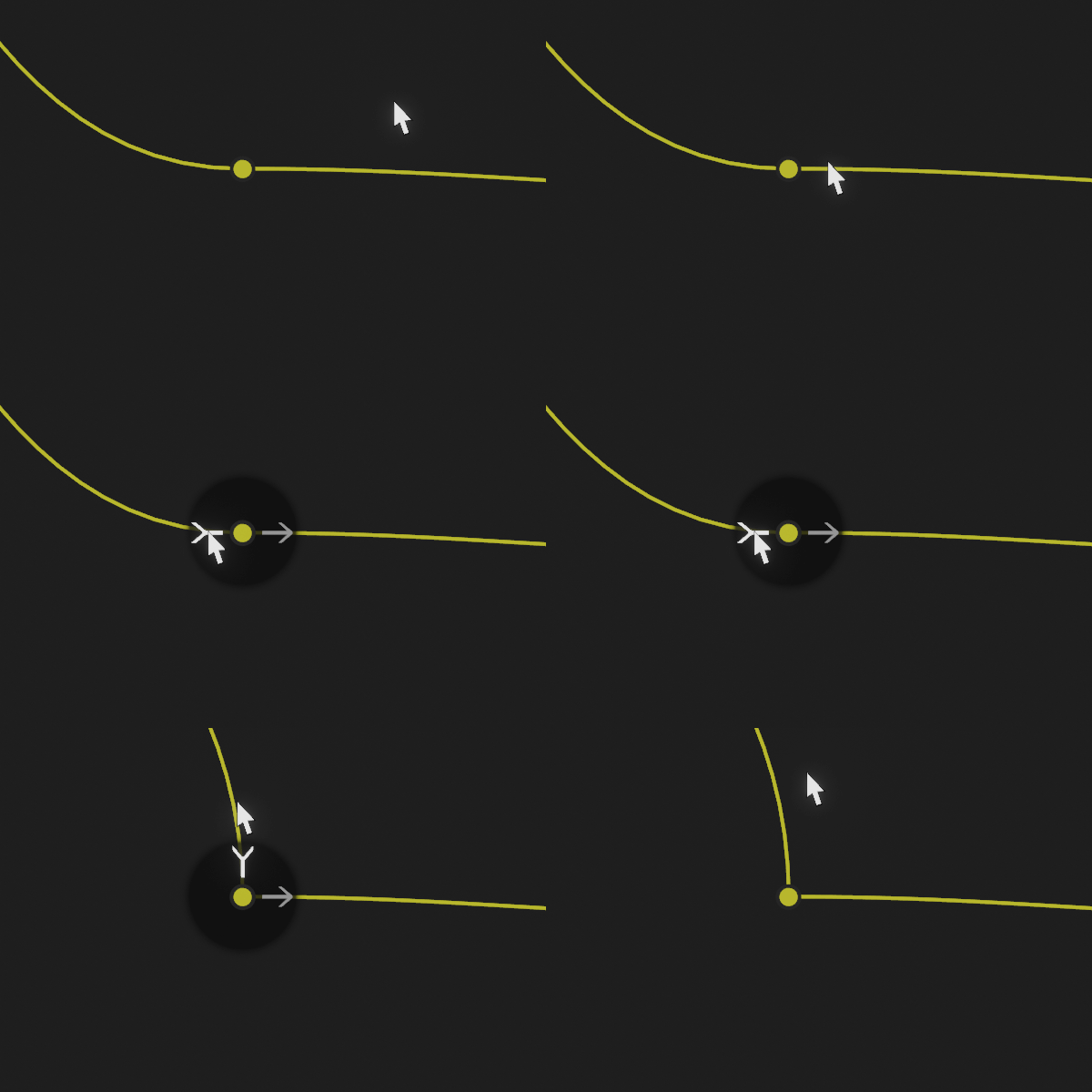
The idea is to add a small overlay with handles that appear when the cursor is over the reroute and disappear when the cursor exits the overlay:

When dragging the handles, the resulting direction will be the closest axis aligned direction, determined by comparing the cursor position to the reroute position:

Maybe the option to use free handles will also be a good addition:
Third time trying to post this. Previous posts doesn't show anywhere. They won't show in the searches or in my profile, but I still can access by the links ¹ ² . Sorry if that's some intended behaviour.
I found that if I don't upload any gifs or videos it shows.
8 Comments
giving you an upvote- but honestly the reroute node should just be smart enough to do this automatically without having to manually mess around with a widget
Automatic direction would be the best if that can be made to work in all cases. But if the automatic way ends failing in some extreme cases, maybe an option to switch a reroute's direction between auto and manual would be the best, auto would be the default value, since most users probably wouldn't use weird directions for their reroutes.
Agree with testure. Plus, if you disable the noodles' curvature completely (which I found more readable anyway), the problem is non-existent.
As cool as this looks, what about people that don't use noodle curving (myself included) ?
I think the overlay should just not show if the noodle curving is 0 in the preferences.
I like it though, It's definitely not a necessity but I don't see any real downsides either. It doesn't crowd the UI and doesn't sound too hard to implement.
I don't fully understand this proposal to be honest, although I agree that the reroutes could be a bit more clever or feature completes, they do connect vertically as well : {attachment 'mMD9' does not exist} Plus, since Blender's node graphs are horizontal, those kinds of layout aren't really necessary I guess. I mean, its not like graphs could expand in any direction, there is a pretty clearly determined flow.
In this image, while it looks that the reroutes are connecting vertically, it's just that the width of the curve bounds is close to 0, so it ends going only down. But, as the image shows, the connections from the nodes to the reroutes are horizontal.
The node graphs are horizontal, but sometimes I need to send the output of a long node chain back to other nodes on the left that also use outputs from nodes on that long node chain. I could of course move the other nodes to the rigth leaving a gap, but on small monitors it's hard to see a big part of the node graph while still being able to read the texts.
Of course, handles for the reroute wouldn't change anything about a monitor's size, it would just give the ability to make those specific weird reroute connections look nicer if they're curved.