
Revamp material output and add 'Renderer Info' node
Problem: Making shader assets that have different implementations for both EEVEE and Cycles is not friendly for end user.
I have been making NPR shader node groups that need to have different setups for each render engine in blender since EEVEE doesnt support some cycles nodes and Cycles doesnt support some EEVEE nodes.
Currently, I need to either have 2 separate node groups (one for each render engine, very cumbersome to maintain) or the solution I currently use which is have 2 shader outputs on the same node. This is necessary because users will switch between Material Preview mode(EEVEE) and Cycles while working. Right now the way you do this is with 2 separate Material Output nodes.
There are a couple issues with doing this:
- Annoying to set up a material, must manually create a second output and set it to EEVEE and the first to Cycles and plug in both shader node outputs
- Viewing nodes with Shift+LClick isnt usable since it only connects to the last material output you selected, doesnt track what engine youre using
My proposal is to remove the engine selector from the Material Output node all together and replace its functionality with a 'Renderer Info' node. With this, asset creators can decide what shader gets fed to the output based on what render engine is currently being used.
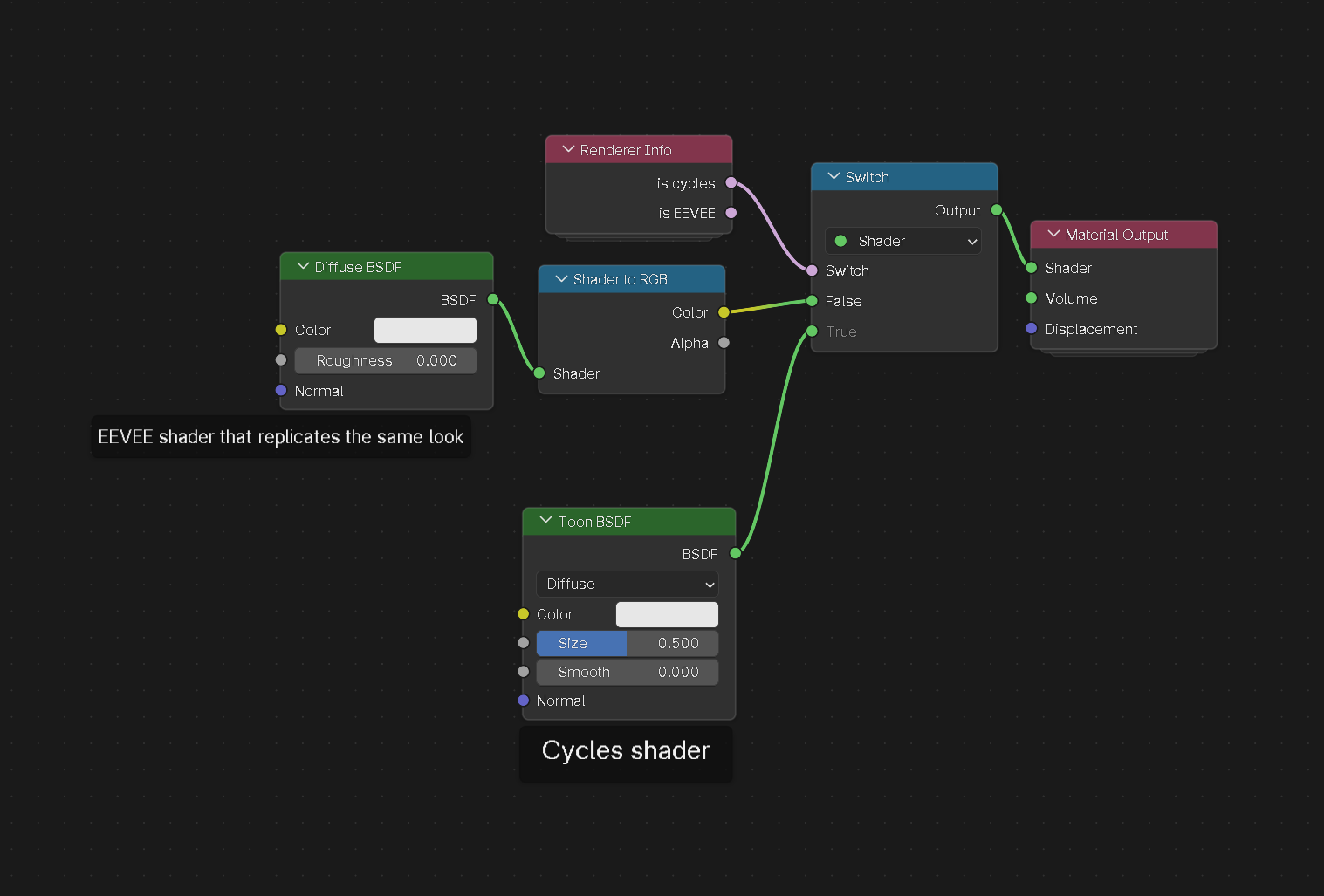
The biggest tradeoff I see here is slightly more work for asset creators, for better end user experience and flexibility.
1 Comment
I think this is a nice idea. If I have some time to spare I’ll see what is needed to realise it