← All ideas19 Feb 2019RomanOpenUser InterfaceRomanAnubisMasterBlendererCoBFalconCreatesManBlenderShimoonVyachWilsman77arturo.leonearyeramatybedrossianbelimlinbernou.samuelbestelixblorenzobriecmuldooncara.di42ckohl_artdanielpaulus90deepdiveferranmartinezclarjfrasermkarpiCzkolovedkotulskymcolemvitegaogneedpaul4rl.amoratoromanvolgushev4565runesilexsvarttesturethiagocavalcantecarvalhoxmaiter01
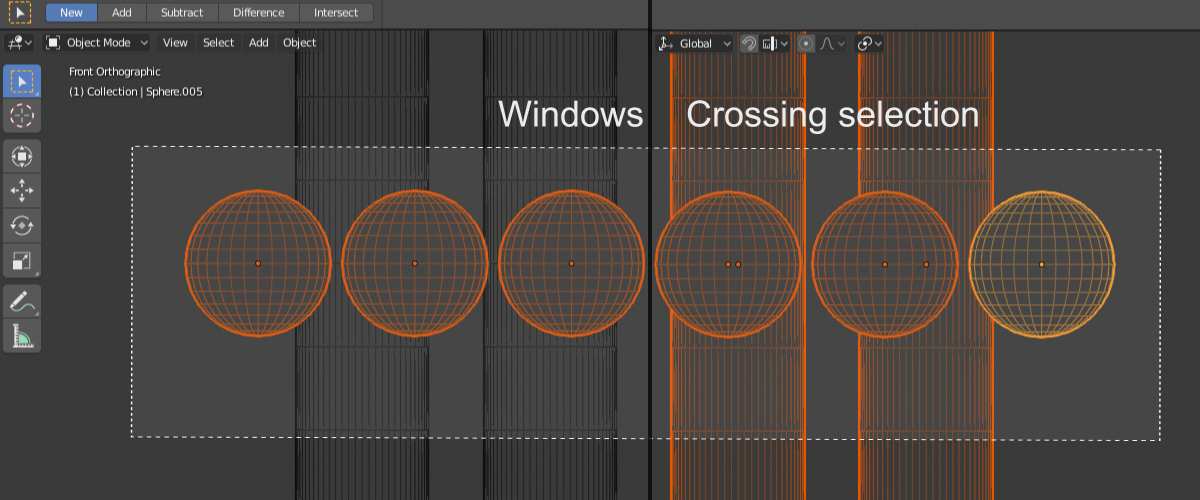
Hey! In a blender really lacks window/crossing selection
100%
Development Status:
Open
Upvote37Downvote0
R
Roman
19 Feb 2019
9 Comments
a
arturo.leone
as long as the selection border or filling could provide some kind of visual feedback to differentiate the two modes could be a very nice addition (disclaimer: i always felt the autocad style of selection was a great intuition)
3
k
karpiCz
Yes! Select win or crossing win according to direction of drag.
And window over empty area clears selection.
2
Z
ZerpDeDerp
Two years after your initial post, here I am with this exact same issue. Window/crossing selection in CAD/Revit is so convenient! I think it would be a great addition to the blender interface. Once you have used that method to work, its so annoying NOT to have it, but it's hard to communicate the intuitive utility to someone who has never used it. It's nice to see at least 35 people agree. There are dozens of us. DOZENS!
1
m
monatsend
Krita seems to have it. when you select from left to right you do window selection and when you drag from right to left you do cross selection. the box even changes color from wich direction you select.
But I am not shure if this workflow is comfortable.
1
p
paul4
This is a fantastically useful and proven feature. Please add.
You may not agree to all modifications but until an official solution you can check:
blenderartists.org/t/a-proper-keymap-for-blender-2-8/1145406
. It features LMB Drag for Box select, Drag outside to deselect, Ctrl+LMB Drag to remove from selection and Shift+LMB to add.


9 Comments
as long as the selection border or filling could provide some kind of visual feedback to differentiate the two modes could be a very nice addition (disclaimer: i always felt the autocad style of selection was a great intuition)
Yes! Select win or crossing win according to direction of drag. And window over empty area clears selection.
Two years after your initial post, here I am with this exact same issue. Window/crossing selection in CAD/Revit is so convenient! I think it would be a great addition to the blender interface. Once you have used that method to work, its so annoying NOT to have it, but it's hard to communicate the intuitive utility to someone who has never used it. It's nice to see at least 35 people agree. There are dozens of us. DOZENS!
Krita seems to have it. when you select from left to right you do window selection and when you drag from right to left you do cross selection. the box even changes color from wich direction you select. But I am not shure if this workflow is comfortable.
This is a fantastically useful and proven feature. Please add.
Status can be changed. developer.blender.org/D9180 — in development.
This topic should be higher. Bump.
You may not agree to all modifications but until an official solution you can check: blenderartists.org/t/a-proper-keymap-for-blender-2-8/1145406 . It features LMB Drag for Box select, Drag outside to deselect, Ctrl+LMB Drag to remove from selection and Shift+LMB to add.
* @Ge Ro * @karpiCz