
Creating Lists Directly in Geometry Nodes and Modifier Inputs
Since the introduction of the new List data type, lists can currently only be created indirectly, for example by converting fields or by constructing them through bundles and other nodes.
This makes it difficult to work with user-defined collections of values when building procedural systems.
Problem
Many Geometry Nodes setups require manually specified lists of data. Some examples:
- Custom coordinates for object placement.
- Lists of indices.
- Lists of IDs.
- Lists of weights or parameters.
- Lists of rotations, scales, colors, etc.
- Lists of geometry elements or references.
Currently, creating such lists often requires workarounds, making node trees more complex and less intuitive.
Proposed Solution
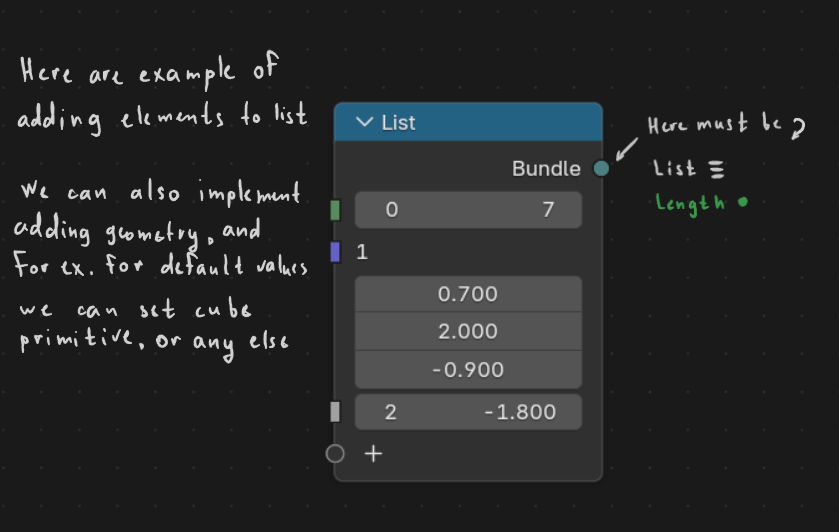
Add a dedicated List Input node that allows users to create and edit lists directly inside the node editor.
For example:
- Add new elements using a "+" button.
- Remove elements.
- Reorder elements.
- Edit values directly inside the node.
- Support all list-compatible data types (Integer, Float, Vector, * Boolean, Color, Geometry, String, and others).
A similar interface could also be exposed in the modifier panel, allowing artists to edit list values without opening the node tree.
Example Use Case
Imagine a terrain-generation system where the user wants to place specific objects at predefined coordinates.
Instead of building the list through multiple nodes or custom workarounds, the user could simply enter a list of vectors:
[(0, 2, -1),
 (3, 1, 5),
 (8, 0, 4)]
and use it directly for object placement.
Mockup
The attached concept demonstrates a possible UI where users can add, remove, and edit list elements directly inside a dedicated List node. (here is example of different types, but it may be only one type list)
Benefits
- Simpler node trees.
- Easier creation of custom procedural tools.
- More practical use of the new List data type.
- Reduced need for workaround nodes and conversions.
In sum
The List data type already exists, but users currently lack a straightforward way to create and edit lists manually. This limits the practical usefulness of lists in many procedural workflows.
0 Comments