← All ideas15 Mar 2019FudushaeOpenUser InterfaceFudushaeDraiseJayeAntonyShimoonbnzsdpdpforlifedust999lsscppmichele.bedendoonfilmrobertandriromanvolgushev4565rs2128rune
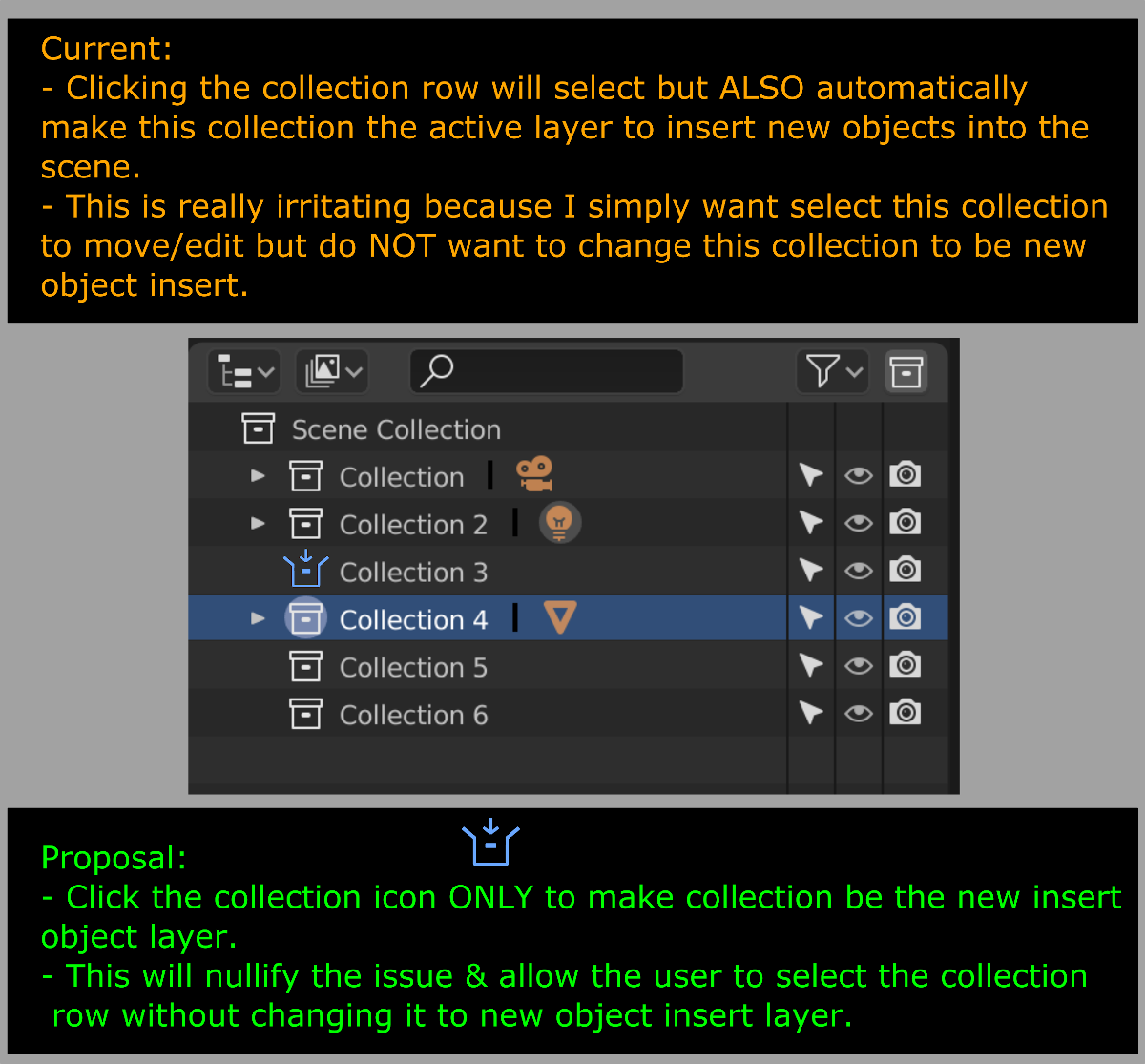
Life Improvement - Click Only The Collection Icon To Make Insert New Object Layer Active
Outliner adjustment
86.7%
Development Status:
Open
Upvote13Downvote2
F
Fudushae
15 Mar 2019
5 Comments
p
pablovazquez
Why would you click on a Collection if it's not for adding objects inside? Just curious, usually when I click on a Collection it's for knowing where my new objects will show up.
1
m
michele.bedendo
*
@Pablo Vazquez
* Try to change the collection name and it will set it as the new active one for new objects. I think that the proposal tries to avoid these kind of situations. Imho, a double click would be even better.
F
FudushaeAuthor
*
@Pablo Vazquez
* Clicking on the collection row to rename it via double left click will also automatically make the selected collection into the insert new object collection which isn't the desired result. This enforces a double function operation (rename & new active collection at the same time) under a single operation (double click) which should be separated.
Also selecting multiple collections for reorganization. The last selected collection will be the insert new object collection which is also undesirable since you are simply moving collections around, another overlaps of more than one operation.
2
p
pablovazquez
*
@fudushae
* Interesting how I never ran into these issues because I use different shortcuts.
Rename with Ctrl+Click, doesn't make it active.
Select multiple via border-select <kbd>B</kbd> key, doesn't make it active.
I'm not saying you should use these shortcuts or that the issue shouldn't be fixed, it's just interesting to see how other people run into different issues by learning a different approach, perhaps from tutorials or wrong documentation.
F
FudushaeAuthor
*
@Pablo Vazquez
* then this would be the nuances of the Blender's simple interactions reflecting the history of 'hiding' its functionality behind shortcuts & users from (beginners to long-time users) discovering during sporadic periods of time.
Regarding the use of B selection (which is consistent with other editors) in the case of renaming, what other parts of Blender utilizes Ctrl LMB to enable the rename feature? The other area I can find that requires this shortcut are the workspace tabs but it only works for non-active tabs, not the current which you have to double click (maybe this is a bug).
In the case of double clicking, should it be removed for renaming if this is the 'incorrect' way of doing so to prevent users from learning this way & teaching them Blender's shortcut method or will it continue to be delegated to its double function operation (rename & new active collection at the same time)?

5 Comments
Why would you click on a Collection if it's not for adding objects inside? Just curious, usually when I click on a Collection it's for knowing where my new objects will show up.
* @Pablo Vazquez * Try to change the collection name and it will set it as the new active one for new objects. I think that the proposal tries to avoid these kind of situations. Imho, a double click would be even better.
* @Pablo Vazquez * Clicking on the collection row to rename it via double left click will also automatically make the selected collection into the insert new object collection which isn't the desired result. This enforces a double function operation (rename & new active collection at the same time) under a single operation (double click) which should be separated.
Also selecting multiple collections for reorganization. The last selected collection will be the insert new object collection which is also undesirable since you are simply moving collections around, another overlaps of more than one operation.
* @fudushae * Interesting how I never ran into these issues because I use different shortcuts.
I'm not saying you should use these shortcuts or that the issue shouldn't be fixed, it's just interesting to see how other people run into different issues by learning a different approach, perhaps from tutorials or wrong documentation.
* @Pablo Vazquez * then this would be the nuances of the Blender's simple interactions reflecting the history of 'hiding' its functionality behind shortcuts & users from (beginners to long-time users) discovering during sporadic periods of time.
Regarding the use of B selection (which is consistent with other editors) in the case of renaming, what other parts of Blender utilizes Ctrl LMB to enable the rename feature? The other area I can find that requires this shortcut are the workspace tabs but it only works for non-active tabs, not the current which you have to double click (maybe this is a bug).
In the case of double clicking, should it be removed for renaming if this is the 'incorrect' way of doing so to prevent users from learning this way & teaching them Blender's shortcut method or will it continue to be delegated to its double function operation (rename & new active collection at the same time)?